2 Requirements Engineering
2.1 Learning Objectives
By the end of this chapter, you will be able to:
- Explain the importance of requirements engineering in software projects
- Distinguish between functional and non-functional requirements
- Apply various requirements elicitation techniques to gather stakeholder needs
- Write effective user stories with clear acceptance criteria
- Create a comprehensive Software Requirements Specification (SRS) document
- Develop and maintain a Requirements Traceability Matrix (RTM)
- Identify and manage common requirements engineering challenges
2.2 The Foundation of Software Projects
Picture this scenario: A client approaches your development team with an exciting idea. “I want an app,” they say, “that helps people manage their tasks. You know, like a to-do list, but better.” Your team gets to work immediately, spending three months building what you believe is an excellent task management application. You present the finished product, and the client’s face falls. “This isn’t what I meant at all. I needed something for teams to collaborate on projects, not a personal to-do list. And where’s the integration with our existing calendar system?”
This scenario plays out in software projects far more often than anyone would like to admit. Studies consistently show that a significant percentage of software project failures can be traced back to poor requirements—requirements that were incomplete, ambiguous, misunderstood, or simply wrong.
Requirements engineering is the systematic process of discovering, documenting, validating, and managing the requirements for a software system. It answers the fundamental question: What should this system do?
2.2.1 Why Requirements Matter
Requirements engineering might seem like overhead—time spent not writing code. But consider the economics of software defects. The cost of fixing a bug increases dramatically depending on when it’s discovered:
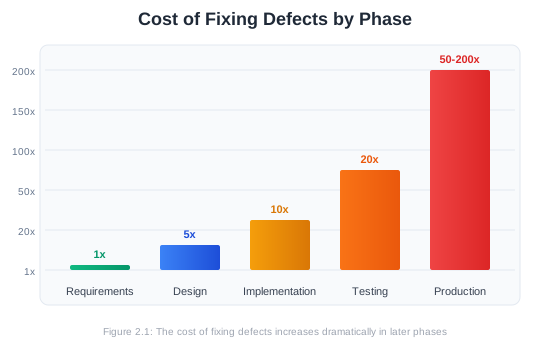
A requirement error caught during the requirements phase might take an hour to fix—a conversation to clarify what the customer actually needs. That same error, if it survives into production code, might require redesigning components, rewriting thousands of lines of code, updating tests, redeploying, and dealing with unhappy users.
The Standish Group’s research on software projects has consistently found that the top factors in project success include:
- Clear statement of requirements
- User involvement throughout the project
- Realistic expectations
- Clear vision and objectives
Notice that three of these four factors relate directly to requirements engineering.
2.2.2 The Requirements Engineering Process
Requirements engineering is not a one-time activity but an ongoing process throughout the project lifecycle. It typically involves four main activities:
1. Elicitation: Discovering requirements from stakeholders, documents, existing systems, and domain knowledge. This is often the most challenging phase because stakeholders may not know what they want, may disagree with each other, or may have difficulty articulating their needs.
2. Analysis: Examining requirements for conflicts, ambiguities, and incompleteness. This phase involves prioritization, negotiation between stakeholders, and feasibility assessment.
3. Specification: Documenting requirements in a clear, precise, and verifiable form. The output is typically a Software Requirements Specification (SRS) document.
4. Validation: Ensuring that the documented requirements actually reflect stakeholder needs and that they are achievable within project constraints.
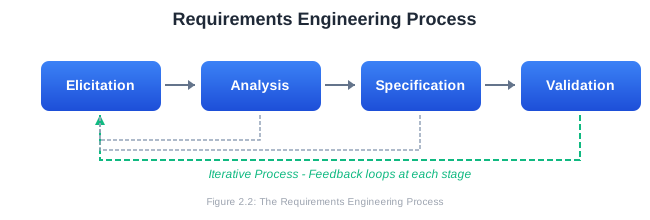
These activities are iterative and often overlap. As you document requirements (specification), you’ll discover gaps that require more elicitation. Validation might reveal conflicts that require additional analysis. Requirements engineering continues throughout the project as understanding deepens and circumstances change.
2.3 Types of Requirements
Requirements come in different forms, each serving a different purpose. Understanding these categories helps ensure comprehensive coverage of what a system must do and how well it must do it.
2.3.1 Functional Requirements
Functional requirements describe what the system should do—the specific behaviors, features, and functions it must provide. They define the system’s capabilities and how it should respond to particular inputs or situations.
Functional requirements typically follow this pattern: The system shall [perform some action] when [some condition occurs].
Examples of Functional Requirements:
For an e-commerce system:
- The system shall allow users to search for products by name, category, or price range
- The system shall calculate shipping costs based on destination and package weight
- The system shall send an email confirmation when an order is placed
- The system shall allow users to save items to a wishlist
- The system shall process payments through credit cards, debit cards, and PayPal
For a library management system:
- The system shall allow librarians to add new books to the catalog
- The system shall track which member has borrowed each book
- The system shall calculate and display overdue fines
- The system shall send reminder notifications three days before a book is due
- The system shall allow members to reserve books that are currently checked out
Characteristics of Good Functional Requirements:
- Specific: Precisely defines behavior without ambiguity
- Measurable: Can be objectively verified through testing
- Achievable: Technically feasible within project constraints
- Relevant: Directly supports user or business needs
- Traceable: Can be linked to business objectives and test cases
2.3.2 Non-Functional Requirements
Non-functional requirements (NFRs) describe how well the system performs its functions—the quality attributes, constraints, and characteristics that define the system’s operational qualities. They’re sometimes called “quality requirements” or “-ilities” (because many end in “-ility”: reliability, scalability, usability, etc.).
Non-functional requirements often have more impact on system architecture than functional requirements. You can add a search feature to an existing architecture, but retrofitting a system to handle millions of concurrent users requires fundamental architectural decisions.
Categories of Non-Functional Requirements:
Performance Requirements specify response times, throughput, and capacity:
- The system shall respond to search queries within 2 seconds
- The system shall support 10,000 concurrent users
- The system shall process at least 100 transactions per second
- Page load time shall not exceed 3 seconds on a 4G mobile connection
Reliability Requirements specify uptime, availability, and fault tolerance:
- The system shall maintain 99.9% uptime (less than 8.76 hours of downtime per year)
- The system shall recover from failures within 5 minutes
- No data loss shall occur during system crashes
- The system shall maintain full functionality when one database server fails
Security Requirements specify protection against threats:
- All passwords shall be stored using bcrypt with a minimum cost factor of 12
- The system shall lock accounts after 5 failed login attempts
- All data transmission shall use TLS 1.3 or higher
- User sessions shall expire after 30 minutes of inactivity
- The system shall log all access to sensitive data
Usability Requirements specify ease of use and user experience:
- New users shall be able to complete a purchase within 5 minutes without training
- The system shall be accessible according to WCAG 2.1 Level AA guidelines
- Error messages shall clearly explain what went wrong and how to fix it
- The system shall work on screens from 320px to 4K resolution
Scalability Requirements specify growth capacity:
- The system architecture shall support horizontal scaling to 10x current load
- Database design shall accommodate 100 million records without performance degradation
- The system shall support adding new geographic regions within 2 weeks
Maintainability Requirements specify ease of modification:
- Code shall achieve a minimum of 80% test coverage
- All public APIs shall include documentation
- The system shall support zero-downtime deployments
- Configuration changes shall not require code redeployment
Compliance Requirements specify regulatory and legal constraints:
- The system shall comply with GDPR data protection requirements
- Payment processing shall comply with PCI DSS Level 1
- Medical records handling shall comply with HIPAA regulations
- The system shall maintain audit logs for 7 years
2.3.3 The Relationship Between Functional and Non-Functional Requirements
Functional and non-functional requirements are deeply intertwined. Consider a simple requirement: “The system shall allow users to search for products.”
This functional requirement raises many non-functional questions:
- How fast should search results appear? (Performance)
- How many products should the search handle? (Scalability)
- What happens if the search service fails? (Reliability)
- How intuitive should the search interface be? (Usability)
- Should search queries be logged? For how long? (Compliance)
A complete specification addresses both what the system does and how well it does it.
2.3.4 Constraints and Assumptions
Beyond functional and non-functional requirements, specifications often include:
Constraints are restrictions on how the system can be built:
- The system must be developed using Java 17
- The database must be PostgreSQL (existing enterprise license)
- Development must be completed within 6 months
- The budget cannot exceed $500,000
- The system must integrate with the existing SAP installation
Assumptions are conditions believed to be true but not verified:
- Users will have modern web browsers (released within the last 2 years)
- Network connectivity between offices is reliable
- The client will provide access to subject matter experts during development
- Current server infrastructure has capacity for the new system
Documenting constraints and assumptions is crucial because they can significantly impact design decisions, and invalid assumptions are a common source of project problems.
2.4 Requirements Elicitation Techniques
Elicitation—discovering what stakeholders actually need—is often the most challenging aspect of requirements engineering. Stakeholders may not know what they want, may have conflicting needs, or may have difficulty expressing their requirements in terms developers can use.
Effective elicitation requires multiple techniques, as different approaches work better for different types of requirements and different stakeholders.
2.4.1 Stakeholder Interviews
Interviews are one-on-one or small group conversations with stakeholders to understand their needs, expectations, and concerns. They’re particularly useful for understanding the context, goals, and priorities behind requirements.
Types of Interviews:
Structured interviews follow a predetermined set of questions asked in a specific order. They ensure consistency across multiple interviews and are useful when you need to compare responses from different stakeholders.
Unstructured interviews are open-ended conversations that follow wherever the discussion leads. They’re useful early in the project when you’re still discovering the problem domain.
Semi-structured interviews combine elements of both: a prepared set of questions with flexibility to explore interesting tangents.
Interview Best Practices:
Before the interview:
- Research the stakeholder’s role and background
- Prepare questions but be ready to deviate
- Schedule appropriate time (typically 45-60 minutes)
- Clarify the interview’s purpose with the stakeholder
During the interview:
- Start with open-ended questions (“Tell me about your current workflow…”)
- Listen more than you talk (aim for 80/20)
- Ask follow-up questions to dig deeper
- Avoid leading questions that suggest answers
- Take notes, but maintain eye contact
- Use active listening techniques (paraphrasing, summarizing)
After the interview:
- Write up notes immediately while details are fresh
- Identify follow-up questions for future sessions
- Share notes with the stakeholder for validation
- Look for patterns across multiple interviews
Sample Interview Questions:
- What are your main responsibilities related to this system?
- Walk me through a typical day using the current system/process.
- What are the biggest challenges you face?
- If you could change one thing about the current system, what would it be?
- What would make your job easier?
- What absolutely must the new system do?
- What would be nice to have but isn’t essential?
- What concerns do you have about the new system?
- Who else should I talk to about this?
2.4.2 Questionnaires and Surveys
Questionnaires allow you to gather information from many stakeholders efficiently. They’re useful when you need quantitative data or when stakeholders are geographically distributed.
When to Use Questionnaires:
- Large number of stakeholders
- Need for statistical analysis
- Follow-up to validate interview findings
- Distributed or remote stakeholders
- Standardized information needed across groups
Questionnaire Design Tips:
- Keep it short (15-20 minutes maximum)
- Use clear, unambiguous language
- Mix question types (multiple choice, rating scales, open-ended)
- Order questions logically
- Pilot test with a small group first
- Provide context for why you’re asking
Example Questions:
Rating scale: How satisfied are you with the current system’s performance? [ ] Very Dissatisfied [ ] Dissatisfied [ ] Neutral [ ] Satisfied [ ] Very Satisfied
Multiple choice: How often do you use the reporting feature? [ ] Daily [ ] Weekly [ ] Monthly [ ] Rarely [ ] Never
Open-ended: What features would you most like to see in the new system?
2.4.3 Observation and Ethnography
Sometimes the best way to understand requirements is to watch users in their natural environment. Observation involves watching stakeholders perform their actual work to understand workflows, pain points, and unspoken needs.
Benefits of Observation:
- Reveals tacit knowledge users can’t articulate
- Uncovers workarounds and unofficial processes
- Shows actual behavior vs. reported behavior
- Provides context for requirements
- Identifies environmental factors
Observation Techniques:
Passive observation: Watch without interfering, taking notes on what you see. Users may behave differently when watched (the Hawthorne effect), but this diminishes over time.
Active observation (contextual inquiry): Ask questions while observing. “I noticed you copied that data into a spreadsheet—can you tell me why?”
Apprenticing: Have the user teach you their job. This builds rapport and surfaces knowledge that might not emerge otherwise.
A Day in the Life: Shadow a user through an entire workday to understand the full context of their activities.
What to Look For:
- Steps in workflows that seem cumbersome
- Workarounds users have developed
- Frequent interruptions or context switches
- Information users need but don’t have easy access to
- Paper notes, sticky notes, or personal tracking systems
- Frustration points
- Collaboration patterns
2.4.4 Workshops and Focus Groups
Workshops bring multiple stakeholders together to collaboratively explore requirements. They’re particularly useful for building consensus, identifying conflicts, and generating ideas.
Types of Workshops:
Requirements workshops gather stakeholders to jointly define requirements. A facilitator guides the group through structured activities.
Joint Application Development (JAD) is a specific workshop methodology that brings together users, managers, and developers for intensive collaborative sessions.
Focus groups explore attitudes, opinions, and preferences with a group of representative users.
Workshop Best Practices:
- Limit group size (6-12 participants)
- Include diverse stakeholder perspectives
- Use a skilled facilitator (often external)
- Set clear objectives and agenda
- Use visual aids and collaborative tools
- Document outcomes in real-time
- Manage dominant personalities
- Allow for individual input before group discussion
Workshop Activities:
Brainstorming: Generate ideas without criticism, then consolidate and prioritize.
Affinity diagrams: Write ideas on sticky notes, then group related items to identify themes.
Dot voting: Give participants dots to vote on priorities; reveals group preferences quickly.
Use case walkthrough: Walk through scenarios step by step, identifying required functionality.
Card sorting: Have participants organize features or concepts into categories to understand mental models.
2.4.5 Document Analysis
Document analysis involves reviewing existing documentation to understand the current system, business rules, and context. It’s particularly useful when working with established organizations or regulated industries.
Documents to Review:
- Current system documentation and user manuals
- Business process documentation
- Organizational charts
- Policy and procedure manuals
- Regulatory and compliance documents
- Previous project documentation
- Training materials
- Reports and forms currently in use
- Industry standards and benchmarks
What to Extract:
- Business rules and logic
- Data definitions and relationships
- Workflow steps
- Roles and responsibilities
- Compliance requirements
- Terminology and vocabulary
2.4.6 Prototyping
Prototyping involves building preliminary versions of the system to explore requirements. Users often find it easier to react to something concrete than to describe abstract needs.
Types of Prototypes:
Paper prototypes: Hand-drawn sketches of screens and interfaces. Quick to create, easy to modify, and effective for early exploration.
Wireframes: Low-fidelity digital mockups showing layout and navigation without visual design.
Clickable prototypes: Interactive mockups that simulate user flows without real functionality.
Proof of concept: Technical prototypes that test feasibility of specific features.
Evolutionary prototypes: Prototypes that evolve into the final system (requires disciplined development).
Throwaway prototypes: Built solely for learning, then discarded. Allows for quick, dirty experimentation.
When to Use Prototyping:
- Requirements are unclear or hard to articulate
- User interface is critical
- Stakeholders need to “see it to believe it”
- Technical feasibility is uncertain
- Novel or innovative features
Prototyping Risks:
- Users may expect the prototype to be the final product
- Pressure to ship the prototype as-is
- Time invested in throwaway prototypes
- Can focus too heavily on UI at expense of other requirements
2.4.7 Analyzing Existing Systems
If replacing or enhancing an existing system, that system is a valuable source of requirements. Understanding current functionality provides a baseline for the new system.
Analysis Approaches:
- Use the existing system yourself
- Review system documentation
- Study the database schema
- Examine reports and outputs
- Interview users about what works and what doesn’t
- Analyze support tickets and bug reports
- Review change request history
Important Considerations:
Not everything in the current system needs to be in the new system. Some features may be unused, obsolete, or present only due to historical accidents. Ask users which features they actually use and value.
2.5 User Stories and Acceptance Criteria
User stories are a popular format for expressing requirements in Agile development. They capture requirements from the user’s perspective, focusing on value delivered rather than technical implementation.
2.5.1 The User Story Format
The classic user story format is:
As a [type of user], I want [some capability] so that [some benefit].
This format emphasizes three key elements:
- Who wants the capability (the persona or role)
- What they want to accomplish
- Why it matters to them (the value or benefit)
Examples:
As a customer, I want to save my shopping cart so that I can continue shopping later from a different device.
As a librarian, I want to see overdue books for a specific member so that I can contact them about returns.
As a sales manager, I want to view my team’s performance dashboard so that I can identify who needs coaching.
As a visually impaired user, I want to navigate the site using only my keyboard so that I can use the application without a mouse.
2.5.2 Writing Effective User Stories
The INVEST Criteria:
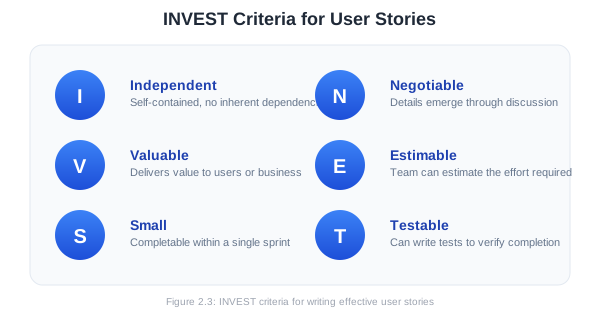
Good user stories follow the INVEST principles:
I - Independent: Stories should be self-contained, without inherent dependencies on other stories. This allows them to be prioritized and scheduled flexibly.
N - Negotiable: Stories are not contracts. They’re placeholders for conversations about requirements. Details emerge through discussion.
V - Valuable: Each story should deliver value to users or the business. Technical tasks that don’t directly deliver value (like “refactor the database”) aren’t user stories.
E - Estimable: The team should be able to estimate the effort required. If a story is too vague to estimate, it needs clarification or splitting.
S - Small: Stories should be completable within a single sprint. Large stories (epics) should be broken down into smaller stories.
T - Testable: It must be possible to write tests that verify the story is complete. If you can’t test it, you can’t confirm it’s done.
Common Mistakes:
Too vague:
As a user, I want the system to be fast. ❌
Better:
As a customer, I want search results to appear within 2 seconds so that I can quickly find products. ✓
Too technical:
As a developer, I want to implement caching using Redis. ❌
Better:
As a customer, I want previously viewed products to load instantly so that I can quickly review items I’ve already seen. ✓
Missing the “why”:
As an admin, I want to export data to CSV. ❌
Better:
As an admin, I want to export user data to CSV so that I can analyze trends in spreadsheet software I’m familiar with. ✓
2.5.3 Acceptance Criteria
Acceptance criteria define the conditions that must be met for a user story to be considered complete. They provide clarity about scope and serve as the basis for testing.
Format Options:
Scenario format (Given-When-Then):
Given [precondition/context]
When [action occurs]
Then [expected outcome]
Example:
Story: As a customer, I want to reset my password so that I can
       regain access to my account if I forget it.

Acceptance Criteria:

Scenario 1: Requesting password reset
Given I am on the login page
When I click "Forgot Password" and enter my email address
Then I should receive a password reset email within 5 minutes

Scenario 2: Valid reset link
Given I have received a password reset email
When I click the reset link within 24 hours
Then I should see a form to enter a new password

Scenario 3: Expired reset link
Given I have received a password reset email
When I click the reset link after 24 hours
Then I should see a message that the link has expired
And I should see an option to request a new reset link

Scenario 4: Password requirements
Given I am on the password reset form
When I enter a new password
Then the password must be at least 8 characters
And contain at least one uppercase letter
And contain at least one number
And contain at least one special character
Checklist format:
Story: As a customer, I want to filter search results so that I can
       find products that match my specific needs.

Acceptance Criteria:
□ Users can filter by price range (min and max)
□ Users can filter by category
□ Users can filter by customer rating (1-5 stars)
□ Users can apply multiple filters simultaneously
□ Filters update results without page reload
□ Active filters are clearly displayed
□ Users can remove individual filters or clear all
□ Filter state is preserved when navigating back to results
2.5.4 Epics, Stories, and Tasks
User stories exist within a hierarchy:
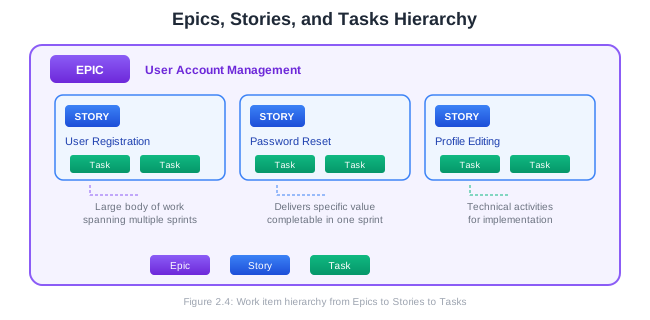
Epics are large bodies of work that span multiple sprints. They represent major features or capabilities but are too big to complete in one iteration.
User Stories are the primary unit of work in Agile. Each story delivers a specific piece of value and can be completed within a sprint.
Tasks are the technical activities required to complete a story. Unlike stories, tasks describe implementation details.
Example Breakdown:
EPIC: Shopping Cart

User Story 1: Add items to cart
  Task: Create cart database schema
  Task: Implement add-to-cart API endpoint
  Task: Build cart UI component
  Task: Write unit tests for cart service
  Task: Write integration tests for cart API

User Story 2: Update cart quantities
  Task: Implement quantity update API
  Task: Add quantity controls to cart UI
  Task: Handle inventory validation
  Task: Write tests

User Story 3: Remove items from cart
  ...

User Story 4: Apply discount codes
  ...
2.5.5 Story Mapping
User story mapping is a technique for organizing user stories to understand the full picture of user experience. Created by Jeff Patton, it arranges stories in a two-dimensional map.
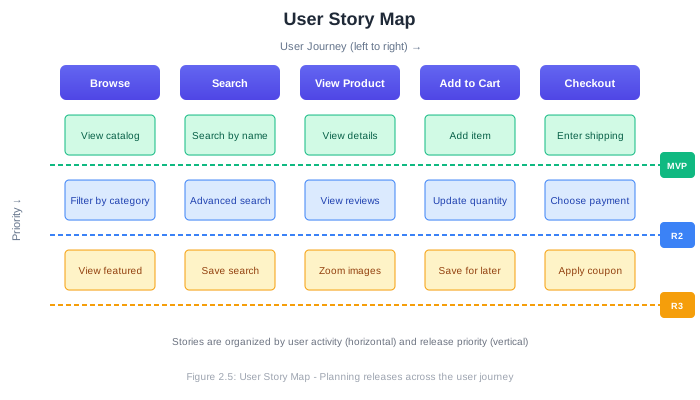
The horizontal axis shows the user’s journey through the system—the activities they perform from left to right. The vertical axis shows priority, with the most essential stories at the top.
Story mapping helps teams:
- See the big picture of user experience
- Identify gaps in functionality
- Plan releases by drawing horizontal lines
- Understand dependencies between stories
- Communicate the product vision
2.6 The Software Requirements Specification (SRS)
The Software Requirements Specification (SRS) is the primary document produced by requirements engineering. It serves as a contract between stakeholders about what the system will do and as a reference for designers, developers, and testers.
2.6.1 Purpose of the SRS
The SRS serves multiple audiences and purposes:
For customers and stakeholders:
- Confirms understanding of their needs
- Serves as basis for acceptance testing
- Documents agreed-upon scope
For project managers:
- Basis for estimating effort and cost
- Defines project scope
- Reference for change management
For designers and developers:
- Input for system design
- Reference during implementation
- Clarifies expected behavior
For testers:
- Basis for test planning
- Defines what to test
- Specifies expected results
2.6.2 SRS Structure (IEEE 830)
While formats vary, the IEEE 830 standard provides a widely-used template. Here’s a typical structure:
1. Introduction
   1.1 Purpose
   1.2 Scope
   1.3 Definitions, Acronyms, and Abbreviations
   1.4 References
   1.5 Overview

2. Overall Description
   2.1 Product Perspective
   2.2 Product Functions
   2.3 User Classes and Characteristics
   2.4 Operating Environment
   2.5 Design and Implementation Constraints
   2.6 Assumptions and Dependencies

3. Specific Requirements
   3.1 Functional Requirements
   3.2 External Interface Requirements
       3.2.1 User Interfaces
       3.2.2 Hardware Interfaces
       3.2.3 Software Interfaces
       3.2.4 Communication Interfaces
   3.3 Non-Functional Requirements
       3.3.1 Performance Requirements
       3.3.2 Security Requirements
       3.3.3 Reliability Requirements
       3.3.4 Availability Requirements
   3.4 System Features

4. Appendices
   4.1 Glossary
   4.2 Analysis Models
   4.3 To Be Determined List
2.6.3 Writing an SRS: Section by Section
Let’s walk through each section with guidance and examples.
1. Introduction
1.1 Purpose
Describe the purpose of this SRS document and its intended audience.
This document specifies the software requirements for TaskFlow, a team task management application. It is intended for the development team, project stakeholders, and quality assurance personnel.
1.2 Scope
Describe the software being specified, its purpose, benefits, and objectives.
TaskFlow is a web-based application that enables teams to create, assign, track, and collaborate on tasks and projects. The system will improve team productivity by centralizing task management, providing visibility into project progress, and facilitating collaboration through comments and notifications.
The system will NOT include: time tracking functionality, billing/invoicing, or integration with version control systems. These features are planned for future releases.
1.3 Definitions, Acronyms, and Abbreviations
Define terms used throughout the document.
Term Definition Task A single unit of work with a title, description, assignee, and due date Project A collection of related tasks Sprint A fixed time period (typically 2 weeks) for completing tasks Board A visual representation of tasks organized by status
1.4 References
List any documents referenced in the SRS.
1.5 Overview
Describe how the rest of the SRS is organized.
2. Overall Description
2.1 Product Perspective
Describe how the system fits into the broader environment. Is it standalone? Does it replace an existing system? What external systems does it interact with?
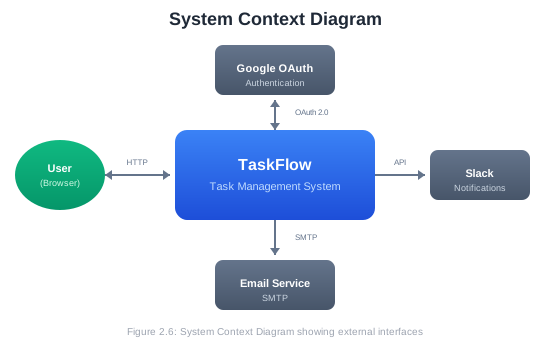
TaskFlow is a new, standalone system that will replace the team’s current use of spreadsheets and email for task tracking. The system will integrate with:
- Google Workspace for user authentication
- Slack for notifications
- Email services for user communications
Provide a summary of major functions (detailed in Section 3).
Major functions include:
- User management: Registration, authentication, profile management
- Project management: Create, configure, and archive projects
- Task management: Create, assign, update, and complete tasks
- Collaboration: Comments, mentions, and activity feeds
- Notifications: Email and Slack notifications for relevant events
- Reporting: Project progress, team velocity, overdue tasks
2.3 User Classes and Characteristics
Describe the different types of users and their characteristics.
User Class Description Technical Expertise Team Member Creates and completes tasks Basic Project Manager Creates projects, assigns tasks, monitors progress Basic Team Admin Manages team membership and permissions Intermediate System Admin Configures system settings, manages integrations Advanced
2.4 Operating Environment
Describe the environment in which the software will operate.
- Server: Linux (Ubuntu 22.04 LTS), Docker containers
- Database: PostgreSQL 15
- Web Server: Nginx
- Client browsers: Chrome, Firefox, Safari, Edge (latest 2 versions)
- Mobile: Responsive design supporting iOS and Android devices
2.5 Design and Implementation Constraints
List any constraints that limit developer options.
- The system must be developed using React for the frontend and Node.js for the backend
- All data must be stored in the United States to comply with data residency requirements
- The system must use the existing corporate design system for UI components
- Development must be complete by [date] to coincide with team restructuring
2.6 Assumptions and Dependencies
Document assumptions that, if wrong, could affect requirements.
Assumptions:
- Users have reliable internet connectivity
- Users have accounts in Google Workspace for authentication
- Team sizes will not exceed 500 members
Dependencies:
- Google OAuth service availability
- Slack API stability
- Corporate design system components
3. Specific Requirements
This is the core of the SRS, containing detailed, testable requirements.
3.1 Functional Requirements
Organize by feature area or use case. Each requirement should have a unique identifier.
3.1.1 User Management

FR-UM-001: User Registration
The system shall allow new users to register using their Google Workspace account.

FR-UM-002: User Profile
The system shall allow users to view and edit their profile information, including:
- Display name
- Profile photo
- Notification preferences

FR-UM-003: Role Assignment
The system shall allow Team Admins to assign roles (Team Member, Project Manager,
Team Admin) to users.

3.1.2 Project Management

FR-PM-001: Project Creation
The system shall allow Project Managers to create new projects with the following
attributes:
- Project name (required, max 100 characters)
- Description (optional, max 500 characters)
- Start date (optional)
- Target completion date (optional)
- Team members (at least one required)

FR-PM-002: Project Status
The system shall allow projects to have one of the following statuses:
- Active (default)
- On Hold
- Completed
- Archived

FR-PM-003: Project Templates
The system shall allow Project Managers to create projects from templates that
pre-populate tasks and settings.
3.2 External Interface Requirements
3.2.1 User Interfaces
UI-001: The system shall provide a web-based interface accessible via modern browsers.
UI-002: The interface shall be responsive, supporting screen widths from 320px to 2560px.
UI-003: The system shall conform to WCAG 2.1 Level AA accessibility guidelines.
UI-004: The primary navigation shall include access to: Dashboard, Projects, My Tasks, Team, and Settings.
3.2.2 Software Interfaces
SI-001: The system shall authenticate users via Google OAuth 2.0.
SI-002: The system shall send notifications to Slack using the Slack Web API.
SI-003: The system shall expose a REST API for potential future integrations.
3.3 Non-Functional Requirements
3.3.1 Performance Requirements
NFR-PERF-001: Page load time shall not exceed 3 seconds on a 4G connection.
NFR-PERF-002: API responses shall return within 500ms for 95% of requests.
NFR-PERF-003: The system shall support 100 concurrent users without degradation.
3.3.2 Security Requirements
NFR-SEC-001: All data transmission shall use TLS 1.3.
NFR-SEC-002: User sessions shall expire after 8 hours of inactivity.
NFR-SEC-003: The system shall log all authentication events.
NFR-SEC-004: Passwords shall never be stored; only Google OAuth shall be used.
3.3.3 Reliability Requirements
NFR-REL-001: The system shall maintain 99.5% uptime, excluding scheduled maintenance.
NFR-REL-002: In the event of server failure, the system shall recover within 10 minutes.
NFR-REL-003: No user data shall be lost due to system failures.
2.6.4 Characteristics of Good Requirements
Individual requirements should be:
Clear: Unambiguous, meaning the same thing to all readers. Avoid vague terms like “user-friendly,” “fast,” or “intuitive” without specific definitions.
Complete: Contains all necessary information. A reader should be able to understand and implement the requirement without asking for clarification.
Consistent: Doesn’t contradict other requirements in the document.
Verifiable: Can be tested or measured. If you can’t write a test for a requirement, it’s not verifiable.
Traceable: Has a unique identifier and can be linked to its source and to downstream artifacts (design, code, tests).
Feasible: Technically achievable within project constraints.
Necessary: Supports a documented need. Requirements without clear justification should be questioned.
Prioritized: Stakeholders understand relative importance.
Bad Examples and Improvements:
| Poor Requirement | Problem | Improved Requirement |
|---|---|---|
| The system shall be fast | Vague, not measurable | The system shall respond to user actions within 2 seconds |
| The system shall handle many users | “Many” is undefined | The system shall support 1,000 concurrent users |
| The system shall be easy to use | Subjective | New users shall complete the registration process in under 3 minutes without assistance |
| The system should have a login feature | Ambiguous (“should” vs “shall”) | The system shall require users to authenticate before accessing any features |
| The interface shall be attractive | Subjective, not testable | The interface shall conform to the corporate style guide (reference: design-system.company.com) |
2.7 Requirements Traceability
Requirements traceability is the ability to follow a requirement from its origin through design, implementation, and testing. It ensures that every requirement is addressed and that all development work serves a documented need.
2.7.1 Why Traceability Matters
Traceability helps answer critical questions:
- Completeness: Is every requirement implemented and tested?
- Impact Analysis: If a requirement changes, what’s affected?
- Coverage: Are there any gaps in testing?
- Justification: Why does this code exist? What requirement does it satisfy?
- Compliance: Can we prove that regulatory requirements are met?
Without traceability, teams face significant risks:
- Requirements silently dropped during development
- Features implemented that nobody asked for
- Changes made without understanding full impact
- Testing gaps leading to defects
- Compliance audit failures
2.7.2 The Requirements Traceability Matrix (RTM)
A Requirements Traceability Matrix (RTM) is a document that maps requirements to other project artifacts. It creates explicit links between requirements and their downstream implementations.
Basic RTM Structure:
| Req ID | Requirement Description | Design Reference | Code Module | Test Case ID | Status |
|---|---|---|---|---|---|
| FR-UM-001 | User registration via Google OAuth | DES-AUTH-001 | auth/google.js | TC-AUTH-001, TC-AUTH-002 | Complete |
| FR-UM-002 | User profile management | DES-USER-001 | users/profile.js | TC-USER-001 | In Progress |
| FR-PM-001 | Project creation | DES-PROJ-001 | projects/create.js | TC-PROJ-001 | Complete |
| NFR-PERF-001 | Page load < 3 seconds | DES-PERF-001 | N/A | TC-PERF-001 | Testing |
Extended RTM with Additional Fields:
| Req ID | Source | Priority | Risk | Stakeholder | Sprint | Notes |
|---|---|---|---|---|---|---|
| FR-UM-001 | Interview-012 | High | Low | Product Owner | Sprint 1 | Core feature |
| FR-UM-002 | Workshop-003 | Medium | Low | Users | Sprint 2 | May defer some fields |
| FR-PM-001 | SRS v1.0 | High | Medium | PM Team | Sprint 1 | Complex validation |
| NFR-PERF-001 | NFR Workshop | High | High | All Users | Sprint 3 | Requires perf testing |
2.7.3 Types of Traceability
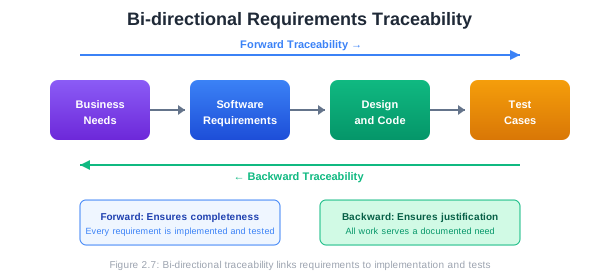
Forward Traceability: From requirements to implementation
- Requirement → Design
- Requirement → Code
- Requirement → Test Cases
Forward traceability ensures every requirement is implemented and tested.
Backward Traceability: From implementation back to requirements
- Code → Requirement
- Test Case → Requirement
- Design → Requirement
Backward traceability ensures all development work serves a documented need—no “gold plating” or undocumented features.
Bi-directional Traceability: Both directions combined, providing complete coverage.
2.7.4 Maintaining the RTM
The RTM is a living document that must be updated throughout the project. Best practices include:
Update triggers:
- New requirement added
- Requirement modified or deleted
- Design decision made
- Code module completed
- Test case created or executed
- Status changes
Review cadence:
- Weekly reviews during development
- Milestone reviews before releases
- Full audit before final delivery
Tooling options:
- Spreadsheets (simple projects)
- Requirements management tools (Jama, DOORS, Helix RM)
- Issue trackers with linking (Jira, GitHub Issues)
- Custom databases
2.7.5 Traceability in Agile Projects
In Agile environments, formal RTMs may seem heavyweight. However, traceability remains important. Agile approaches include:
Linking in issue trackers: User stories linked to epics (backward to business need), linked to tasks (forward to implementation), linked to test cases.
Definition of Done: Including “acceptance criteria verified” and “tests written” in the definition of done ensures traceability.
Living documentation: Tools like Cucumber connect executable specifications directly to tests, creating automatic traceability.
Epic: E-001 User Authentication
├── Story: US-001 User Login
│   ├── Task: T-001 Implement login API
│   ├── Task: T-002 Build login form component
│   └── Test: TC-001 Verify successful login
│   └── Test: TC-002 Verify invalid credentials
├── Story: US-002 Password Reset
│   └── ...
2.8 Managing Requirements Challenges
Requirements engineering faces several common challenges. Recognizing and addressing these challenges is key to project success.
2.8.1 Scope Creep
Scope creep is the uncontrolled expansion of project scope—new requirements added without corresponding increases in time or budget. It’s one of the most common causes of project overruns.
Causes:
- Unclear or incomplete initial requirements
- Stakeholders adding “just one more feature”
- Gold plating by developers
- Poor change management
- Lack of clear project boundaries
Prevention and Management:
Clear scope statements: Document what’s in scope AND what’s out of scope explicitly.
Change control process: All changes go through a formal review:
- Document the change request
- Assess impact on schedule, budget, and other requirements
- Decide: approve, reject, or defer
- Update documentation if approved
Baseline requirements: Freeze requirements at a specific point; changes after baseline require formal approval.
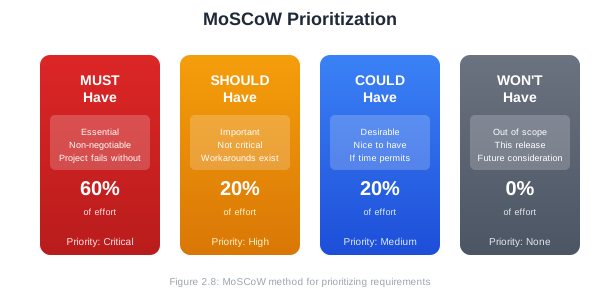
MoSCoW prioritization: Categorize requirements as:
- Must have: Essential, non-negotiable
- Should have: Important but not critical
- Could have: Nice to have if time permits
- Won’t have: Explicitly out of scope (this time)
2.8.2 Ambiguous Requirements
Ambiguous requirements mean different things to different readers, leading to incorrect implementations and costly rework.
Common Sources of Ambiguity:
Vague adjectives: “fast,” “user-friendly,” “secure,” “reliable”
Unbounded lists: “including but not limited to,” “such as,” “etc.”
Ambiguous pronouns: “The system sends a notification to the user when they submit the form. It should be formatted as HTML.” (What does “it” refer to?)
Missing conditions: “The system displays an error message.” (When? Under what conditions?)
Unclear quantities: “The system supports multiple users.” (How many? 10? 10,000?)
Strategies for Clarity:
Specific numbers: Replace “fast” with “within 2 seconds”
Complete lists: If the list is exhaustive, say so: “The system shall support exactly these payment methods: credit card, debit card, and PayPal”
Examples: Include concrete examples to illustrate requirements
Glossary: Define terms precisely in a glossary
Reviews: Multiple reviewers from different backgrounds catch different ambiguities
2.8.3 Conflicting Requirements
Different stakeholders often have different—sometimes contradictory—needs.
Examples:
- Marketing wants maximum features; development wants a sustainable pace
- Security wants strong authentication; UX wants minimal friction
- Sales wants customization for each client; architecture wants standardization
Resolution Strategies:
Identify conflicts early: Requirements analysis should explicitly look for conflicts.
Understand underlying needs: Often conflicts arise from different solutions to the same underlying need. Find the root cause.
Negotiate and prioritize: Bring stakeholders together to discuss trade-offs and agree on priorities.
Document decisions: Record what was decided and why, so the decision isn’t relitigated later.
Escalate when necessary: Some conflicts require executive decision-making.
2.8.4 Changing Requirements
Requirements will change. Users learn what they actually need by seeing early versions. Market conditions shift. Technology evolves. Regulations change.
The question isn’t whether requirements will change, but how you’ll manage change.
Agile Approach: Embrace change. Short iterations deliver working software frequently. Requirements emerge and evolve based on feedback. The backlog is continuously refined.
Plan-Driven Approach: Manage change formally. Establish baselines. Evaluate change requests for impact. Maintain version control of requirements documents.
Hybrid Approach: Most real projects use a combination. Core requirements are stable (plan-driven), while details emerge iteratively (Agile).
Best Practices:
- Accept that change is inevitable
- Build processes to handle change efficiently
- Communicate the cost of late changes (not to prevent change, but to inform decisions)
- Keep requirements documentation up to date
- Maintain traceability so impacts are visible
2.9 Requirements in Practice: Tools and Techniques
2.9.1 Requirements Management Tools
Various tools support requirements engineering:
Document-based tools:
- Microsoft Word/Google Docs with templates
- Confluence
- Notion
Dedicated requirements tools:
- Jama Connect
- IBM DOORS
- Helix RM
- Modern Requirements
Agile tools with requirements support:
- Jira
- Azure DevOps
- GitHub Issues + Projects
- Linear
- Shortcut
Choosing a tool:
- Team size and distribution
- Project complexity
- Regulatory requirements
- Budget
- Integration with other tools
- Learning curve
For your course project, GitHub Issues and Projects provide adequate requirements management while learning fundamental concepts.
2.9.2 Using GitHub for Requirements
GitHub provides several features useful for requirements management:
Issues for user stories and requirements:
Title: As a customer, I want to reset my password

Description:
**User Story:**
As a customer, I want to reset my password so that I can
regain access if I forget it.

**Acceptance Criteria:**
- [ ] Reset link sent via email within 5 minutes
- [ ] Link expires after 24 hours
- [ ] New password must meet security requirements
- [ ] Confirmation shown after successful reset

**Priority:** High
**Sprint:** Sprint 2
Labels for categorization:
type: featuretype: bugpriority: highstatus: in-progressarea: authentication
Milestones for releases or sprints
Projects for Kanban boards and tracking
Linking issues to pull requests for traceability
2.10 Chapter Summary
Requirements engineering is the foundation of successful software projects. Investing time in understanding and documenting what the system should do—before writing code—dramatically reduces the risk of building the wrong thing.
Key takeaways from this chapter:
Requirements engineering is the systematic process of discovering, documenting, validating, and managing requirements. It’s iterative and continues throughout the project.
Functional requirements describe what the system should do; non-functional requirements describe how well it should do it (performance, security, usability, etc.).
Multiple elicitation techniques are needed: interviews, questionnaires, observation, workshops, document analysis, and prototyping each reveal different types of requirements.
User stories capture requirements from the user’s perspective (“As a… I want… so that…”) and include acceptance criteria that define when the story is complete.
The SRS document serves as a contract and reference for all project stakeholders. Good requirements are clear, complete, consistent, verifiable, traceable, feasible, and necessary.
Requirements traceability links requirements to their sources and to downstream artifacts (design, code, tests), ensuring nothing falls through the cracks.
Common challenges include scope creep, ambiguity, conflicts, and change. Each requires specific management strategies.
2.11 Key Terms
| Term | Definition |
|---|---|
| Requirements Engineering | The process of discovering, documenting, validating, and managing software requirements |
| Functional Requirement | A specification of what the system should do |
| Non-Functional Requirement | A specification of how well the system should perform (quality attributes) |
| Elicitation | The process of gathering requirements from stakeholders and other sources |
| User Story | A brief description of a feature from the perspective of a user |
| Acceptance Criteria | Conditions that must be met for a user story to be considered complete |
| Epic | A large body of work that can be broken down into smaller user stories |
| SRS | Software Requirements Specification; the primary requirements document |
| RTM | Requirements Traceability Matrix; a document linking requirements to other artifacts |
| Scope Creep | Uncontrolled expansion of project scope |
| MoSCoW | Prioritization method: Must have, Should have, Could have, Won’t have |
| INVEST | Criteria for good user stories: Independent, Negotiable, Valuable, Estimable, Small, Testable |
2.12 Review Questions
Explain the difference between functional and non-functional requirements. Why are both important? Give two examples of each for a mobile banking application.
Describe three different requirements elicitation techniques. For each, explain when it would be most appropriate and what types of requirements it’s best suited to discover.
What makes a good user story according to the INVEST criteria? Write a user story for an online food ordering system and evaluate it against INVEST.
Why is the “so that” clause important in user stories? What happens when it’s omitted?
Compare acceptance criteria written in Given-When-Then format versus checklist format. What are the advantages of each?
What are the key sections of an SRS document? Who are the different audiences for the SRS, and how does each use it?
Explain forward and backward traceability. Why is bi-directional traceability valuable?
What is scope creep? Describe three strategies for preventing or managing it.
You’re reviewing a requirements document and find this requirement: “The system shall be secure.” What’s wrong with this requirement? How would you improve it?
A stakeholder says, “We don’t have time for all this requirements documentation. Just start coding and we’ll figure it out as we go.” How would you respond?
2.13 Hands-On Exercises
2.13.1 Exercise 2.1: Elicitation Practice
Select a system you use regularly (a mobile app, website, or desktop application). Imagine you’re replacing it with a new system.
- Write 10 interview questions you would ask users of the current system.
- Identify 5 things you would look for if you were observing users.
- List 5 documents you would want to review.
2.13.2 Exercise 2.2: Writing User Stories
For your semester project, write 10 user stories following the “As a… I want… so that…” format. For each story:
- Identify the user role
- Write the story
- Add 3-5 acceptance criteria
- Evaluate against INVEST criteria
2.13.3 Exercise 2.3: Requirement Analysis
Review the following requirements and identify problems (ambiguity, incompleteness, conflicts, etc.). Rewrite each to improve it.
- “The system should load quickly.”
- “Users can search for products.”
- “The system shall support all major browsers.”
- “The interface shall be intuitive.”
- “Reports should be generated daily, weekly, or on-demand.”
- “The system must be reliable.”
2.13.4 Exercise 2.4: Software Requirements Specification
Create an SRS document for your semester project using the IEEE 830 structure as a guide. Include:
- Introduction (purpose, scope, definitions)
- Overall description (product perspective, user classes, constraints)
- At least 15 functional requirements with unique IDs
- At least 5 non-functional requirements covering different categories
- Initial traceability to user stories
2.13.5 Exercise 2.5: Requirements Traceability Matrix
Create an RTM for your project that includes:
- Requirement ID and description
- Priority (MoSCoW)
- Source (which elicitation activity or stakeholder)
- Status (Not Started, In Progress, Complete)
- Placeholder columns for Design, Code Module, and Test Case (to be filled in later)
2.13.6 Exercise 2.6: GitHub Project Setup
Set up requirements management for your project in GitHub:
- Create issues for at least 10 user stories
- Add appropriate labels (priority, type, area)
- Create a milestone for your first release
- Set up a project board with columns: Backlog, Ready, In Progress, Review, Done
- Add acceptance criteria as checkboxes in each issue
2.14 Further Reading
Books:
- Wiegers, K. & Beatty, J. (2013). Software Requirements (3rd Edition). Microsoft Press.
- Robertson, S. & Robertson, J. (2012). Mastering the Requirements Process (3rd Edition). Addison-Wesley.
- Cohn, M. (2004). User Stories Applied. Addison-Wesley.
- Patton, J. (2014). User Story Mapping. O’Reilly Media.
Standards:
- IEEE 830-1998: Recommended Practice for Software Requirements Specifications
- ISO/IEC/IEEE 29148:2018: Systems and software engineering — Life cycle processes — Requirements engineering
Online Resources:
- Atlassian Agile Coach: User Stories (https://www.atlassian.com/agile/project-management/user-stories)
- Mountain Goat Software: User Stories (https://www.mountaingoatsoftware.com/agile/user-stories)
- Requirements Engineering Magazine (https://re-magazine.ireb.org/)
2.15 References
Cohn, M. (2004). User Stories Applied: For Agile Software Development. Addison-Wesley.
IEEE. (1998). IEEE Recommended Practice for Software Requirements Specifications (IEEE Std 830-1998).
Patton, J. (2014). User Story Mapping: Discover the Whole Story, Build the Right Product. O’Reilly Media.
Pohl, K. (2010). Requirements Engineering: Fundamentals, Principles, and Techniques. Springer.
Robertson, S., & Robertson, J. (2012). Mastering the Requirements Process: Getting Requirements Right (3rd Edition). Addison-Wesley.
Standish Group. (2020). CHAOS Report 2020. The Standish Group International.
Wake, B. (2003). INVEST in Good Stories, and SMART Tasks. Retrieved from https://xp123.com/articles/invest-in-good-stories-and-smart-tasks/
Wiegers, K., & Beatty, J. (2013). Software Requirements (3rd Edition). Microsoft Press.