8 Testing and Quality Assurance
8.1 Learning Objectives
By the end of this chapter, you will be able to:
- Explain the importance of software testing and its role in quality assurance
- Distinguish between different testing levels: unit, integration, system, and acceptance testing
- Apply test-driven development (TDD) principles to write better code
- Write effective unit tests using industry-standard frameworks
- Design integration tests that verify component interactions
- Implement end-to-end tests that validate user workflows
- Apply code coverage metrics appropriately without misusing them
- Create comprehensive test plans and test cases
- Use mocking and stubbing techniques to isolate units under test
- Integrate automated testing into continuous integration pipelines
8.2 Why Testing Matters
Software bugs are expensive. The later a bug is discovered, the more costly it is to fix. A bug caught during development might take minutes to fix; the same bug discovered in production might require emergency patches, customer support, reputation repair, and in extreme cases, legal liability.
8.2.1 The Cost of Bugs
The Cost Escalation Curve:
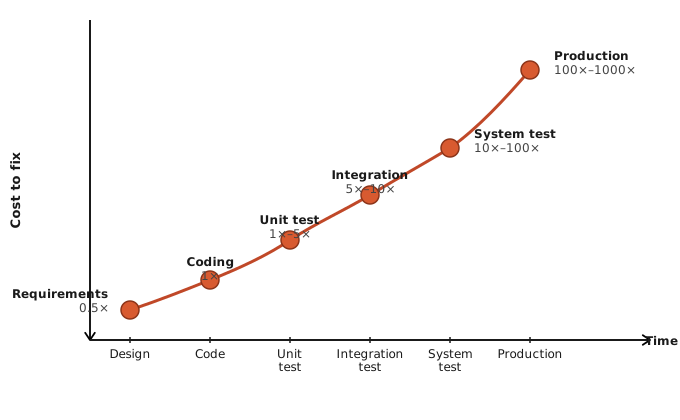
Studies consistently show that bugs found later in the development cycle cost exponentially more to fix. IBM’s Systems Sciences Institute found that a bug found during maintenance costs 100 times more than one found during design.
Real-World Failures:
Knight Capital (2012): A software bug caused the trading firm to lose $440 million in 45 minutes. Old code was accidentally reactivated, causing erratic trades. The company nearly went bankrupt.
Therac-25 (1985-1987): A radiation therapy machine delivered lethal doses to patients due to software bugs. Race conditions and inadequate testing led to at least six deaths.
Mars Climate Orbiter (1999): NASA lost a $327 million spacecraft because one team used metric units while another used imperial units. Integration testing would have caught this.
Healthcare.gov (2013): The initial launch was plagued with bugs and performance issues. Inadequate testing of the integrated system led to a public embarrassment and required months of emergency fixes.
8.2.2 What Testing Provides
Confidence: Testing gives developers confidence to make changes. Without tests, every modification risks breaking something unexpectedly.
Documentation: Tests demonstrate how code is supposed to work. They’re executable documentation that never goes out of date.
Design Feedback: Difficulty writing tests often signals design problems. Testable code tends to be well-designed code.
Regression Prevention: Tests catch regressions—bugs introduced when fixing other bugs or adding features. Without tests, the same bugs return repeatedly.
Faster Development: Counterintuitively, testing speeds development. Time spent writing tests is recovered many times over through faster debugging and fewer production issues.
8.2.3 Testing vs. Quality Assurance
Testing is a subset of Quality Assurance (QA). Testing verifies that software works correctly; QA encompasses all activities that ensure quality throughout the development process.
┌─────────────────────────────────────────────────────────────────────────┐
│                        QUALITY ASSURANCE                                │
├─────────────────────────────────────────────────────────────────────────┤
│                                                                         │
│  PROCESS QUALITY                    PRODUCT QUALITY                     │
│  ──────────────                     ───────────────                     │
│  • Requirements review              • Testing (all levels)              │
│  • Design review                    • Code review                       │
│  • Coding standards                 • Static analysis                   │
│  • Documentation standards          • Performance testing               │
│  • Change management                • Security testing                  │
│  • Training                         • Usability testing                 │
│                                                                         │
└─────────────────────────────────────────────────────────────────────────┘
QA is proactive (preventing defects); testing is reactive (finding defects). Both are essential.
8.3 Testing Levels
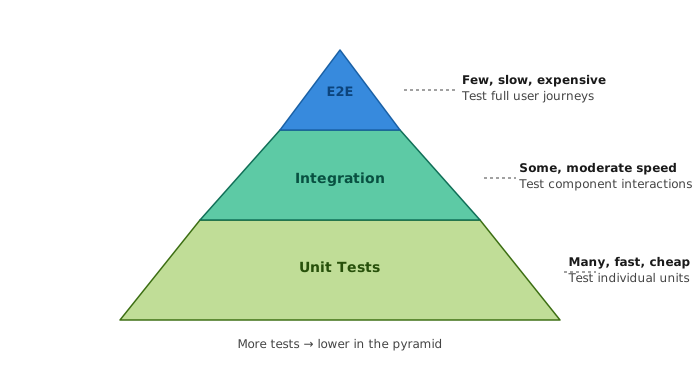
Software testing is organized into levels, each targeting different aspects of the system. The testing pyramid illustrates the recommended distribution of tests:
8.3.1 Unit Testing
Unit tests test individual components in isolation—typically single functions, methods, or classes. They’re the foundation of the testing pyramid.
Characteristics:
- Fast (milliseconds per test)
- Isolated (no external dependencies)
- Focused (test one thing)
- Deterministic (same result every time)
- Independent (can run in any order)
What Makes a Good Unit Test:
┌─────────────────────────────────────────────────────────────────────────┐
│                        GOOD UNIT TEST                                   │
├─────────────────────────────────────────────────────────────────────────┤
│                                                                         │
│  FAST         → Runs in milliseconds                                    │
│  ISOLATED     → No database, network, or file system                    │
│  REPEATABLE   → Same result every time, anywhere                        │
│  SELF-CHECKING→ Automatically determines pass/fail                      │
│  TIMELY       → Written close to the code it tests                      │
│                                                                         │
│  Also known as the F.I.R.S.T. principles                                │
│                                                                         │
└─────────────────────────────────────────────────────────────────────────┘
Example Unit Test (JavaScript/Jest):
// calculator.js
function add(a, b) {
  if (typeof a !== 'number' || typeof b !== 'number') {
    throw new Error('Arguments must be numbers');
  }
  return a + b;
}

function divide(a, b) {
  if (b === 0) {
    throw new Error('Cannot divide by zero');
  }
  return a / b;
}

module.exports = { add, divide };
// calculator.test.js
const { add, divide } = require('./calculator');
describe('Calculator', () => {
describe('add', () => {
test('adds two positive numbers', () => {
expect(add(2, 3)).toBe(5);
});
test('adds negative numbers', () => {
expect(add(-1, -1)).toBe(-2);
});
test('adds zero', () => {
expect(add(5, 0)).toBe(5);
});
test('throws error for non-numbers', () => {
expect(() => add('2', 3)).toThrow('Arguments must be numbers');
});
});
describe('divide', () => {
test('divides two numbers', () => {
expect(divide(10, 2)).toBe(5);
});
test('handles decimal results', () => {
expect(divide(5, 2)).toBe(2.5);
});
test('throws error when dividing by zero', () => {
expect(() => divide(10, 0)).toThrow('Cannot divide by zero');
});
});
});Example Unit Test (Python/pytest):
# calculator.py
def add(a, b):
    if not isinstance(a, (int, float)) or not isinstance(b, (int, float)):
        raise TypeError("Arguments must be numbers")
    return a + b

def divide(a, b):
    if b == 0:
        raise ValueError("Cannot divide by zero")
    return a / b
# test_calculator.py
import pytest
from calculator import add, divide
class TestAdd:
def test_adds_two_positive_numbers(self):
assert add(2, 3) == 5
def test_adds_negative_numbers(self):
assert add(-1, -1) == -2
def test_adds_zero(self):
assert add(5, 0) == 5
def test_raises_error_for_non_numbers(self):
with pytest.raises(TypeError, match="Arguments must be numbers"):
add("2", 3)
class TestDivide:
def test_divides_two_numbers(self):
assert divide(10, 2) == 5
def test_handles_decimal_results(self):
assert divide(5, 2) == 2.5
def test_raises_error_when_dividing_by_zero(self):
with pytest.raises(ValueError, match="Cannot divide by zero"):
divide(10, 0)8.3.2 Integration Testing
Integration tests verify that components work together correctly. They test the interactions between units, subsystems, or services.
Types of Integration Testing:
┌─────────────────────────────────────────────────────────────────────────┐
│                    INTEGRATION TESTING APPROACHES                       │
├─────────────────────────────────────────────────────────────────────────┤
│                                                                         │
│  BIG BANG                                                               │
│  • Integrate all components at once                                     │
│  • Simple but hard to isolate failures                                  │
│  • Not recommended                                                      │
│                                                                         │
│  TOP-DOWN                                                               │
│  • Start from top-level modules                                         │
│  • Use stubs for lower-level modules                                    │
│  • Tests high-level logic early                                         │
│                                                                         │
│  BOTTOM-UP                                                              │
│  • Start from lowest-level modules                                      │
│  • Use drivers to call lower modules                                    │
│  • Tests foundational components first                                  │
│                                                                         │
│  SANDWICH (Hybrid)                                                      │
│  • Combine top-down and bottom-up                                       │
│  • Meet in the middle                                                   │
│  • Balances benefits of both approaches                                 │
│                                                                         │
└─────────────────────────────────────────────────────────────────────────┘
What Integration Tests Verify:
- Components communicate correctly
- Data flows properly between modules
- APIs work as specified
- Database operations succeed
- Third-party services integrate properly
Example Integration Test (API + Database):
// user.integration.test.js
const request = require('supertest');
const app = require('../app');
const db = require('../db');

describe('User API Integration', () => {
  // Set up test database before tests
  beforeAll(async () => {
    await db.migrate.latest();
  });

  // Clean up between tests
  beforeEach(async () => {
    await db('users').truncate();
  });

  // Close database connection after all tests
  afterAll(async () => {
    await db.destroy();
  });

  describe('POST /api/users', () => {
    test('creates a new user and stores in database', async () => {
      const userData = {
        email: 'test@example.com',
        name: 'Test User',
        password: 'securepassword123'
      };

      // Make API request
      const response = await request(app)
        .post('/api/users')
        .send(userData)
        .expect(201);

      // Verify response
      expect(response.body.email).toBe(userData.email);
      expect(response.body.name).toBe(userData.name);
      expect(response.body.id).toBeDefined();
      expect(response.body.password).toBeUndefined(); // Not returned

      // Verify database
      const dbUser = await db('users').where({ id: response.body.id }).first();
      expect(dbUser.email).toBe(userData.email);
      expect(dbUser.name).toBe(userData.name);
      expect(dbUser.password_hash).toBeDefined(); // Hashed
    });

    test('returns 400 for invalid email', async () => {
      const response = await request(app)
        .post('/api/users')
        .send({ email: 'invalid', name: 'Test', password: 'password' })
        .expect(400);

      expect(response.body.error).toContain('email');
    });

    test('returns 409 for duplicate email', async () => {
      // Create first user
      await request(app)
        .post('/api/users')
        .send({ email: 'test@example.com', name: 'User 1', password: 'pass1' });

      // Try to create second user with same email
      const response = await request(app)
        .post('/api/users')
        .send({ email: 'test@example.com', name: 'User 2', password: 'pass2' })
        .expect(409);

      expect(response.body.error).toContain('already exists');
    });
  });

  describe('GET /api/users/:id', () => {
    test('retrieves an existing user', async () => {
      // Create user
      const createResponse = await request(app)
        .post('/api/users')
        .send({ email: 'test@example.com', name: 'Test User', password: 'pass' });

      const userId = createResponse.body.id;

      // Retrieve user
      const response = await request(app)
        .get(`/api/users/${userId}`)
        .expect(200);

      expect(response.body.id).toBe(userId);
      expect(response.body.email).toBe('test@example.com');
    });

    test('returns 404 for non-existent user', async () => {
      await request(app)
        .get('/api/users/99999')
        .expect(404);
    });
  });
});
8.3.3 System Testing
System testing validates the complete, integrated system against requirements. It tests the entire application as a black box, without knowledge of internal structure.
System Test Types:
| Type | Purpose |
|---|---|
| Functional Testing | Verify features work per requirements |
| Performance Testing | Verify response times and throughput |
| Security Testing | Verify protection against threats |
| Usability Testing | Verify user experience |
| Compatibility Testing | Verify works across environments |
| Recovery Testing | Verify system recovers from failures |
Example System Test Scenario:
TEST CASE: TC-SYS-001
═══════════════════════════════════════════════════════════════

Title: Complete Order Placement Flow

Objective: Verify that a user can successfully place an order
through the entire system

Preconditions:
- User account exists with verified email
- At least one product in catalog with available inventory
- Payment gateway is operational

Test Steps:
1. Navigate to login page
2. Enter valid credentials and submit
3. Browse to product catalog
4. Add product to cart
5. Navigate to cart
6. Proceed to checkout
7. Enter shipping address
8. Select shipping method
9. Enter payment information
10. Review order summary
11. Confirm order

Expected Results:
- User is logged in successfully
- Product appears in cart with correct price
- Checkout flow completes without errors
- Order confirmation page displays
- Order confirmation email is sent
- Order appears in order history
- Inventory is decremented
- Payment is captured

Pass Criteria:
All expected results are achieved
8.3.4 Acceptance Testing
Acceptance testing determines whether the system satisfies business requirements and is ready for delivery. It’s the final testing phase before release.
Types of Acceptance Testing:
User Acceptance Testing (UAT):
- Performed by end users or representatives
- Validates business requirements
- Uses real-world scenarios
- Final approval before release
Alpha Testing:
- Internal testing by employees
- Before external release
- Controlled environment
Beta Testing:
- External testing by selected users
- Real environment with real data
- Gathers feedback before general release
Contract Acceptance Testing:
- Verifies contractual requirements
- Often for custom software
- Legal and compliance focus
Acceptance Test Example (Gherkin/BDD):
Feature: User Registration
  As a new user
  I want to create an account
  So that I can access the application

  Scenario: Successful registration with valid information
    Given I am on the registration page
    When I enter "john.doe@example.com" as my email
    And I enter "John Doe" as my name
    And I enter "SecureP@ss123" as my password
    And I enter "SecureP@ss123" as password confirmation
    And I click the "Create Account" button
    Then I should see a success message
    And I should receive a verification email
    And I should be redirected to the login page

  Scenario: Registration fails with existing email
    Given a user exists with email "existing@example.com"
    And I am on the registration page
    When I enter "existing@example.com" as my email
    And I enter valid registration information
    And I click the "Create Account" button
    Then I should see an error message "Email already registered"
    And I should remain on the registration page

  Scenario: Registration fails with weak password
    Given I am on the registration page
    When I enter valid email and name
    And I enter "weak" as my password
    And I click the "Create Account" button
    Then I should see an error message about password requirements
    And I should remain on the registration page
8.3.5 End-to-End (E2E) Testing
End-to-end tests simulate real user scenarios through the entire application stack—from UI to database and back. They verify the system works as users would experience it.
E2E Testing Tools:
| Tool | Language | Best For |
|---|---|---|
| Cypress | JavaScript | Modern web apps, great DX |
| Playwright | JavaScript/TypeScript | Cross-browser, multiple languages |
| Selenium | Multiple | Legacy, wide support |
| Puppeteer | JavaScript | Chrome/Chromium |
Example E2E Test (Cypress):
// cypress/e2e/checkout.cy.js
describe('Checkout Flow', () => {
  beforeEach(() => {
    // Reset database to known state
    cy.task('db:seed');

    // Login as test user
    cy.login('testuser@example.com', 'password123');
  });

  it('completes checkout successfully', () => {
    // Navigate to products
    cy.visit('/products');

    // Add item to cart
    cy.contains('[data-testid="product-card"]', 'Wireless Headphones')
      .find('[data-testid="add-to-cart"]')
      .click();

    // Verify cart badge updates
    cy.get('[data-testid="cart-badge"]').should('contain', '1');

    // Go to cart
    cy.get('[data-testid="cart-icon"]').click();
    cy.url().should('include', '/cart');

    // Verify item in cart
    cy.contains('Wireless Headphones').should('be.visible');
    cy.get('[data-testid="cart-total"]').should('contain', '$79.99');

    // Proceed to checkout
    cy.get('[data-testid="checkout-button"]').click();
    cy.url().should('include', '/checkout');

    // Fill shipping information
    cy.get('[data-testid="shipping-address"]').type('123 Main St');
    cy.get('[data-testid="shipping-city"]').type('San Francisco');
    cy.get('[data-testid="shipping-state"]').select('CA');
    cy.get('[data-testid="shipping-zip"]').type('94102');

    // Continue to payment
    cy.get('[data-testid="continue-to-payment"]').click();

    // Fill payment information (test card)
    cy.getIframeBody('[data-testid="stripe-card-element"]')
      .find('input[name="cardnumber"]')
      .type('4242424242424242');
    cy.getIframeBody('[data-testid="stripe-card-element"]')
      .find('input[name="exp-date"]')
      .type('1225');
    cy.getIframeBody('[data-testid="stripe-card-element"]')
      .find('input[name="cvc"]')
      .type('123');

    // Place order
    cy.get('[data-testid="place-order"]').click();

    // Verify success
    cy.url().should('include', '/order-confirmation');
    cy.contains('Thank you for your order').should('be.visible');
    cy.get('[data-testid="order-number"]').should('be.visible');

    // Verify order in history
    cy.visit('/account/orders');
    cy.contains('Wireless Headphones').should('be.visible');
    cy.contains('$79.99').should('be.visible');
  });

  it('shows error for invalid card', () => {
    // Add item and go to checkout
    cy.visit('/products');
    cy.get('[data-testid="add-to-cart"]').first().click();
    cy.get('[data-testid="cart-icon"]').click();
    cy.get('[data-testid="checkout-button"]').click();

    // Fill shipping
    cy.fillShippingForm(); // Custom command
    cy.get('[data-testid="continue-to-payment"]').click();

    // Enter invalid card
    cy.getIframeBody('[data-testid="stripe-card-element"]')
      .find('input[name="cardnumber"]')
      .type('4000000000000002'); // Decline card
    cy.getIframeBody('[data-testid="stripe-card-element"]')
      .find('input[name="exp-date"]')
      .type('1225');
    cy.getIframeBody('[data-testid="stripe-card-element"]')
      .find('input[name="cvc"]')
      .type('123');

    // Try to place order
    cy.get('[data-testid="place-order"]').click();

    // Verify error
    cy.contains('Your card was declined').should('be.visible');
    cy.url().should('include', '/checkout');
  });
});
Example E2E Test (Playwright):
// tests/checkout.spec.js
const { test, expect } = require('@playwright/test');

test.describe('Checkout Flow', () => {
  test.beforeEach(async ({ page }) => {
    // Login
    await page.goto('/login');
    await page.fill('[data-testid="email"]', 'testuser@example.com');
    await page.fill('[data-testid="password"]', 'password123');
    await page.click('[data-testid="login-button"]');
    await expect(page).toHaveURL('/dashboard');
  });

  test('completes checkout successfully', async ({ page }) => {
    // Add item to cart
    await page.goto('/products');
    await page.click('[data-testid="add-to-cart"]:first-child');

    // Go to cart and checkout
    await page.click('[data-testid="cart-icon"]');
    await expect(page.locator('[data-testid="cart-item"]')).toHaveCount(1);

    await page.click('[data-testid="checkout-button"]');
    await expect(page).toHaveURL('/checkout');

    // Fill form
    await page.fill('[data-testid="shipping-address"]', '123 Main St');
    await page.fill('[data-testid="shipping-city"]', 'San Francisco');
    await page.selectOption('[data-testid="shipping-state"]', 'CA');
    await page.fill('[data-testid="shipping-zip"]', '94102');

    // Submit
    await page.click('[data-testid="place-order"]');

    // Verify success
    await expect(page).toHaveURL(/order-confirmation/);
    await expect(page.locator('text=Thank you')).toBeVisible();
  });
});
8.4 Test-Driven Development (TDD)
Test-Driven Development is a development practice where you write tests before writing the code that makes them pass. It flips the traditional order: test first, then code.
8.4.1 The TDD Cycle
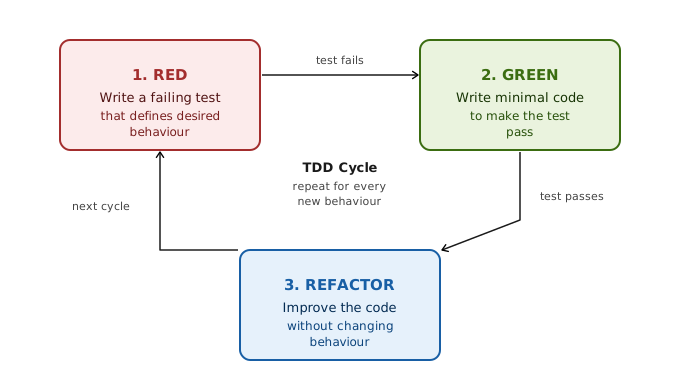
The Three Laws of TDD (Robert Martin):
- You may not write production code until you have written a failing unit test.
- You may not write more of a unit test than is sufficient to fail.
- You may not write more production code than is sufficient to pass the currently failing test.
8.4.2 TDD Example: Building a Shopping Cart
Let’s build a shopping cart using TDD:
Step 1: RED - Write a failing test
// cart.test.js
const Cart = require('./cart');

describe('Shopping Cart', () => {
  test('new cart is empty', () => {
    const cart = new Cart();
    expect(cart.isEmpty()).toBe(true);
  });
});
Run tests: FAIL - Cart doesn’t exist
Step 2: GREEN - Write minimal code to pass
// cart.js
class Cart {
  isEmpty() {
    return true;
  }
}

module.exports = Cart;
Run tests: PASS
Step 3: REFACTOR - Nothing to refactor yet
Continue the cycle:
RED:
test('cart is not empty after adding item', () => {
  const cart = new Cart();
  cart.addItem({ id: 1, name: 'Widget', price: 9.99 });
  expect(cart.isEmpty()).toBe(false);
});
Run tests: FAIL - addItem doesn’t exist
GREEN:
class Cart {
  constructor() {
    this.items = [];
  }

  isEmpty() {
    return this.items.length === 0;
  }

  addItem(item) {
    this.items.push(item);
  }
}
Run tests: PASS
RED:
test('returns correct item count', () => {
  const cart = new Cart();
  cart.addItem({ id: 1, name: 'Widget', price: 9.99 });
  cart.addItem({ id: 2, name: 'Gadget', price: 19.99 });
  expect(cart.itemCount()).toBe(2);
});
GREEN:
itemCount() {
  return this.items.length;
}
RED:
test('calculates total price', () => {
  const cart = new Cart();
  cart.addItem({ id: 1, name: 'Widget', price: 9.99 });
  cart.addItem({ id: 2, name: 'Gadget', price: 19.99 });
  expect(cart.total()).toBeCloseTo(29.98);
});
GREEN:
total() {
  return this.items.reduce((sum, item) => sum + item.price, 0);
}
RED:
test('handles quantity for same item', () => {
  const cart = new Cart();
  cart.addItem({ id: 1, name: 'Widget', price: 9.99 }, 3);
  expect(cart.total()).toBeCloseTo(29.97);
  expect(cart.itemCount()).toBe(3);
});
GREEN:
addItem(item, quantity = 1) {
  for (let i = 0; i < quantity; i++) {
    this.items.push({ ...item });
  }
}
REFACTOR: This implementation is inefficient. Let’s improve it:
class Cart {
  constructor() {
    this.items = new Map(); // id -> { item, quantity }
  }

  isEmpty() {
    return this.items.size === 0;
  }

  addItem(item, quantity = 1) {
    if (this.items.has(item.id)) {
      const existing = this.items.get(item.id);
      existing.quantity += quantity;
    } else {
      this.items.set(item.id, { item, quantity });
    }
  }

  itemCount() {
    let count = 0;
    for (const { quantity } of this.items.values()) {
      count += quantity;
    }
    return count;
  }

  total() {
    let sum = 0;
    for (const { item, quantity } of this.items.values()) {
      sum += item.price * quantity;
    }
    return sum;
  }
}
Run tests: PASS - Refactoring didn’t break anything
Continue with more tests:
test('removes item from cart', () => {
  const cart = new Cart();
  cart.addItem({ id: 1, name: 'Widget', price: 9.99 });
  cart.addItem({ id: 2, name: 'Gadget', price: 19.99 });
  cart.removeItem(1);
  expect(cart.itemCount()).toBe(1);
  expect(cart.total()).toBeCloseTo(19.99);
});

test('clears all items', () => {
  const cart = new Cart();
  cart.addItem({ id: 1, name: 'Widget', price: 9.99 });
  cart.addItem({ id: 2, name: 'Gadget', price: 19.99 });
  cart.clear();
  expect(cart.isEmpty()).toBe(true);
});

test('applies percentage discount', () => {
  const cart = new Cart();
  cart.addItem({ id: 1, name: 'Widget', price: 100 });
  cart.applyDiscount(10); // 10% off
  expect(cart.total()).toBe(90);
});
8.4.3 Benefits of TDD
Better Design:
- Forces you to think about API before implementation
- Results in more modular, testable code
- Interfaces emerge from usage
Complete Test Coverage:
- Every feature has tests by definition
- No untested code paths
- Confidence in the codebase
Documentation:
- Tests describe expected behavior
- Serve as usage examples
- Always up to date
Simpler Code:
- Write only what’s needed to pass tests
- Avoid over-engineering
- YAGNI (You Aren’t Gonna Need It) enforced
Faster Debugging:
- Bugs caught immediately
- Small increments mean small bug surface
- Tests pinpoint issues
8.4.4 TDD Challenges
Learning Curve:
- Feels slow initially
- Requires discipline
- Different mindset
Test Maintenance:
- Tests need updating when requirements change
- Brittle tests cause frustration
- Requires good test design skills
Not Always Applicable:
- Exploratory coding
- UI prototyping
- Spike solutions
Over-Testing:
- Testing implementation details
- Excessive mocking
- Diminishing returns
8.5 Writing Effective Tests
Good tests are assets; bad tests are liabilities. Learning to write effective tests is a crucial skill.
8.5.1 Test Structure: Arrange-Act-Assert
The AAA pattern provides clear structure for tests:
test('calculates order total with tax', () => {
  // ARRANGE - Set up the test conditions
  const order = new Order();
  order.addItem({ name: 'Widget', price: 100 });
  order.setTaxRate(0.08); // 8% tax

  // ACT - Perform the action being tested
  const total = order.calculateTotal();

  // ASSERT - Verify the result
  expect(total).toBe(108);
});
Given-When-Then (BDD style):
test('Given an order with items, When calculating total with tax, Then includes tax amount', () => {
  // Given
  const order = new Order();
  order.addItem({ name: 'Widget', price: 100 });
  order.setTaxRate(0.08);

  // When
  const total = order.calculateTotal();

  // Then
  expect(total).toBe(108);
});
8.5.2 Test Naming
Test names should describe what is being tested and expected outcome:
Bad Names:
test('test1', () => { ... });
test('order test', () => { ... });
test('it works', () => { ... });
Good Names:
test('calculateTotal returns sum of item prices', () => { ... });
test('calculateTotal includes tax when tax rate is set', () => { ... });
test('calculateTotal throws error when cart is empty', () => { ... });
Naming Patterns:
[MethodUnderTest]_[Scenario]_[ExpectedResult]

calculateTotal_WithTaxRate_IncludesTax
login_WithInvalidPassword_ReturnsError
addItem_WhenItemExists_IncreasesQuantity
Or using describe blocks:
describe('Order', () => {
  describe('calculateTotal', () => {
    test('returns sum of item prices', () => { ... });
    test('includes tax when tax rate is set', () => { ... });
    test('throws error when cart is empty', () => { ... });
  });
});
8.5.3 One Assertion Per Test (Usually)
Each test should verify one thing. This makes failures clear and tests focused.
Bad: Multiple unrelated assertions
test('order functionality', () => {
  const order = new Order();
  expect(order.isEmpty()).toBe(true);

  order.addItem({ name: 'Widget', price: 100 });
  expect(order.isEmpty()).toBe(false);
  expect(order.itemCount()).toBe(1);
  expect(order.total()).toBe(100);

  order.removeItem('Widget');
  expect(order.isEmpty()).toBe(true);
});
Good: Separate tests for separate behaviors
test('new order is empty', () => {
  const order = new Order();
  expect(order.isEmpty()).toBe(true);
});

test('order is not empty after adding item', () => {
  const order = new Order();
  order.addItem({ name: 'Widget', price: 100 });
  expect(order.isEmpty()).toBe(false);
});

test('item count increases when adding item', () => {
  const order = new Order();
  order.addItem({ name: 'Widget', price: 100 });
  expect(order.itemCount()).toBe(1);
});

test('total reflects added item price', () => {
  const order = new Order();
  order.addItem({ name: 'Widget', price: 100 });
  expect(order.total()).toBe(100);
});

test('order is empty after removing all items', () => {
  const order = new Order();
  order.addItem({ name: 'Widget', price: 100 });
  order.removeItem('Widget');
  expect(order.isEmpty()).toBe(true);
});
Exception: Related assertions on the same object are fine:
test('creates user with correct properties', () => {
  const user = createUser({ name: 'Alice', email: 'alice@example.com' });

  expect(user.name).toBe('Alice');
  expect(user.email).toBe('alice@example.com');
  expect(user.id).toBeDefined();
  expect(user.createdAt).toBeInstanceOf(Date);
});
8.5.4 Test Data and Fixtures
Use Clear, Meaningful Test Data:
// Bad: Magic numbers and unclear data
test('validates order', () => {
  const order = { amount: 150, items: 3 };
  expect(validateOrder(order)).toBe(true);
});

// Good: Clear, meaningful data
test('validates order when amount is above minimum', () => {
  const orderAboveMinimum = {
    amount: 150,  // Minimum is 100
    items: 3
  };
  expect(validateOrder(orderAboveMinimum)).toBe(true);
});
Use Test Fixtures for Common Setup:
// fixtures/users.js
const validUser = {
  id: 1,
  email: 'test@example.com',
  name: 'Test User',
  role: 'customer'
};

const adminUser = {
  id: 2,
  email: 'admin@example.com',
  name: 'Admin User',
  role: 'admin'
};

module.exports = { validUser, adminUser };
// user.test.js
const { validUser, adminUser } = require('./fixtures/users');
test('regular user cannot access admin panel', () => {
expect(canAccessAdminPanel(validUser)).toBe(false);
});
test('admin user can access admin panel', () => {
expect(canAccessAdminPanel(adminUser)).toBe(true);
});Factory Functions for Test Data:
// factories/user.js
let idCounter = 1;

function createUser(overrides = {}) {
  return {
    id: idCounter++,
    email: `user${idCounter}@example.com`,
    name: 'Test User',
    role: 'customer',
    createdAt: new Date(),
    ...overrides
  };
}

module.exports = { createUser };
// user.test.js
const { createUser } = require('./factories/user');
test('admin users have elevated permissions', () => {
const admin = createUser({ role: 'admin' });
expect(getPermissions(admin)).toContain('manage_users');
});
test('customers have limited permissions', () => {
const customer = createUser({ role: 'customer' });
expect(getPermissions(customer)).not.toContain('manage_users');
});8.5.5 Testing Edge Cases
Good tests cover edge cases—boundary conditions and unusual inputs:
describe('divide', () => {
  // Happy path
  test('divides positive numbers', () => {
    expect(divide(10, 2)).toBe(5);
  });

  // Edge cases
  test('divides by 1 returns the number', () => {
    expect(divide(10, 1)).toBe(10);
  });

  test('divides zero by any number returns zero', () => {
    expect(divide(0, 5)).toBe(0);
  });

  test('handles negative numbers', () => {
    expect(divide(-10, 2)).toBe(-5);
    expect(divide(10, -2)).toBe(-5);
    expect(divide(-10, -2)).toBe(5);
  });

  test('handles decimal results', () => {
    expect(divide(5, 2)).toBe(2.5);
  });

  test('handles very large numbers', () => {
    expect(divide(1e15, 1e10)).toBe(1e5);
  });

  test('handles very small numbers', () => {
    expect(divide(1e-10, 1e-5)).toBeCloseTo(1e-5);
  });

  // Error cases
  test('throws error when dividing by zero', () => {
    expect(() => divide(10, 0)).toThrow('Cannot divide by zero');
  });

  test('throws error for non-numeric input', () => {
    expect(() => divide('10', 2)).toThrow();
    expect(() => divide(10, '2')).toThrow();
    expect(() => divide(null, 2)).toThrow();
  });
});
Boundary Testing:
describe('validateAge', () => {
  // Valid boundaries
  test('accepts minimum valid age (18)', () => {
    expect(validateAge(18)).toBe(true);
  });

  test('accepts maximum valid age (120)', () => {
    expect(validateAge(120)).toBe(true);
  });

  // Just outside boundaries
  test('rejects age just below minimum (17)', () => {
    expect(validateAge(17)).toBe(false);
  });

  test('rejects age just above maximum (121)', () => {
    expect(validateAge(121)).toBe(false);
  });

  // Well outside boundaries
  test('rejects negative age', () => {
    expect(validateAge(-1)).toBe(false);
  });

  test('rejects unreasonable age', () => {
    expect(validateAge(1000)).toBe(false);
  });
});
8.5.6 Avoiding Test Smells
Test Smells are signs of poorly written tests:
1. Logic in Tests:
// Bad: Logic in test
test('calculates total', () => {
  const items = [{ price: 10 }, { price: 20 }, { price: 30 }];
  const cart = new Cart(items);

  let expectedTotal = 0;
  items.forEach(item => expectedTotal += item.price);  // Logic!

  expect(cart.total()).toBe(expectedTotal);
});

// Good: Explicit expected value
test('calculates total', () => {
  const cart = new Cart([
    { price: 10 },
    { price: 20 },
    { price: 30 }
  ]);
  expect(cart.total()).toBe(60);  // Clear expected value
});
2. Testing Implementation Details:
// Bad: Testing internal implementation
test('adds item to cart', () => {
  const cart = new Cart();
  cart.addItem({ id: 1, price: 10 });

  // Testing internal array structure
  expect(cart._items[0].id).toBe(1);
  expect(cart._items.length).toBe(1);
});

// Good: Testing behavior
test('adds item to cart', () => {
  const cart = new Cart();
  cart.addItem({ id: 1, price: 10 });

  expect(cart.itemCount()).toBe(1);
  expect(cart.total()).toBe(10);
});
3. Excessive Setup:
// Bad: Too much setup
test('user can post comment', () => {
  const db = new Database();
  db.connect();
  db.createTable('users');
  db.createTable('posts');
  db.createTable('comments');
  const user = db.insert('users', { name: 'Alice' });
  const post = db.insert('posts', { title: 'Hello', userId: user.id });
  const comment = new Comment({ text: 'Great!', userId: user.id, postId: post.id });
  // ... finally the actual test
});

// Good: Abstract setup
test('user can post comment', () => {
  const { user, post } = setupUserWithPost();  // Helper function
  const comment = user.addComment(post, 'Great!');
  expect(comment.text).toBe('Great!');
});
4. Flaky Tests:
Tests that sometimes pass and sometimes fail are worse than no tests:
// Bad: Flaky due to timing
test('shows notification after delay', async () => {
  showNotification();
  await sleep(100);  // Race condition!
  expect(document.querySelector('.notification')).toBeVisible();
});

// Good: Wait for condition
test('shows notification after delay', async () => {
  showNotification();
  await waitFor(() => {
    expect(document.querySelector('.notification')).toBeVisible();
  });
});
8.6 Mocking and Test Doubles
Real-world code has dependencies: databases, APIs, file systems, other modules. Test doubles replace these dependencies during testing to isolate the code under test.
8.6.1 Types of Test Doubles
┌─────────────────────────────────────────────────────────────────────────┐
│                        TEST DOUBLES                                     │
├─────────────────────────────────────────────────────────────────────────┤
│                                                                         │
│  DUMMY                                                                  │
│  • Passed around but never used                                         │
│  • Satisfies parameter requirements                                     │
│  • Example: Empty object passed to fulfill a signature                  │
│                                                                         │
│  STUB                                                                   │
│  • Provides canned answers to calls                                     │
│  • Doesn't respond to anything outside programmed                       │
│  • Example: Returns fixed data regardless of input                      │
│                                                                         │
│  SPY                                                                    │
│  • Records information about calls                                      │
│  • Can verify how many times called, with what arguments                │
│  • Example: Tracks that sendEmail was called with correct recipient     │
│                                                                         │
│  MOCK                                                                   │
│  • Pre-programmed with expectations                                     │
│  • Verifies it received expected calls                                  │
│  • Fails test if expectations not met                                   │
│                                                                         │
│  FAKE                                                                   │
│  • Working implementation, but simplified                               │
│  • Not suitable for production                                          │
│  • Example: In-memory database instead of real database                 │
│                                                                         │
└─────────────────────────────────────────────────────────────────────────┘
8.6.2 Mocking in Practice
Mocking a Module (Jest):
// emailService.js
const sendEmail = async (to, subject, body) => {
  // Real implementation sends email via SMTP
  return await smtpClient.send({ to, subject, body });
};

module.exports = { sendEmail };
// userService.js
const { sendEmail } = require('./emailService');
const registerUser = async (userData) => {
const user = await db.createUser(userData);
await sendEmail(
user.email,
'Welcome!',
`Hello ${user.name}, welcome to our app!`
);
return user;
};
module.exports = { registerUser };// userService.test.js
const { registerUser } = require('./userService');
const { sendEmail } = require('./emailService');
const db = require('./db');
// Mock the email service
jest.mock('./emailService');
// Mock the database
jest.mock('./db');
describe('registerUser', () => {
beforeEach(() => {
jest.clearAllMocks();
});
test('creates user and sends welcome email', async () => {
// Arrange: Set up mock return values
const mockUser = { id: 1, name: 'Alice', email: 'alice@example.com' };
db.createUser.mockResolvedValue(mockUser);
sendEmail.mockResolvedValue(true);
// Act: Call the function
const result = await registerUser({
name: 'Alice',
email: 'alice@example.com'
});
// Assert: Verify result
expect(result).toEqual(mockUser);
// Assert: Verify database was called correctly
expect(db.createUser).toHaveBeenCalledWith({
name: 'Alice',
email: 'alice@example.com'
});
// Assert: Verify email was sent correctly
expect(sendEmail).toHaveBeenCalledWith(
'alice@example.com',
'Welcome!',
'Hello Alice, welcome to our app!'
);
});
test('does not send email if user creation fails', async () => {
// Arrange: Database throws error
db.createUser.mockRejectedValue(new Error('Database error'));
// Act & Assert: Function throws
await expect(registerUser({ name: 'Bob' })).rejects.toThrow('Database error');
// Assert: Email was not sent
expect(sendEmail).not.toHaveBeenCalled();
});
});Mocking in Python (pytest):
# user_service.py
from email_service import send_email
from database import db

def register_user(user_data):
    user = db.create_user(user_data)
    send_email(
        to=user['email'],
        subject='Welcome!',
        body=f"Hello {user['name']}, welcome to our app!"
    )
    return user
# test_user_service.py
from unittest.mock import patch, MagicMock
import pytest
from user_service import register_user
class TestRegisterUser:
@patch('user_service.send_email')
@patch('user_service.db')
def test_creates_user_and_sends_email(self, mock_db, mock_send_email):
# Arrange
mock_user = {'id': 1, 'name': 'Alice', 'email': 'alice@example.com'}
mock_db.create_user.return_value = mock_user
# Act
result = register_user({'name': 'Alice', 'email': 'alice@example.com'})
# Assert
assert result == mock_user
mock_db.create_user.assert_called_once_with({
'name': 'Alice',
'email': 'alice@example.com'
})
mock_send_email.assert_called_once_with(
to='alice@example.com',
subject='Welcome!',
body='Hello Alice, welcome to our app!'
)
@patch('user_service.send_email')
@patch('user_service.db')
def test_no_email_if_creation_fails(self, mock_db, mock_send_email):
# Arrange
mock_db.create_user.side_effect = Exception('Database error')
# Act & Assert
with pytest.raises(Exception, match='Database error'):
register_user({'name': 'Bob'})
mock_send_email.assert_not_called()8.6.3 Mocking External APIs
// weatherService.js
const axios = require('axios');

const getWeather = async (city) => {
  const response = await axios.get(
    `https://api.weather.com/v1/current?city=${city}&key=${API_KEY}`
  );
  return {
    temperature: response.data.temp,
    description: response.data.description,
    humidity: response.data.humidity
  };
};

module.exports = { getWeather };
// weatherService.test.js
const axios = require('axios');
const { getWeather } = require('./weatherService');
jest.mock('axios');
describe('getWeather', () => {
test('returns formatted weather data', async () => {
// Arrange: Mock API response
axios.get.mockResolvedValue({
data: {
temp: 72,
description: 'Sunny',
humidity: 45
}
});
// Act
const weather = await getWeather('San Francisco');
// Assert
expect(weather).toEqual({
temperature: 72,
description: 'Sunny',
humidity: 45
});
expect(axios.get).toHaveBeenCalledWith(
expect.stringContaining('city=San Francisco')
);
});
test('handles API errors gracefully', async () => {
// Arrange: Mock API error
axios.get.mockRejectedValue(new Error('Network error'));
// Act & Assert
await expect(getWeather('Invalid')).rejects.toThrow('Network error');
});
});8.6.4 When to Mock
Mock When:
- External services (APIs, databases, file systems)
- Non-deterministic code (current time, random numbers)
- Slow operations
- Code with side effects (sending emails, making payments)
- Dependencies that are hard to set up
Don’t Mock When:
- Testing integration between components
- The real implementation is fast and reliable
- Mocking would make tests meaningless
- You’re testing data structures or algorithms
The Mocking Balance:
Over-Mocking                      Under-Mocking
──────────────────────────────────────────────────────
• Tests pass but code is broken   • Tests are slow
• Testing mocks, not code         • Tests are flaky
• Brittle tests                   • Complex setup
• False confidence                • Hard to isolate failures
8.6.5 Dependency Injection for Testability
Dependency Injection makes code testable by allowing dependencies to be provided from outside:
// Without DI - Hard to test
class OrderService {
  async createOrder(orderData) {
    const order = await database.save(orderData);  // Direct dependency
    await emailService.sendConfirmation(order);    // Direct dependency
    return order;
  }
}

// With DI - Easy to test
class OrderService {
  constructor(database, emailService) {
    this.database = database;
    this.emailService = emailService;
  }

  async createOrder(orderData) {
    const order = await this.database.save(orderData);
    await this.emailService.sendConfirmation(order);
    return order;
  }
}

// Production usage
const orderService = new OrderService(realDatabase, realEmailService);

// Test usage
const orderService = new OrderService(mockDatabase, mockEmailService);
8.7 Code Coverage
Code coverage measures how much of your code is executed during testing. It’s a useful metric, but often misunderstood.
8.7.1 Types of Coverage
┌─────────────────────────────────────────────────────────────────────────┐
│                      CODE COVERAGE TYPES                                │
├─────────────────────────────────────────────────────────────────────────┤
│                                                                         │
│  LINE COVERAGE                                                          │
│  • Percentage of lines executed                                         │
│  • Most common metric                                                   │
│  • Example: 80% line coverage = 80 of 100 lines executed                │
│                                                                         │
│  BRANCH COVERAGE                                                        │
│  • Percentage of branches (if/else) taken                               │
│  • More meaningful than line coverage                                   │
│  • Example: Both true and false paths of if statement tested            │
│                                                                         │
│  FUNCTION COVERAGE                                                      │
│  • Percentage of functions called                                       │
│  • Doesn't indicate thoroughness of testing                             │
│                                                                         │
│  STATEMENT COVERAGE                                                     │
│  • Percentage of statements executed                                    │
│  • Similar to line coverage                                             │
│                                                                         │
│  CONDITION COVERAGE                                                     │
│  • Each boolean sub-expression tested for true and false                │
│  • Example: In (a && b), test a=true, a=false, b=true, b=false         │
│                                                                         │
│  PATH COVERAGE                                                          │
│  • Every possible path through code tested                              │
│  • Often impractical due to combinatorial explosion                     │
│                                                                         │
└─────────────────────────────────────────────────────────────────────────┘
Coverage Example:
function calculateDiscount(price, customerType, quantity) {
  let discount = 0;

  if (customerType === 'premium') {        // Branch 1
    discount = 0.1;
  } else if (customerType === 'vip') {     // Branch 2
    discount = 0.2;
  }

  if (quantity > 10) {                     // Branch 3
    discount += 0.05;
  }

  return price * (1 - discount);
}
Test with 100% Line Coverage but Missing Branches:
test('calculates discount for premium customer', () => {
  expect(calculateDiscount(100, 'premium', 5)).toBe(90);
});
This covers all lines but misses:
- VIP customer path
- Regular customer path
- quantity > 10 path
Better Tests with Branch Coverage:
describe('calculateDiscount', () => {
  test('premium customer gets 10% discount', () => {
    expect(calculateDiscount(100, 'premium', 5)).toBe(90);
  });

  test('VIP customer gets 20% discount', () => {
    expect(calculateDiscount(100, 'vip', 5)).toBe(80);
  });

  test('regular customer gets no discount', () => {
    expect(calculateDiscount(100, 'regular', 5)).toBe(100);
  });

  test('bulk order adds 5% discount', () => {
    expect(calculateDiscount(100, 'regular', 15)).toBe(95);
  });

  test('premium bulk order gets 15% total', () => {
    expect(calculateDiscount(100, 'premium', 15)).toBe(85);
  });
});
8.7.2 Running Coverage Reports
Jest (JavaScript):
# Run tests with coverage
npx jest --coverage

# Coverage output
------------------------|---------|----------|---------|---------|
File                    | % Stmts | % Branch | % Funcs | % Lines |
------------------------|---------|----------|---------|---------|
All files               |   85.71 |    83.33 |   90.00 |   85.71 |
 calculator.js          |   100   |    100   |   100   |   100   |
 orderService.js        |   75.00 |    66.67 |   80.00 |   75.00 |
------------------------|---------|----------|---------|---------|
pytest (Python):
# Install coverage plugin
pip install pytest-cov

# Run tests with coverage
pytest --cov=mypackage --cov-report=html

# View HTML report
open htmlcov/index.html
8.7.3 Coverage Guidelines
Coverage Targets:
Coverage Level   Quality Assessment
─────────────────────────────────────────────
< 40%            Dangerously low
40-60%           Minimal coverage
60-80%           Acceptable for most projects
80-90%           Good coverage
> 90%            Excellent (but watch for diminishing returns)
100%             Suspicious - may be testing too much
What Coverage Tells You:
- Which code hasn’t been executed during tests
- Potential areas of risk
- Progress toward testing goals
What Coverage Doesn’t Tell You:
- Whether tests are meaningful
- Whether assertions are correct
- Whether edge cases are covered
- Whether the code is correct
8.7.4 Coverage Anti-Patterns
Chasing 100% Coverage:
// Terrible test just to hit coverage
test('covers the error path', () => {
  const fn = () => {};
  fn();  // No assertion! This is useless.
});
100% coverage with bad tests is worse than 70% coverage with good tests.
Testing Trivial Code:
// Not worth testing
class User {
  constructor(name) {
    this.name = name;
  }

  getName() {
    return this.name;
  }
}

// Testing this adds coverage but no value
test('getName returns name', () => {
  const user = new User('Alice');
  expect(user.getName()).toBe('Alice');
});
Excluding Code to Game Metrics:
/* istanbul ignore next */  // Don't do this to avoid testing
function complexFunction() {
  // ...
}
Exclusions should be rare and justified (e.g., code that can’t be reached in tests).
8.7.5 Meaningful Coverage Strategy
Focus on Critical Paths:
- Business logic
- Data transformations
- Security-sensitive code
- Complex algorithms
Accept Lower Coverage For:
- UI components (harder to unit test)
- Infrastructure code
- Boilerplate
- Generated code
Use Coverage as a Guide, Not a Goal:
- Review uncovered code manually
- Decide if tests would add value
- Don’t write tests just for numbers
8.8 Test Planning and Documentation
Systematic testing requires planning. Test plans and test cases document what to test and how.
8.8.1 Test Plan
A test plan documents the overall testing strategy for a project or feature.
TEST PLAN: TaskFlow v1.0
═══════════════════════════════════════════════════════════════

1. INTRODUCTION
────────────────
This test plan covers the initial release of TaskFlow, a task
management application. Testing will ensure core functionality
works correctly and the system meets quality requirements.

2. SCOPE
────────────────
In Scope:
• User authentication (registration, login, logout)
• Task management (create, read, update, delete)
• Task assignment and collaboration
• Due dates and reminders
• Search and filtering

Out of Scope:
• Mobile applications
• Third-party integrations
• Advanced reporting

3. TEST APPROACH
────────────────
Testing Levels:
• Unit Testing: Jest for JavaScript modules (target 80% coverage)
• Integration Testing: API endpoint testing with Supertest
• E2E Testing: Cypress for critical user workflows
• Manual Testing: Exploratory testing and UAT

Testing Types:
• Functional Testing: Verify features work per requirements
• Performance Testing: Response times under load
• Security Testing: OWASP Top 10 vulnerabilities
• Usability Testing: User acceptance testing

4. RESOURCES
────────────────
Team:
• 2 developers (unit tests, integration tests)
• 1 QA engineer (E2E tests, test coordination)
• 1 UX designer (usability testing)

Environment:
• Development: Local environments
• Testing: Staging server (staging.taskflow.com)
• CI: GitHub Actions

Tools:
• Jest (unit tests)
• Supertest (API tests)
• Cypress (E2E tests)
• k6 (performance tests)

5. SCHEDULE
────────────────
Week 1-2: Unit tests for core modules
Week 3: Integration tests for APIs
Week 4: E2E tests for critical paths
Week 5: Performance and security testing
Week 6: UAT and bug fixes

6. ENTRY/EXIT CRITERIA
────────────────
Entry Criteria:
• Code complete for feature
• Unit tests written by developers
• Test environment available

Exit Criteria:
• All critical test cases passed
• No P1 (critical) bugs open
• P2 (major) bugs documented with workarounds
• 80% code coverage achieved
• Performance targets met

7. RISKS
────────────────
• Schedule pressure may reduce testing time
• Third-party API availability for integration tests
• Limited access to production-like data

Mitigation:
• Prioritize critical path testing
• Use mocked APIs for reliability
• Create representative test data sets

8. DELIVERABLES
────────────────
• Test cases document
• Automated test suites
• Bug reports
• Test summary report
• Coverage reports
8.8.2 Test Cases
Test cases document specific tests to execute. They should be detailed enough for anyone to run them.
Test Case Format:
TEST CASE: TC-AUTH-001
═══════════════════════════════════════════════════════════════

Title: User can register with valid email and password

Module: Authentication
Priority: High
Type: Functional

Preconditions:
• Application is running
• User is not logged in
• Email "newuser@example.com" is not registered

Test Data:
• Email: newuser@example.com
• Password: SecureP@ss123
• Name: New User

Steps:
1. Navigate to registration page (/register)
2. Enter "newuser@example.com" in email field
3. Enter "New User" in name field
4. Enter "SecureP@ss123" in password field
5. Enter "SecureP@ss123" in confirm password field
6. Click "Create Account" button

Expected Results:
• Success message is displayed
• User is redirected to login page
• Verification email is sent to newuser@example.com
• User record exists in database with correct data
• Password is hashed (not stored in plain text)

Actual Results:
[To be filled during execution]

Status: [ ] Pass  [ ] Fail  [ ] Blocked

Notes:
[Any observations during testing]
Test Case Matrix:
┌────────────────────────────────────────────────────────────────────────┐
│                    AUTHENTICATION TEST CASES                           │
├─────────┬─────────────────────────────────────┬──────────┬─────────────┤
│ TC ID   │ Test Case                           │ Priority │ Status      │
├─────────┼─────────────────────────────────────┼──────────┼─────────────┤
│AUTH-001 │ Register with valid credentials     │ High     │ Pass        │
│AUTH-002 │ Register with existing email        │ High     │ Pass        │
│AUTH-003 │ Register with invalid email format  │ Medium   │ Pass        │
│AUTH-004 │ Register with weak password         │ High     │ Pass        │
│AUTH-005 │ Login with valid credentials        │ High     │ Pass        │
│AUTH-006 │ Login with wrong password           │ High     │ Pass        │
│AUTH-007 │ Login with non-existent email       │ High     │ Pass        │
│AUTH-008 │ Logout destroys session             │ High     │ Pass        │
│AUTH-009 │ Password reset sends email          │ Medium   │ In Progress │
│AUTH-010 │ Password reset with valid token     │ Medium   │ Not Started │
│AUTH-011 │ Password reset with expired token   │ Medium   │ Not Started │
│AUTH-012 │ Account lockout after failed attempts│ High    │ Pass        │
│AUTH-013 │ Remember me extends session         │ Low      │ Not Started │
└─────────┴─────────────────────────────────────┴──────────┴─────────────┘
8.8.3 Bug Reports
When tests find bugs, document them clearly:
BUG REPORT: BUG-042
═══════════════════════════════════════════════════════════════

Title: Password reset email not sent for valid email addresses

Severity: High (P1)
Priority: Urgent

Environment:
• Browser: Chrome 120
• OS: macOS 14
• Environment: Staging (staging.taskflow.com)

Steps to Reproduce:
1. Navigate to login page
2. Click "Forgot Password"
3. Enter valid registered email: alice@example.com
4. Click "Send Reset Link"
5. Check email inbox

Expected Result:
Password reset email should arrive within 1 minute

Actual Result:
No email received after 10 minutes. Success message still shown.

Additional Information:
• Console shows: "SMTP connection timeout"
• Logs show: "Email service unavailable"
• Issue started after deployment on 12/5

Screenshots:
[Console error screenshot]
[Success message screenshot]

Workaround:
None - users cannot reset passwords

Reported By: QA Team
Assigned To: Alice (Backend)
Date Found: 2024-12-06
8.8.4 Test Summary Report
After testing, summarize results:
TEST SUMMARY REPORT: TaskFlow v1.0 Release
═══════════════════════════════════════════════════════════════

EXECUTIVE SUMMARY
────────────────
Testing for TaskFlow v1.0 is complete. The application meets
quality criteria for release with minor known issues.

TEST EXECUTION SUMMARY
────────────────
┌─────────────────────┬──────────┬────────┬────────┬─────────┐
│ Category            │ Total    │ Passed │ Failed │ Blocked │
├─────────────────────┼──────────┼────────┼────────┼─────────┤
│ Unit Tests          │ 342      │ 340    │ 2      │ 0       │
│ Integration Tests   │ 87       │ 85     │ 2      │ 0       │
│ E2E Tests           │ 45       │ 43     │ 1      │ 1       │
│ Manual Test Cases   │ 68       │ 65     │ 2      │ 1       │
├─────────────────────┼──────────┼────────┼────────┼─────────┤
│ TOTAL               │ 542      │ 533    │ 7      │ 2       │
│                     │          │ 98.3%  │ 1.3%   │ 0.4%    │
└─────────────────────┴──────────┴────────┴────────┴─────────┘

COVERAGE
────────────────
• Line Coverage: 84%
• Branch Coverage: 78%
• Function Coverage: 91%

DEFECT SUMMARY
────────────────
┌────────────┬───────┬───────────┬────────┬────────┐
│ Severity   │ Found │ Fixed     │ Open   │ Deferred│
├────────────┼───────┼───────────┼────────┼─────────┤
│ Critical   │ 2     │ 2         │ 0      │ 0       │
│ Major      │ 8     │ 7         │ 1      │ 0       │
│ Minor      │ 15    │ 10        │ 2      │ 3       │
│ Trivial    │ 6     │ 4         │ 0      │ 2       │
├────────────┼───────┼───────────┼────────┼─────────┤
│ TOTAL      │ 31    │ 23        │ 3      │ 5       │
└────────────┴───────┴───────────┴────────┴─────────┘

KNOWN ISSUES FOR RELEASE
────────────────
1. BUG-089 (Major): Search does not highlight matching text
   - Workaround: None, cosmetic issue only

2. BUG-095 (Minor): Date picker doesn't close on outside click
   - Workaround: Press Escape to close

3. BUG-101 (Minor): Slow load time on tasks page with 500+ tasks
   - Workaround: Use filters to reduce displayed tasks

RECOMMENDATIONS
────────────────
✓ RECOMMEND RELEASE with known issues documented

Post-release priorities:
1. Fix search highlighting (BUG-089)
2. Performance optimization for large task lists
3. Improve error messages for validation failures

Prepared By: QA Team
Date: December 8, 2024
8.9 Continuous Testing and CI Integration
Modern development integrates testing into continuous integration pipelines. Tests run automatically on every change, catching problems early.
8.9.1 CI Testing Pipeline
┌─────────────────────────────────────────────────────────────────────────┐
│                      CI TESTING PIPELINE                                │
├─────────────────────────────────────────────────────────────────────────┤
│                                                                         │
│  COMMIT/PR                                                              │
│      │                                                                  │
│      ▼                                                                  │
│  ┌────────────┐    ┌────────────┐    ┌────────────┐                    │
│  │   Lint     │───►│   Build    │───►│Unit Tests  │                    │
│  │ (seconds)  │    │ (minutes)  │    │ (minutes)  │                    │
│  └────────────┘    └────────────┘    └────────────┘                    │
│                                             │                           │
│                                             ▼                           │
│                          ┌────────────────────────────────┐            │
│                          │     Integration Tests          │            │
│                          │        (minutes)               │            │
│                          └────────────────────────────────┘            │
│                                             │                           │
│                                             ▼                           │
│                          ┌────────────────────────────────┐            │
│                          │         E2E Tests              │            │
│                          │       (5-15 minutes)           │            │
│                          └────────────────────────────────┘            │
│                                             │                           │
│                                             ▼                           │
│                          ┌────────────────────────────────┐            │
│                          │     Deploy to Staging          │            │
│                          └────────────────────────────────┘            │
│                                             │                           │
│                                             ▼                           │
│                          ┌────────────────────────────────┐            │
│                          │   Smoke Tests on Staging       │            │
│                          └────────────────────────────────┘            │
│                                             │                           │
│                                             ▼                           │
│                                       ✓ READY TO MERGE                  │
│                                                                         │
└─────────────────────────────────────────────────────────────────────────┘
8.9.2 GitHub Actions Configuration
# .github/workflows/ci.yml
name: CI

on:
  push:
    branches: [main]
  pull_request:
    branches: [main]

jobs:
  lint:
    runs-on: ubuntu-latest
    steps:
      - uses: actions/checkout@v4
      - uses: actions/setup-node@v4
        with:
          node-version: '20'
          cache: 'npm'
      - run: npm ci
      - run: npm run lint

  unit-tests:
    runs-on: ubuntu-latest
    needs: lint
    steps:
      - uses: actions/checkout@v4
      - uses: actions/setup-node@v4
        with:
          node-version: '20'
          cache: 'npm'
      - run: npm ci
      - run: npm test -- --coverage
      - uses: actions/upload-artifact@v4
        with:
          name: coverage-report
          path: coverage/

  integration-tests:
    runs-on: ubuntu-latest
    needs: unit-tests
    services:
      postgres:
        image: postgres:15
        env:
          POSTGRES_PASSWORD: testpass
          POSTGRES_DB: testdb
        options: >-
          --health-cmd pg_isready
          --health-interval 10s
          --health-timeout 5s
          --health-retries 5
        ports:
          - 5432:5432
    steps:
      - uses: actions/checkout@v4
      - uses: actions/setup-node@v4
        with:
          node-version: '20'
          cache: 'npm'
      - run: npm ci
      - run: npm run test:integration
        env:
          DATABASE_URL: postgresql://postgres:testpass@localhost:5432/testdb

  e2e-tests:
    runs-on: ubuntu-latest
    needs: integration-tests
    steps:
      - uses: actions/checkout@v4
      - uses: actions/setup-node@v4
        with:
          node-version: '20'
          cache: 'npm'
      - run: npm ci
      - run: npm run build
      - run: npm run start &
      - run: npx wait-on http://localhost:3000
      - run: npm run test:e2e
      - uses: actions/upload-artifact@v4
        if: failure()
        with:
          name: e2e-screenshots
          path: cypress/screenshots/

  coverage-check:
    runs-on: ubuntu-latest
    needs: unit-tests
    steps:
      - uses: actions/checkout@v4
      - uses: actions/download-artifact@v4
        with:
          name: coverage-report
          path: coverage/
      - name: Check coverage thresholds
        run: |
          COVERAGE=$(cat coverage/coverage-summary.json | jq '.total.lines.pct')
          if (( $(echo "$COVERAGE < 80" | bc -l) )); then
            echo "Coverage $COVERAGE% is below 80% threshold"
            exit 1
          fi
8.9.3 Test Parallelization
Speed up CI by running tests in parallel:
# Parallel test jobs
jobs:
  test:
    runs-on: ubuntu-latest
    strategy:
      matrix:
        shard: [1, 2, 3, 4]
    steps:
      - uses: actions/checkout@v4
      - run: npm ci
      - run: npm test -- --shard=${{ matrix.shard }}/4
# Parallel E2E with Cypress
e2e:
runs-on: ubuntu-latest
strategy:
matrix:
containers: [1, 2, 3]
steps:
- uses: actions/checkout@v4
- uses: cypress-io/github-action@v6
with:
start: npm start
wait-on: 'http://localhost:3000'
record: true
parallel: true
group: 'UI Tests'
env:
CYPRESS_RECORD_KEY: ${{ secrets.CYPRESS_RECORD_KEY }}8.9.4 Test Reporting
Jest JUnit Reporter:
// jest.config.js
module.exports = {
  reporters: [
    'default',
    ['jest-junit', {
      outputDirectory: 'reports',
      outputName: 'junit.xml',
    }]
  ]
};
Display Test Results in PR:
- name: Publish Test Results
  uses: EnricoMi/publish-unit-test-result-action@v2
  if: always()
  with:
    files: reports/junit.xml
8.10 Performance and Security Testing
Beyond functional testing, ensure your application performs well and is secure.
8.10.1 Performance Testing
Types of Performance Tests:
| Type | Purpose | Example |
|---|---|---|
| Load Testing | Verify performance under expected load | 1000 concurrent users |
| Stress Testing | Find breaking point | Increase load until failure |
| Spike Testing | Handle sudden traffic spikes | 0 to 5000 users instantly |
| Endurance Testing | Sustained load over time | 24-hour test at 500 users |
k6 Load Test Example:
// load-test.js
import http from 'k6/http';
import { check, sleep } from 'k6';

export const options = {
  stages: [
    { duration: '2m', target: 100 },  // Ramp up to 100 users
    { duration: '5m', target: 100 },  // Stay at 100 users
    { duration: '2m', target: 200 },  // Ramp up to 200 users
    { duration: '5m', target: 200 },  // Stay at 200 users
    { duration: '2m', target: 0 },    // Ramp down
  ],
  thresholds: {
    http_req_duration: ['p(95)<500'],  // 95% of requests under 500ms
    http_req_failed: ['rate<0.01'],    // Less than 1% failure rate
  },
};

export default function () {
  // Login
  const loginRes = http.post('https://api.example.com/login', {
    email: 'testuser@example.com',
    password: 'password123',
  });

  check(loginRes, {
    'login successful': (r) => r.status === 200,
    'has auth token': (r) => r.json('token') !== '',
  });

  const authToken = loginRes.json('token');

  // Get tasks
  const tasksRes = http.get('https://api.example.com/tasks', {
    headers: { Authorization: `Bearer ${authToken}` },
  });

  check(tasksRes, {
    'tasks loaded': (r) => r.status === 200,
    'response time OK': (r) => r.timings.duration < 500,
  });

  sleep(1);
}
8.10.2 Security Testing
OWASP Top 10 provides a framework for security testing:
- Broken Access Control
- Cryptographic Failures
- Injection
- Insecure Design
- Security Misconfiguration
- Vulnerable Components
- Authentication Failures
- Data Integrity Failures
- Logging Failures
- Server-Side Request Forgery
Security Test Examples:
describe('Security Tests', () => {
  describe('SQL Injection', () => {
    test('rejects SQL injection in login', async () => {
      const response = await request(app)
        .post('/api/login')
        .send({
          email: "'; DROP TABLE users; --",
          password: 'password'
        });

      // Should not error, should reject gracefully
      expect(response.status).toBe(400);
      expect(response.body.error).toContain('Invalid email');
    });
  });

  describe('XSS Prevention', () => {
    test('sanitizes user input in task title', async () => {
      const response = await request(app)
        .post('/api/tasks')
        .set('Authorization', `Bearer ${token}`)
        .send({
          title: '<script>alert("xss")</script>',
          description: 'Test task'
        });

      expect(response.body.title).not.toContain('<script>');
    });
  });

  describe('Authentication', () => {
    test('rejects expired tokens', async () => {
      const expiredToken = generateToken({ userId: 1, exp: Date.now() / 1000 - 3600 });

      const response = await request(app)
        .get('/api/tasks')
        .set('Authorization', `Bearer ${expiredToken}`);

      expect(response.status).toBe(401);
    });

    test('rate limits login attempts', async () => {
      // Make 10 failed login attempts
      for (let i = 0; i < 10; i++) {
        await request(app)
          .post('/api/login')
          .send({ email: 'test@example.com', password: 'wrong' });
      }

      // 11th attempt should be rate limited
      const response = await request(app)
        .post('/api/login')
        .send({ email: 'test@example.com', password: 'wrong' });

      expect(response.status).toBe(429);
      expect(response.body.error).toContain('Too many attempts');
    });
  });

  describe('Authorization', () => {
    test('user cannot access other user tasks', async () => {
      const user1Token = await loginAs('user1@example.com');
      const user2Token = await loginAs('user2@example.com');

      // Create task as user1
      const createRes = await request(app)
        .post('/api/tasks')
        .set('Authorization', `Bearer ${user1Token}`)
        .send({ title: 'User 1 Task' });

      const taskId = createRes.body.id;

      // Try to access as user2
      const response = await request(app)
        .get(`/api/tasks/${taskId}`)
        .set('Authorization', `Bearer ${user2Token}`);

      expect(response.status).toBe(403);
    });
  });
});
8.11 Chapter Summary
Software testing is essential for delivering quality software. A comprehensive testing strategy includes multiple levels of testing, from fast unit tests to thorough end-to-end tests, all integrated into continuous integration pipelines.
Key takeaways from this chapter:
Testing finds bugs early when they’re cheapest to fix. The cost of bugs increases exponentially as they move through the development lifecycle.
The testing pyramid guides test distribution: many fast unit tests, fewer integration tests, and few slow E2E tests.
Unit tests test individual components in isolation. They should be fast, isolated, repeatable, self-checking, and timely (FIRST).
Integration tests verify components work together correctly, including database operations and API interactions.
End-to-end tests simulate real user scenarios through the entire application stack.
Test-Driven Development (TDD) writes tests before code, following the Red-Green-Refactor cycle. This leads to better-designed, well-tested code.
Good tests follow patterns like Arrange-Act-Assert, have clear names, test one thing, and cover edge cases while avoiding test smells.
Mocking and test doubles isolate code under test from dependencies. Use them judiciously—over-mocking leads to meaningless tests.
Code coverage measures how much code is executed during testing. It’s a useful guide but not a goal; high coverage with bad tests is worse than moderate coverage with good tests.
Test documentation including test plans, test cases, and bug reports ensures systematic, repeatable testing.
CI integration runs tests automatically on every change, catching problems early.
8.12 Key Terms
| Term | Definition |
|---|---|
| Unit Test | Test of an individual component in isolation |
| Integration Test | Test of interactions between components |
| End-to-End Test | Test of complete user scenarios through full stack |
| Test-Driven Development | Practice of writing tests before implementation |
| Code Coverage | Metric measuring how much code is executed during testing |
| Mock | Test double that verifies interactions |
| Stub | Test double that provides canned responses |
| Test Fixture | Fixed test data or environment setup |
| Regression Test | Test to ensure bugs don’t reappear |
| Smoke Test | Quick test to verify basic functionality |
| AAA Pattern | Test structure: Arrange, Act, Assert |
| Test Double | Object replacing a real dependency in tests |
| Branch Coverage | Percentage of code branches executed during testing |
| Test Plan | Document describing overall testing strategy |
| Test Case | Specific test scenario with steps and expected results |
8.13 Review Questions
Explain the testing pyramid. Why should we have more unit tests than E2E tests?
What are the FIRST principles for unit tests? Explain each with an example.
Describe the TDD cycle. What are the benefits of writing tests before code?
What is the difference between a mock and a stub? When would you use each?
Explain the AAA (Arrange-Act-Assert) pattern. Why is it useful?
What does code coverage measure? What are its limitations?
Compare unit testing and integration testing. What does each verify?
What should a good bug report include?
Why is testing in CI/CD important? What happens if tests run only locally?
Describe three “test smells” and how to avoid them.
8.14 Hands-On Exercises
8.14.1 Exercise 8.1: Unit Testing with TDD
Practice TDD by building a StringCalculator:
Using TDD, implement a string calculator that:
- Takes a string of comma-separated numbers
- Returns their sum
- Handles empty string (returns 0)
- Handles single number
- Handles newlines as delimiters
- Throws error for negative numbers
Follow the Red-Green-Refactor cycle strictly
Document your process (what test, what code, what refactor)
8.14.2 Exercise 8.2: Integration Testing
Write integration tests for your project’s API:
- Set up a test database
- Write tests for at least 3 endpoints including:
- Successful operations
- Validation errors
- Authentication errors
- Clean up test data between tests
- Verify both response and database state
8.14.3 Exercise 8.3: E2E Testing
Create E2E tests for your project:
- Choose Cypress or Playwright
- Write tests for one complete user flow (e.g., registration → login → create task → logout)
- Handle authentication properly (set up test user)
- Include assertions for UI state changes
- Run tests in CI pipeline
8.14.4 Exercise 8.4: Test Coverage Analysis
Analyze and improve test coverage:
- Run coverage report for your project
- Identify untested code paths
- Write tests for the three most critical untested areas
- Re-run coverage and document improvement
- Decide which remaining uncovered code doesn’t need tests (justify)
8.14.5 Exercise 8.5: Mocking Practice
Practice mocking external dependencies:
- Create a service that calls an external API
- Write unit tests using mocks for:
- Successful API response
- API error
- Network timeout
- Verify your mocks were called correctly
- Compare running time with/without mocks
8.14.6 Exercise 8.6: Test Plan Creation
Create a test plan for your project:
- Define scope (in/out)
- Specify test types and levels
- Document entry/exit criteria
- Create at least 10 detailed test cases
- Define how you’ll track and report bugs
8.14.7 Exercise 8.7: CI Testing Pipeline
Set up automated testing in CI:
- Configure GitHub Actions (or similar)
- Run linting, unit tests, and integration tests
- Generate and store coverage reports
- Fail the build if tests fail or coverage drops
- Add test result badges to README
8.15 Further Reading
Books:
- Beck, K. (2002). Test-Driven Development: By Example. Addison-Wesley.
- Meszaros, G. (2007). xUnit Test Patterns: Refactoring Test Code. Addison-Wesley.
- Freeman, S., & Pryce, N. (2009). Growing Object-Oriented Software, Guided by Tests. Addison-Wesley.
- Whittaker, J. (2009). Exploratory Software Testing. Addison-Wesley.
Online Resources:
- Jest Documentation: https://jestjs.io/docs/getting-started
- Cypress Documentation: https://docs.cypress.io/
- Playwright Documentation: https://playwright.dev/docs/intro
- pytest Documentation: https://docs.pytest.org/
- Martin Fowler’s Testing Articles: https://martinfowler.com/testing/
Tools:
- Jest: https://jestjs.io/ (JavaScript testing)
- pytest: https://pytest.org/ (Python testing)
- Cypress: https://www.cypress.io/ (E2E testing)
- Playwright: https://playwright.dev/ (E2E testing)
- k6: https://k6.io/ (Load testing)
8.16 References
Beck, K. (2002). Test-Driven Development: By Example. Addison-Wesley.
Fowler, M. (2006). Continuous Integration. Retrieved from https://martinfowler.com/articles/continuousIntegration.html
Fowler, M. (2012). Test Pyramid. Retrieved from https://martinfowler.com/bliki/TestPyramid.html
Kaner, C., Falk, J., & Nguyen, H. Q. (1999). Testing Computer Software (2nd Edition). Wiley.
Martin, R. C. (2008). Clean Code: A Handbook of Agile Software Craftsmanship. Prentice Hall.
Meszaros, G. (2007). xUnit Test Patterns: Refactoring Test Code. Addison-Wesley.
OWASP. (2021). OWASP Top Ten. Retrieved from https://owasp.org/Top10/