6 Agile Methodologies and Project Management
6.1 Learning Objectives
By the end of this chapter, you will be able to:
- Explain the philosophy and values behind the Agile movement
- Compare and contrast Scrum, Kanban, and Extreme Programming (XP)
- Implement Scrum practices, including sprint planning, daily standups, reviews, and retrospectives
- Apply Kanban principles to visualize and optimize workflow
- Estimate work using story points and measure team velocity
- Use project management tools like GitHub Projects and Jira effectively
- Break down projects into epics, stories, and tasks
- Create and manage a sprint backlog and Kanban board
- Adapt Agile practices to different team sizes and contexts
6.2 The Agile Revolution
In the late 1990s, software development was in crisis. Projects routinely failed—delivered late, over budget, or not at all. The dominant approach, often called “big design up front” or Waterfall, required extensive planning and documentation before any code was written. By the time software was delivered, requirements had changed, and the product no longer met user needs.
A group of software practitioners who had been experimenting with lighter, more iterative approaches came together in February 2001 at a ski resort in Snowbird, Utah. They emerged with the Agile Manifesto, a document that would reshape how the world builds software.
6.2.1 The Agile Manifesto
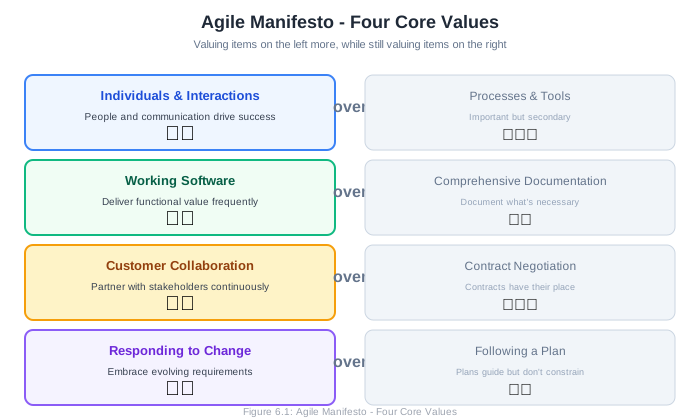
The manifesto articulates four core values:
Individuals and interactions over processes and tools
Working software over comprehensive documentation
Customer collaboration over contract negotiation
Responding to change over following a plan
The manifesto explicitly notes: “While there is value in the items on the right, we value the items on the left more.”
This is a crucial nuance. Agile doesn’t reject processes, documentation, contracts, or plans. It prioritizes their counterparts when trade-offs must be made.
Unpacking the Values:
Individuals and interactions over processes and tools: The best processes and tools can’t compensate for poor communication or unmotivated people. Focus on building collaborative teams and enabling effective communication.
Working software over comprehensive documentation: Documentation that nobody reads adds no value. Working software that users can actually use provides real feedback. This doesn’t mean “no documentation”—it means documentation that serves a purpose.
Customer collaboration over contract negotiation: Traditional contracts tried to specify everything upfront, then hold parties accountable to that specification. But requirements evolve. Agile favors ongoing collaboration where customers and developers work together toward shared goals.
Responding to change over following a plan: Plans become obsolete. Markets shift, users provide feedback, technologies evolve. Rather than fighting change, Agile embraces it as an opportunity to deliver more value.
6.2.2 The Twelve Principles
Behind the manifesto are twelve principles that guide Agile practice:
Satisfy the customer through early and continuous delivery of valuable software.
Welcome changing requirements, even late in development. Agile processes harness change for the customer’s competitive advantage.
Deliver working software frequently, from a couple of weeks to a couple of months, with a preference to the shorter timescale.
Business people and developers must work together daily throughout the project.
Build projects around motivated individuals. Give them the environment and support they need, and trust them to get the job done.
Face-to-face conversation is the most efficient and effective method of conveying information.
Working software is the primary measure of progress.
Agile processes promote sustainable development. The sponsors, developers, and users should be able to maintain a constant pace indefinitely.
Continuous attention to technical excellence and good design enhances agility.
Simplicity—the art of maximizing the amount of work not done—is essential.
The best architectures, requirements, and designs emerge from self-organizing teams.
At regular intervals, the team reflects on how to become more effective, then tunes and adjusts its behavior accordingly.
6.2.3 Agile Is a Mindset, Not a Methodology
A common misconception is that “Agile” is a specific process you can install. It’s not. Agile is a set of values and principles—a mindset. Specific methodologies like Scrum, Kanban, and XP are implementations of that mindset, each with different practices suited to different contexts.
Organizations that adopt Agile practices without embracing Agile values often fail to see benefits. They do “Agile theater”—standups that are status reports, sprints that are just short Waterfall phases, retrospectives that lead to no changes. True agility requires genuine commitment to the underlying principles.
                    Agile Mindset
                    (Values & Principles)
                          │
        ┌─────────────────┼─────────────────┐
        │                 │                 │
        ▼                 ▼                 ▼
    ┌───────┐        ┌───────┐        ┌───────┐
    │ Scrum │        │Kanban │        │  XP   │
    └───────┘        └───────┘        └───────┘
        │                 │                 │
        └─────────────────┴─────────────────┘
                          │
                          ▼
                   Your Team's Process
                   (Adapted to Context)
6.2.4 Why Agile Works
Agile works because it aligns with fundamental truths about software development:
Requirements are uncertain. Users often don’t know what they want until they see it. Agile delivers working software frequently, enabling early feedback and course correction.
Complexity defies prediction. Software projects are complex adaptive systems. Small changes can have large effects. Agile embraces empiricism—making decisions based on observation rather than prediction.
People matter. Software is built by humans, and human factors dominate project outcomes. Agile focuses on team dynamics, motivation, and sustainable pace.
Change is constant. Markets evolve, competitors move, users learn. Organizations that can respond quickly to change have a competitive advantage. Agile makes change a feature, not a bug.
6.3 Scrum: A Framework for Agile Development
Scrum is the most widely adopted Agile framework. Originally described by Ken Schwaber and Jeff Sutherland, Scrum provides a lightweight structure for teams to deliver complex products iteratively.
Scrum is named after the rugby formation where a team works together to move the ball down the field. Like rugby, Scrum emphasizes teamwork, adaptability, and continuous forward progress.
6.3.1 The Scrum Framework Overview
Scrum organizes work into fixed-length iterations called sprints, typically two weeks long. Each sprint produces a potentially shippable product increment.
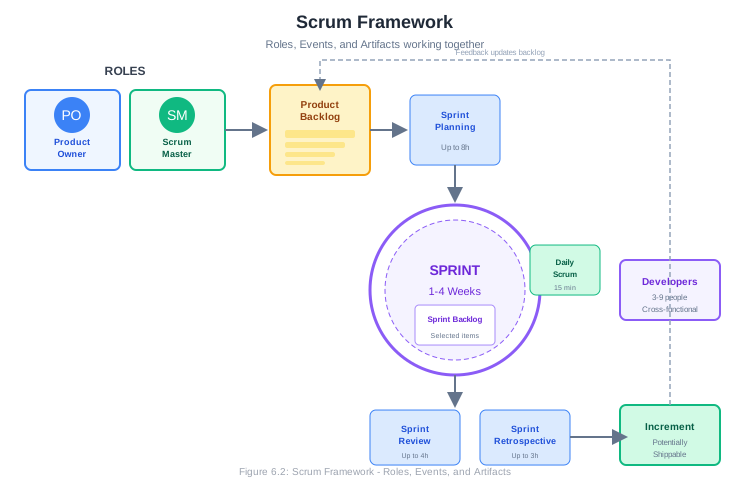
┌─────────────────────────────────────────────────────────────────────────┐
│                           SCRUM FRAMEWORK                               │
├─────────────────────────────────────────────────────────────────────────┤
│                                                                         │
│  ROLES              EVENTS                 ARTIFACTS                    │
│  ─────              ──────                 ─────────                    │
│  • Product Owner    • Sprint               • Product Backlog            │
│  • Scrum Master     • Sprint Planning      • Sprint Backlog             │
│  • Developers       • Daily Scrum          • Increment                  │
│                     • Sprint Review                                     │
│                     • Sprint Retrospective                              │
│                                                                         │
└─────────────────────────────────────────────────────────────────────────┘
The Sprint Cycle:
┌─────────────────────────────────────────────────────────────────────────┐
│                                                                         │
│   Product        Sprint          Daily        Sprint        Sprint      │
│   Backlog       Planning        Scrum         Review      Retrospective │
│      │             │              │             │              │        │
│      │             │    ┌─────────┼─────────┐   │              │        │
│      │             │    │         │         │   │              │        │
│      ▼             ▼    ▼         ▼         ▼   ▼              ▼        │
│   ┌──────┐    ┌────────────────────────────────────┐    ┌──────────┐   │
│   │      │    │                                    │    │          │   │
│   │ What │───►│         SPRINT (2-4 weeks)         │───►│ Increment│   │
│   │      │    │                                    │    │          │   │
│   └──────┘    └────────────────────────────────────┘    └──────────┘   │
│                                    │                                    │
│                                    │                                    │
│                    ┌───────────────┴───────────────┐                    │
│                    │      Sprint Backlog           │                    │
│                    │   (Committed work for sprint) │                    │
│                    └───────────────────────────────┘                    │
│                                                                         │
└─────────────────────────────────────────────────────────────────────────┘
6.3.2 Scrum Roles
Scrum defines three roles, each with distinct responsibilities:
Product Owner
The Product Owner is responsible for maximizing the value of the product. They are the single voice of the customer within the team.
Responsibilities:
- Maintains and prioritizes the Product Backlog
- Ensures the backlog is visible, transparent, and understood
- Makes decisions about what to build and in what order
- Accepts or rejects work completed by the team
- Communicates with stakeholders about progress and priorities
The Product Owner must be empowered to make decisions. A committee of stakeholders or a Product Owner who must get approval for every decision slows the team down.
Scrum Master
The Scrum Master is responsible for the Scrum process itself. They help the team understand and apply Scrum effectively.
Responsibilities:
- Facilitates Scrum events (planning, standups, reviews, retrospectives)
- Removes impediments that block the team
- Coaches the team on Scrum practices
- Protects the team from external interruptions
- Helps the organization understand and adopt Scrum
The Scrum Master is not a project manager. They don’t assign tasks or manage the team. They serve the team by enabling effective Scrum practice.
Developers
The Developers are the people who do the work of building the product. Despite the name, this includes anyone contributing to the increment—developers, testers, designers, analysts, and others.
Responsibilities:
- Estimate work and commit to sprint goals
- Self-organize to accomplish sprint work
- Deliver a potentially shippable increment each sprint
- Participate in all Scrum events
- Hold each other accountable for quality and commitments
Scrum teams are cross-functional—they have all skills needed to deliver the increment without depending on people outside the team.
Team Size:
Scrum works best with small teams. The Scrum Guide recommends 10 or fewer people. Larger groups should split into multiple Scrum teams.
┌─────────────────────────────────────────────────────────────────────────┐
│                          SCRUM TEAM                                     │
│                                                                         │
│   ┌─────────────┐    ┌─────────────┐    ┌─────────────────────────┐    │
│   │   Product   │    │   Scrum     │    │      Developers         │    │
│   │    Owner    │    │   Master    │    │    (3-9 people)         │    │
│   │             │    │             │    │                         │    │
│   │ • Backlog   │    │ • Process   │    │  • Designer             │    │
│   │ • Priority  │    │ • Coach     │    │  • Developer            │    │
│   │ • Value     │    │ • Facilitate│    │  • Developer            │    │
│   │ • Decide    │    │ • Remove    │    │  • Developer            │    │
│   │             │    │   obstacles │    │  • QA Engineer          │    │
│   └─────────────┘    └─────────────┘    └─────────────────────────┘    │
│                                                                         │
└─────────────────────────────────────────────────────────────────────────┘
6.3.3 Scrum Artifacts
Product Backlog
The Product Backlog is an ordered list of everything that might be needed in the product. It’s the single source of requirements.
Characteristics:
- Owned and maintained by the Product Owner
- Ordered by value, risk, priority, and necessity
- Items at the top are more detailed than items at the bottom
- Continuously refined (grooming/refinement)
- Never complete—it evolves as the product and market evolve
Backlog items typically include:
- Features
- Bug fixes
- Technical work
- Knowledge acquisition (spikes)
Example Product Backlog:
┌─────────────────────────────────────────────────────────────────────────┐
│ PRODUCT BACKLOG - TaskFlow                              Owner: Sarah    │
├─────┬──────────────────────────────────────────────┬────────┬──────────┤
│ Rank│ Item                                         │ Points │ Status   │
├─────┼──────────────────────────────────────────────┼────────┼──────────┤
│  1  │ User can create and edit tasks               │   5    │ Ready    │
│  2  │ User can assign tasks to team members        │   3    │ Ready    │
│  3  │ User can set due dates with reminders        │   5    │ Ready    │
│  4  │ User can view tasks on Kanban board          │   8    │ Ready    │
│  5  │ User can receive email notifications         │   5    │ Needs    │
│     │                                              │        │ refinement│
│  6  │ User can filter and search tasks             │   8    │ Needs    │
│     │                                              │        │ refinement│
│  7  │ Admin can manage team membership             │   5    │ Rough    │
│  8  │ User can attach files to tasks               │   8    │ Rough    │
│  9  │ Integration with Google Calendar             │   13   │ Rough    │
│ 10  │ Mobile app (iOS)                             │   ?    │ Idea     │
│ 11  │ Mobile app (Android)                         │   ?    │ Idea     │
│ ... │ ...                                          │        │          │
└─────┴──────────────────────────────────────────────┴────────┴──────────┘
Sprint Backlog
The Sprint Backlog is the set of Product Backlog items selected for the sprint, plus a plan for delivering them.
Characteristics:
- Created during Sprint Planning
- Owned by the Developers
- Represents the team’s commitment for the sprint
- Updated daily as work progresses
- Visible to all stakeholders
The Sprint Backlog includes:
- Selected user stories
- Tasks to complete each story
- Estimated hours remaining (optional)
Example Sprint Backlog:
┌─────────────────────────────────────────────────────────────────────────┐
│ SPRINT 3 BACKLOG                          Sprint Goal: Core Task CRUD   │
├─────────────────────────────────────────────────────────────────────────┤
│                                                                         │
│ ┌─────────────────────────────────────────────────────────────────────┐ │
│ │ Story: User can create and edit tasks (5 pts)                       │ │
│ │ Status: In Progress                                                 │ │
│ │ ─────────────────────────────────────────────────────────────────── │ │
│ │ Tasks:                                                              │ │
│ │ [x] Design task creation form (Designer, 4h)                        │ │
│ │ [x] Create Task model and database schema (Dev A, 3h)               │ │
│ │ [~] Implement create task API endpoint (Dev B, 4h) - In Progress    │ │
│ │ [ ] Build task creation UI component (Dev C, 6h)                    │ │
│ │ [ ] Implement edit task functionality (Dev B, 4h)                   │ │
│ │ [ ] Write unit tests (QA, 3h)                                       │ │
│ │ [ ] Write integration tests (QA, 2h)                                │ │
│ └─────────────────────────────────────────────────────────────────────┘ │
│                                                                         │
│ ┌─────────────────────────────────────────────────────────────────────┐ │
│ │ Story: User can assign tasks to team members (3 pts)                │ │
│ │ Status: Not Started                                                 │ │
│ │ ─────────────────────────────────────────────────────────────────── │ │
│ │ Tasks:                                                              │ │
│ │ [ ] Add assignee field to Task model (Dev A, 2h)                    │ │
│ │ [ ] Create user assignment dropdown component (Dev C, 4h)           │ │
│ │ [ ] Implement assignment API (Dev B, 3h)                            │ │
│ │ [ ] Add assignment notification (Dev A, 2h)                         │ │
│ │ [ ] Write tests (QA, 2h)                                            │ │
│ └─────────────────────────────────────────────────────────────────────┘ │
│                                                                         │
│ ┌─────────────────────────────────────────────────────────────────────┐ │
│ │ Story: User can set due dates with reminders (5 pts)                │ │
│ │ Status: Not Started                                                 │ │
│ └─────────────────────────────────────────────────────────────────────┘ │
│                                                                         │
│ Sprint Capacity: 60 hours | Committed: 52 hours | Remaining: 38 hours   │
└─────────────────────────────────────────────────────────────────────────┘
Increment
The Increment is the sum of all Product Backlog items completed during a sprint, plus all previous increments. It must be in usable condition—meeting the team’s Definition of Done—regardless of whether the Product Owner decides to release it.
Definition of Done (DoD)
The Definition of Done is a shared understanding of what “complete” means. It ensures transparency and quality.
Example Definition of Done:
- Code complete and peer-reviewed
- Unit tests written and passing
- Integration tests passing
- Documentation updated
- No known bugs
- Meets acceptance criteria
- Deployed to staging environment
- Product Owner accepted
6.3.4 Scrum Events
Scrum prescribes five events, each with a specific purpose. These events create regularity and minimize the need for ad-hoc meetings.
The Sprint
The Sprint is a container for all other events. It’s a fixed time-box (typically 2 weeks) during which the team works to deliver a potentially shippable increment.
Sprint Rules:
- Fixed duration (don’t extend sprints)
- No changes that endanger the Sprint Goal
- Quality standards don’t decrease
- Scope may be clarified and renegotiated with Product Owner
- A new sprint begins immediately after the previous one ends
Sprint Planning
Sprint Planning kicks off the sprint. The team decides what to work on and how to accomplish it.
Duration: Up to 8 hours for a one-month sprint (proportionally less for shorter sprints)
Part 1: What can be done this sprint?
- Product Owner presents top-priority items
- Team discusses and asks clarifying questions
- Team selects items they believe they can complete
- Team crafts a Sprint Goal
Part 2: How will the work be accomplished?
- Team breaks selected items into tasks
- Team estimates task effort
- Team commits to the Sprint Backlog
Sprint Planning Agenda Example:
SPRINT 3 PLANNING
══════════════════════════════════════════════════════════════

Time: Monday 9:00 AM - 1:00 PM (4 hours)
Attendees: Full Scrum Team

AGENDA
──────

9:00 - 9:15    Review Sprint 2 outcomes and current velocity
               Previous velocity: 18 points
               Capacity this sprint: Full team available

9:15 - 10:30   PART 1: Select Sprint Backlog Items
               • Product Owner presents priorities
               • Team asks clarifying questions
               • Team selects items (targeting ~18-20 points)

10:30 - 10:45  Break

10:45 - 11:15  Define Sprint Goal
               • What business value will we deliver?
               • How will we know we succeeded?

11:15 - 12:45  PART 2: Plan the Work
               • Break stories into tasks
               • Identify dependencies
               • Assign initial owners (optional)
               • Identify risks and unknowns

12:45 - 1:00   Confirm Commitment
               • Review Sprint Backlog
               • Team confirms they can commit
               • Scrum Master confirms understanding

OUTPUT
──────
• Sprint Goal: "Users can create, edit, and manage basic tasks"
• Sprint Backlog: 5 stories, 18 points
• Task breakdown for all stories
Daily Scrum (Standup)
The Daily Scrum is a brief daily meeting for the Developers to synchronize and plan the day’s work.
Duration: 15 minutes maximum Time: Same time and place every day Attendees: Developers (Scrum Master facilitates, Product Owner may attend)
Traditional Format (Three Questions):
- What did I accomplish yesterday?
- What will I work on today?
- What obstacles are in my way?
Alternative Format (Walking the Board):
- Review each item on the sprint board
- What’s needed to move it forward?
- Who’s working on what?
Daily Scrum Best Practices:
DO:
- Stand up (keeps it short)
- Start on time, even if people are missing
- Focus on sprint goal progress
- Identify blockers immediately
- Keep it under 15 minutes
DON’T:
- Give detailed status reports
- Solve problems during standup (take offline)
- Make it a report to the Scrum Master
- Skip days
- Let it become a complaint session
Example Daily Scrum:
DAILY SCRUM - Tuesday 9:00 AM
═════════════════════════════

ALICE:
"Yesterday I completed the task creation API. Today I'm starting
on the edit endpoint. No blockers."

BOB:
"I'm still working on the task form component. Should finish
today. I have a question about validation rules—I'll grab Sarah
after standup."

CAROL:
"Finished unit tests for the model layer. Starting integration
tests today. Blocked on needing access to the staging database—
can someone help?"

SCRUM MASTER:
"I'll get Carol database access right after this. Anything else?
No? Let's get to work."

Duration: 4 minutes
Sprint Review
The Sprint Review is held at the end of the sprint to inspect the increment and adapt the Product Backlog.
Duration: Up to 4 hours for a one-month sprint Attendees: Scrum Team plus invited stakeholders
What happens:
- Team demonstrates completed work
- Stakeholders provide feedback
- Product Owner discusses the backlog
- Group collaborates on what to do next
- Discussion of timeline, budget, and capabilities
What it’s NOT:
- A formal presentation
- A sign-off meeting
- Just a demo (it’s interactive)
Sprint Review Agenda Example:
SPRINT 3 REVIEW
══════════════════════════════════════════════════════════════

Time: Friday 2:00 PM - 3:30 PM
Attendees: Scrum Team + Marketing Lead, Customer Success Lead

AGENDA
──────

2:00 - 2:10    Welcome and Sprint Overview
               • Sprint Goal: Core Task CRUD
               • What we committed to vs. what we delivered

2:10 - 2:45    Demo of Completed Work
               • Task creation (Alice)
               • Task editing (Bob)
               • Task assignment (Carol)
               • Due date setting (Alice)

               [Interactive—stakeholders can try features]

2:45 - 3:00    Discussion and Feedback
               • What do you like?
               • What would you change?
               • What questions do you have?

3:00 - 3:15    Product Backlog Review
               • What's coming next sprint?
               • Any priority changes based on feedback?
               • New items to add?

3:15 - 3:30    Release Discussion
               • Are we on track for beta launch?
               • What risks do we see?

OUTPUT
──────
• Feedback captured
• Backlog updates identified
• Stakeholder alignment
Sprint Retrospective
The Sprint Retrospective is held after the Sprint Review and before the next Sprint Planning. The team inspects how the sprint went and identifies improvements.
Duration: Up to 3 hours for a one-month sprint Attendees: Scrum Team only (safe space for candid discussion)
Purpose:
- Inspect the last sprint (people, relationships, process, tools)
- Identify what went well
- Identify what could be improved
- Create a plan for implementing improvements
Retrospective Formats:
Start-Stop-Continue:
- What should we START doing?
- What should we STOP doing?
- What should we CONTINUE doing?
Glad-Sad-Mad:
- What made us GLAD?
- What made us SAD?
- What made us MAD?
4Ls:
- What did we LIKE?
- What did we LEARN?
- What did we LACK?
- What do we LONG FOR?
Sailboat:
         🏝️ Island (Goals)
            │
            │
   ⛵ Boat (Team)
     │
     │
  ⚓ Anchor (What slows us down)
     │
  🌬️ Wind (What propels us forward)
     │
  🪨 Rocks (Risks ahead)
Example Retrospective Output:
SPRINT 3 RETROSPECTIVE
══════════════════════════════════════════════════════════════

WHAT WENT WELL
──────────────
• Completed all committed stories
• Great collaboration between frontend and backend
• New testing approach caught bugs early
• Stakeholder feedback was very positive

WHAT COULD BE IMPROVED
──────────────────────
• Sprint planning ran long (5 hours instead of 4)
• Two stories had unclear acceptance criteria
• Staging environment was unstable
• Daily standups started late several times

ACTION ITEMS
────────────
1. [HIGH] Refine stories before sprint planning
   Owner: Product Owner
   Due: Before Sprint 4 planning

2. [MEDIUM] Set up staging environment monitoring
   Owner: Carol
   Due: Sprint 4, Day 3

3. [LOW] Start standup alarm at 8:58 AM
   Owner: Scrum Master
   Due: Immediately
6.3.5 Sprint Metrics
Velocity
Velocity is the amount of work a team completes in a sprint, measured in story points. It’s used for planning future sprints.
Sprint History:
Sprint 1: 15 points
Sprint 2: 18 points
Sprint 3: 21 points
Sprint 4: 16 points
Sprint 5: 20 points

Average Velocity: 18 pointsImportant: Velocity is a planning tool, not a performance metric. Using velocity to compare teams or pressure teams to “increase velocity” undermines its usefulness.
Burndown Chart
A burndown chart shows work remaining versus time. It helps visualize sprint progress.
Story Points
Remaining
    │
 20 │●
    │ ╲  - - - - - - - - - - - - Ideal Burndown
 15 │  ╲ ●
    │   ╲  ●
 10 │    ╲   ●
    │     ╲    ●●
  5 │      ╲     ╲●
    │       ╲      ●
  0 │────────╲───────●─────────────
    └────┬────┬────┬────┬────┬────┬─ Days
         1    2    3    4    5    6
If actual burndown is above the ideal line, the team is behind. If below, they’re ahead.
Burnup Chart
A burnup chart shows cumulative work completed. It’s useful for seeing scope changes.
Story Points
    │                              ┌─ Scope (may change)
 50 │─────────────────────────────●┘
    │                         ●●●
 40 │                    ●●●●
    │               ●●●●
 30 │          ●●●●
    │     ●●●●
 20 │●●●●
    │
 10 │
    │
  0 │────────────────────────────────
    └────┬────┬────┬────┬────┬────┬─ Days
         1    2    3    4    5    6
6.4 Kanban: Continuous Flow
While Scrum organizes work into sprints, Kanban focuses on continuous flow. Originating from Toyota’s manufacturing system, Kanban was adapted for software development by David Anderson in the mid-2000s.
6.4.1 Kanban Principles
Kanban is built on four foundational principles:
1. Start with what you do now
Kanban doesn’t prescribe roles, ceremonies, or artifacts. It overlays on your existing process to make it visible and improve it incrementally.
2. Agree to pursue incremental, evolutionary change
Rather than wholesale transformation, Kanban favors small, continuous improvements. This reduces resistance and risk.
3. Respect the current process, roles, and responsibilities
Don’t throw everything out. Preserve what works while improving what doesn’t.
4. Encourage acts of leadership at all levels
Improvement ideas can come from anywhere. Empower everyone to identify and implement improvements.
6.4.2 Kanban Practices
1. Visualize the Workflow
Make work visible using a Kanban board. Each column represents a stage in your workflow.
┌─────────────────────────────────────────────────────────────────────────┐
│                           KANBAN BOARD                                  │
├────────────┬────────────┬────────────┬────────────┬────────────────────┤
│  Backlog   │    To Do   │In Progress │   Review   │       Done         │
│            │            │            │            │                    │
│ ┌────────┐ │ ┌────────┐ │ ┌────────┐ │ ┌────────┐ │ ┌────────┐        │
│ │Task 8  │ │ │Task 5  │ │ │Task 3  │ │ │Task 1  │ │ │Task A  │        │
│ │        │ │ │        │ │ │ Alice  │ │ │ Carol  │ │ └────────┘        │
│ └────────┘ │ └────────┘ │ └────────┘ │ └────────┘ │                    │
│ ┌────────┐ │ ┌────────┐ │ ┌────────┐ │            │ ┌────────┐        │
│ │Task 9  │ │ │Task 6  │ │ │Task 4  │ │            │ │Task B  │        │
│ │        │ │ │        │ │ │  Bob   │ │            │ └────────┘        │
│ └────────┘ │ └────────┘ │ └────────┘ │            │                    │
│ ┌────────┐ │            │            │            │ ┌────────┐        │
│ │Task 10 │ │            │            │            │ │Task C  │        │
│ │        │ │            │            │            │ └────────┘        │
│ └────────┘ │            │            │            │                    │
│            │            │            │            │                    │
│    (∞)     │    (3)     │    (3)     │    (2)     │       (∞)         │
│            │            │            │            │                    │
└────────────┴────────────┴────────────┴────────────┴────────────────────┘
                    WIP Limits shown in parentheses
2. Limit Work in Progress (WIP)
WIP limits cap how many items can be in each stage simultaneously. This prevents overload and improves flow.
Why WIP limits matter:
- Reduces context switching
- Exposes bottlenecks
- Encourages finishing before starting
- Improves cycle time
- Increases focus
Without WIP Limits:              With WIP Limits:
──────────────────────           ──────────────────────

In Progress: 12 items            In Progress: 3 items (Limit: 3)
• Many half-finished             • Fewer items, more focus
• Lots of context switching      • Items finish faster
• Nothing actually finishing     • Problems visible immediately
• Problems hidden in pile        • Team swarms to unblock
3. Manage Flow
Monitor and optimize the flow of work through the system. Track metrics, identify bottlenecks, and make improvements.
4. Make Policies Explicit
Document the rules governing how work flows through the system:
- Definition of Ready (when can work enter a column?)
- Definition of Done (when can work leave a column?)
- WIP limits
- Prioritization rules
- Blocked item policies
5. Implement Feedback Loops
Regular cadences for review and adaptation:
- Daily standups
- Replenishment meetings (add work to board)
- Delivery planning
- Service delivery review
- Operations review
- Risk review
- Strategy review
6. Improve Collaboratively, Evolve Experimentally
Use the scientific method:
- Observe current state
- Form hypotheses about improvements
- Experiment with changes
- Measure results
- Adopt what works
6.4.3 Kanban Board Design
Columns should reflect your actual workflow. Common patterns:
Simple Board:
Backlog → In Progress → DoneDevelopment Board:
Backlog → Ready → Development → Code Review → Testing → DoneBoard with Explicit Buffer:
Backlog → Ready → Development → Dev Done → Testing → Done

         (Buffer between development and testing)
Board with Swimlanes:
┌─────────────────────────────────────────────────────────────┐
│         │ To Do │ In Progress │ Review │ Done │            │
├─────────┼───────┼─────────────┼────────┼──────┤            │
│ Urgent  │ ▢ ▢   │     ▢       │   ▢    │  ▢   │ ← Priority │
│─────────┼───────┼─────────────┼────────┼──────┤   Lanes    │
│ Normal  │ ▢ ▢ ▢ │    ▢ ▢      │   ▢    │ ▢ ▢  │            │
│─────────┼───────┼─────────────┼────────┼──────┤            │
│ Low     │ ▢ ▢   │             │        │  ▢   │            │
└─────────┴───────┴─────────────┴────────┴──────┘
6.4.4 Kanban Metrics
Cycle Time
Cycle time is how long an item takes from start to finish—the time between “work started” and “work completed.”
Task A: Started Monday 9 AM → Completed Wednesday 4 PM
Cycle Time: 2.3 days

Average Cycle Time: Sum of all cycle times / Number of items
Lower cycle time means faster delivery. Track cycle time over time to measure improvement.
Lead Time
Lead time is the total time from request to delivery—including time waiting in the backlog.
Request ──────► Start ──────────────► Complete
│←────── Lead Time (total) ─────────────────►│
              │←── Cycle Time ────────►│
Throughput
Throughput is the number of items completed in a given time period.
Week 1: 12 items completed
Week 2: 15 items completed
Week 3: 11 items completed

Average Throughput: 12.7 items/week
Cumulative Flow Diagram (CFD)
A CFD shows the quantity of items in each state over time. It reveals bottlenecks and flow problems.
Items
    │
 50 │████████████████████████████████████ Done
    │████████████████████████████
 40 │███████████████████████████████████ Review
    │██████████████████████████
 30 │████████████████████████████████ In Progress
    │██████████████████████████
 20 │█████████████████████████████ To Do
    │█████████████████████
 10 │████████████████████████ Backlog
    │█████████████████
  0 │─────────────────────────────────────
    └────┬────┬────┬────┬────┬────┬────┬─ Weeks
         1    2    3    4    5    6    7
The vertical distance between bands represents WIP. The horizontal distance represents cycle time. Widening bands indicate bottlenecks.
6.4.5 Scrum vs. Kanban
| Aspect | Scrum | Kanban |
|---|---|---|
| Cadence | Fixed sprints (1-4 weeks) | Continuous flow |
| Roles | Product Owner, Scrum Master, Developers | No prescribed roles |
| Planning | Sprint Planning at start of sprint | Continuous (just-in-time) |
| Change | No changes during sprint | Change anytime |
| Metrics | Velocity, Burndown | Cycle time, Throughput |
| Commitment | Sprint backlog commitment | No commitment beyond WIP |
| Best for | Product development, cross-functional teams | Operations, maintenance, varied work |
Scrumban:
Many teams combine elements of both:
- Kanban board with visualized flow
- WIP limits
- Sprint cadence for planning and review
- Retrospectives for improvement
6.5 Extreme Programming (XP)
Extreme Programming (XP) is an Agile methodology that emphasizes technical excellence and team practices. Created by Kent Beck in the late 1990s, XP “turns the dials to 10” on good software practices.
6.5.1 XP Values
Communication: Team members communicate face-to-face frequently. Problems are surfaced immediately. Knowledge is shared, not hoarded.
Simplicity: Do the simplest thing that could possibly work. Don’t build for requirements you don’t have yet. Simplify code through refactoring.
Feedback: Get feedback quickly and often. Short iterations, continuous integration, pair programming, and customer involvement all provide rapid feedback.
Courage: Make difficult decisions. Refactor mercilessly. Throw away code that doesn’t work. Tell customers the truth about estimates.
Respect: Team members respect each other’s contributions. Everyone’s input matters. People are not resources.
6.5.2 XP Practices
XP defines twelve practices organized into four categories:
Fine-Scale Feedback:
Pair Programming: Two developers work together at one workstation. One “drives” (types), the other “navigates” (reviews). Pairs switch frequently. Benefits include knowledge sharing, better design, and fewer bugs.
Planning Game: Customers and developers collaborate on release and iteration planning. Customers define features; developers estimate. Simple, cards-based planning.
Test-Driven Development (TDD): Write a failing test before writing code. Write just enough code to pass the test. Refactor. Repeat. This produces well-tested, well-designed code.
Whole Team: The customer (or customer representative) is part of the team, available daily to answer questions, provide feedback, and make decisions.
Continuous Process:
Continuous Integration: Developers integrate code frequently (multiple times per day). Each integration is verified by automated tests. This catches problems early and keeps the codebase stable.
Refactoring: Continuously improve code structure without changing behavior. Remove duplication. Improve clarity. Keep the codebase healthy.
Small Releases: Release small increments frequently. This provides feedback, delivers value early, and reduces risk.
Shared Understanding:
Coding Standards: The team agrees on coding conventions and follows them. Anyone can work on any code. The codebase looks like one person wrote it.
Collective Code Ownership: Anyone can modify any code. This spreads knowledge and enables flexibility. Code reviews and pair programming support this.
Simple Design: Design for current requirements, not imagined future needs. The simplest design is easiest to understand, test, and modify.
System Metaphor: A shared story of how the system works. A metaphor helps the team communicate and reason about the system consistently.
Developer Welfare:
Sustainable Pace: Work at a pace you can maintain indefinitely. No death marches. Tired developers make mistakes and burn out.
6.5.3 The TDD Cycle
Test-Driven Development follows a simple cycle:
        ┌────────────────────────┐
        │                        │
        │    1. RED              │
        │    Write a failing     │
        │    test                │
        │                        │
        └───────────┬────────────┘
                    │
                    ▼
        ┌────────────────────────┐
        │                        │
        │    2. GREEN            │
        │    Write code to       │
        │    pass the test       │
        │                        │
        └───────────┬────────────┘
                    │
                    ▼
        ┌────────────────────────┐
        │                        │
        │    3. REFACTOR         │◄────────┐
        │    Improve the code    │         │
        │    (tests still pass)  │         │
        │                        │         │
        └───────────┬────────────┘         │
                    │                      │
                    └──────────────────────┘
Example TDD Session:
# Step 1: RED - Write a failing test
def test_calculate_total_for_empty_cart():
    cart = ShoppingCart()
    assert cart.calculate_total() == 0

# Run tests: FAIL - ShoppingCart doesn't exist

# Step 2: GREEN - Write minimal code to pass
class ShoppingCart:
    def calculate_total(self):
        return 0

# Run tests: PASS

# Step 3: REFACTOR - Nothing to refactor yet

# Step 1: RED - Write next failing test
def test_calculate_total_for_single_item():
    cart = ShoppingCart()
    cart.add_item(Product("Widget", 9.99), quantity=1)
    assert cart.calculate_total() == 9.99

# Run tests: FAIL - add_item doesn't exist

# Step 2: GREEN - Write code to pass
class ShoppingCart:
    def __init__(self):
        self.items = []

    def add_item(self, product, quantity):
        self.items.append((product, quantity))

    def calculate_total(self):
        return sum(product.price * qty for product, qty in self.items)

# Run tests: PASS

# Continue cycle...
6.5.4 When to Use XP Practices
Not all XP practices are appropriate for all situations:
| Practice | High Value When… | Less Valuable When… |
|---|---|---|
| Pair Programming | Complex problems, knowledge transfer needed, quality critical | Simple tasks, team very experienced, remote-only team |
| TDD | New code, complex logic, long-lived codebase | Prototypes, UI-heavy work, exploratory work |
| Continuous Integration | Multiple developers, frequent changes | Solo developer, stable codebase |
| Refactoring | Growing codebase, changing requirements | Throwaway code, frozen requirements |
| Collective Ownership | Cross-functional teams, bus factor concerns | Specialized expertise areas |
6.6 Estimation: Story Points and Planning
Estimation is notoriously difficult in software development. How long will a feature take? It depends on countless factors, many unknown at estimation time. Agile approaches estimation differently—focusing on relative sizing rather than absolute time predictions.
6.6.1 Why Traditional Estimation Fails
Traditional estimation asks: “How many hours/days will this take?” This approach fails because:
Uncertainty: Early in a project, we don’t know enough to estimate precisely. Later, we know more but have less flexibility.
Anchoring: Once someone states an estimate, others anchor to it. The first number biases all subsequent discussion.
Pressure: Estimates become commitments, then deadlines. Teams pad estimates defensively or face blame when reality differs from prediction.
Individual variation: A task that takes Alice two hours might take Bob eight. Whose estimate do we use?
Hidden complexity: Software has unknown unknowns. We discover complexity during implementation, not during estimation.
6.6.2 Story Points
Story points are a relative measure of effort, complexity, and uncertainty. Rather than estimating in hours, teams assign point values that represent how “big” a story is relative to other stories.
Key Characteristics:
- Relative, not absolute: “Story A is about twice as big as Story B”
- Team-specific: Points aren’t comparable across teams
- Include uncertainty: Bigger point values include higher uncertainty
- Not tied to time: A 2-point story doesn’t mean 2 hours or 2 days
The Fibonacci Sequence:
Most teams use a modified Fibonacci sequence for point values:
1, 2, 3, 5, 8, 13, 21, (40, 100)Why Fibonacci? The gaps between numbers grow larger at higher values, reflecting the increasing uncertainty of larger work items. You can reasonably distinguish a 2-point story from a 3-point story, but distinguishing 21 points from 22 points is meaningless.
Reference Story:
Teams establish a reference story—a well-understood, medium-sized piece of work assigned a middle value (often 3 or 5 points). All other stories are sized relative to this reference.
Reference: "User can log in with email/password" = 3 points

Now estimate:
• "User can reset password via email" → Similar complexity → 3 points
• "User can view their profile" → Simpler → 2 points
• "User can upload profile photo" → More complex (file handling) → 5 points
• "User can log in with SSO (Google, Microsoft)" → Much more complex → 8 points
6.6.3 Planning Poker
Planning Poker is a consensus-based estimation technique that avoids anchoring and encourages discussion.
How It Works:
- Each team member has cards with point values (1, 2, 3, 5, 8, 13, 21, ?)
- The Product Owner presents a story
- Team asks clarifying questions
- Everyone simultaneously reveals their estimate
- If estimates differ significantly, discuss and re-estimate
- Repeat until consensus
PLANNING POKER SESSION
══════════════════════════════════════════════════════════════

Story: "User can filter tasks by status, assignee, and due date"

Round 1:
Alice: 5    Bob: 8    Carol: 8    Dave: 5    Eve: 13

Discussion:
Eve: "I'm thinking about the complexity of combining multiple filters"
Alice: "I assumed we'd reuse our existing filter component"
Bob: "Good point, but we need new database queries for each filter type"
Eve: "Oh, if we're reusing components, that does simplify things"

Round 2:
Alice: 5    Bob: 8    Carol: 5    Dave: 5    Eve: 8

Discussion:
Carol: "Changed my mind—filter component does help"
Bob: "I'm still at 8 because of the query complexity"

Final: Team agrees on 8 (erring toward higher due to query work)
Planning Poker Benefits:
- Everyone participates
- No anchoring (simultaneous reveal)
- Differences trigger valuable discussions
- Builds shared understanding
- Fun and engaging
6.6.4 Velocity and Capacity Planning
Velocity is the average number of story points a team completes per sprint. It’s calculated from historical data.
Sprint 1: 21 points completed
Sprint 2: 18 points completed
Sprint 3: 24 points completed
Sprint 4: 20 points completed
Sprint 5: 22 points completed

Average Velocity: 21 points per sprint
Using Velocity for Planning:
If average velocity is 21 points, the team should plan for approximately 21 points next sprint. Some teams use a range:
- Pessimistic: 18 points (worst recent sprint)
- Expected: 21 points (average)
- Optimistic: 24 points (best recent sprint)
Velocity Adjustments:
Adjust for known factors:
- Team member on vacation: Reduce proportionally
- New team member: Expect lower velocity initially
- Technical debt paydown sprint: Reduce feature velocity
Important Cautions:
- Don’t compare velocity across teams (points aren’t standardized)
- Don’t use velocity as a performance metric (teams will game it)
- Velocity stabilizes after 3-5 sprints; early sprints are unreliable
- Changing team composition resets velocity
6.6.5 Estimation Alternatives
Some teams abandon points entirely:
Story Counting:
If stories are consistently small (well-refined), just count them. “We complete about 8 stories per sprint.” This works when stories are similar in size.
T-Shirt Sizing:
Use qualitative sizes: XS, S, M, L, XL. Simpler than points but still enables relative comparison. Often converted to points for tracking:
XS = 1 point
S  = 2 points
M  = 5 points
L  = 8 points
XL = 13 points (should probably be split)
#NoEstimates:
Some teams avoid estimation entirely, focusing instead on:
- Breaking work into small, similarly-sized pieces
- Counting completed items
- Using cycle time for forecasting
This works best with mature teams and well-refined backlogs.
6.7 Project Management Tools
Modern project management tools support Agile workflows with digital boards, backlog management, and reporting.
6.7.1 GitHub Projects
GitHub Projects provides project management directly integrated with GitHub’s issues and pull requests.
Setting Up a GitHub Project:
- Navigate to your repository (or organization)
- Click “Projects” tab → “New Project”
- Choose a template (Board, Table, or Roadmap)
- Customize columns to match your workflow
Board View:
┌─────────────────────────────────────────────────────────────────────────┐
│ TaskFlow Development                                        + Add view  │
├────────────────┬────────────────┬────────────────┬────────────────┬─────┤
│   📋 Backlog   │   🎯 Ready     │   🔄 In Progress│   👀 Review   │ ✅  │
│                │                │                 │               │Done │
├────────────────┼────────────────┼────────────────┼────────────────┼─────┤
│ #23 SSO Login  │ #18 Password   │ #15 Task CRUD  │ #12 User      │#10  │
│ enhancement    │ reset          │ @alice         │ profiles      │#8   │
│                │ 3 points       │ 5 points       │ @carol        │#7   │
│ #24 File       │                │                │ 3 points      │#5   │
│ attachments    │ #19 Due date   │ #16 Task       │               │#3   │
│                │ reminders      │ assignment     │               │#1   │
│ #25 Calendar   │ 5 points       │ @bob           │               │     │
│ integration    │                │ 3 points       │               │     │
│                │                │                │               │     │
│ + Add item     │ + Add item     │ + Add item     │ + Add item    │     │
└────────────────┴────────────────┴────────────────┴────────────────┴─────┘
Table View:
┌──────────────────────────────────────────────────────────────────────────┐
│ Title                │ Status      │ Assignee │ Points │ Sprint │ Labels │
├──────────────────────┼─────────────┼──────────┼────────┼────────┼────────┤
│ Task CRUD            │ In Progress │ @alice   │ 5      │ Sprint3│ feature│
│ Task assignment      │ In Progress │ @bob     │ 3      │ Sprint3│ feature│
│ User profiles        │ Review      │ @carol   │ 3      │ Sprint3│ feature│
│ Password reset       │ Ready       │ -        │ 3      │ Sprint3│ feature│
│ Due date reminders   │ Ready       │ -        │ 5      │ Sprint3│ feature│
│ SSO Login            │ Backlog     │ -        │ 8      │ -      │ feature│
│ File attachments     │ Backlog     │ -        │ 8      │ -      │ feature│
└──────────────────────┴─────────────┴──────────┴────────┴────────┴────────┘
GitHub Projects Features:
- Custom Fields: Add story points, sprints, priorities
- Automation: Auto-move items when issues close or PRs merge
- Filtering: Filter by assignee, label, milestone, custom fields
- Grouping: Group items by sprint, assignee, or status
- Iterations: Track sprint cycles
- Insights: Burnup charts and progress tracking
Connecting Issues to Projects:
# Issue Template Example

## User Story
As a [user type], I want to [action] so that [benefit].

## Acceptance Criteria
- [ ] Criterion 1
- [ ] Criterion 2
- [ ] Criterion 3

## Technical Notes
- Relevant implementation details

## Story Points: 5
## Sprint: Sprint 3
6.7.2 Jira
Jira is the most widely used Agile project management tool, especially in enterprise environments.
Key Jira Concepts:
- Project: Container for all issues related to a product or initiative
- Issue Types: Story, Bug, Task, Epic, Subtask
- Workflow: States and transitions (To Do → In Progress → Done)
- Board: Scrum or Kanban visualization
- Sprint: Time-boxed iteration (Scrum)
- Backlog: Ordered list of work items
Jira Board Example:
┌─────────────────────────────────────────────────────────────────────────┐
│ TASKFLOW SPRINT 3                              Sprint ends in 5 days    │
├────────────────┬────────────────┬────────────────┬─────────────────────┤
│   TO DO (5)    │IN PROGRESS (3) │  IN REVIEW (1) │      DONE (4)       │
├────────────────┼────────────────┼────────────────┼─────────────────────┤
│                │                │                │                     │
│ ┌────────────┐ │ ┌────────────┐ │ ┌────────────┐ │ ┌────────────┐      │
│ │📘 TASK-45  │ │ │📘 TASK-42  │ │ │📘 TASK-40  │ │ │📘 TASK-38  │      │
│ │Filter UI   │ │ │Due dates   │ │ │User profile│ │ │Login page  │      │
│ │           ◇│ │ │Alice    ◇◇│ │ │Carol    ◇◇◇│ │ │Done     ◇◇│      │
│ └────────────┘ │ └────────────┘ │ └────────────┘ │ └────────────┘      │
│                │                │                │                     │
│ ┌────────────┐ │ ┌────────────┐ │                │ ┌────────────┐      │
│ │🐛 TASK-46  │ │ │📘 TASK-43  │ │                │ │📘 TASK-39  │      │
│ │Date bug    │ │ │Assignments │ │                │ │Task model  │      │
│ │        🔥◇│ │ │Bob      ◇◇│ │                │ │Done     ◇◇│      │
│ └────────────┘ │ └────────────┘ │                │ └────────────┘      │
│                │                │                │                     │
│ ┌────────────┐ │ ┌────────────┐ │                │ ┌────────────┐      │
│ │📘 TASK-47  │ │ │📘 TASK-44  │ │                │ │📘 TASK-41  │      │
│ │Sort tasks  │ │ │Task CRUD   │ │                │ │DB schema   │      │
│ │           ◇│ │ │Dave     ◇◇│ │                │ │Done      ◇│      │
│ └────────────┘ │ └────────────┘ │                │ └────────────┘      │
│                │                │                │                     │
└────────────────┴────────────────┴────────────────┴─────────────────────┘

◇ = Story Point    🔥 = High Priority    📘 = Story    🐛 = Bug
Jira Reports:
- Burndown Chart: Work remaining vs. time
- Velocity Chart: Points completed per sprint
- Sprint Report: Summary of sprint completion
- Cumulative Flow: Work in each state over time
- Control Chart: Cycle time analysis
6.7.3 Other Tools
Trello: Simple, visual board-based tool. Good for small teams and simple workflows. Less feature-rich than Jira but easier to learn.
Asana: Task and project management with multiple views (list, board, timeline, calendar). Good for cross-functional teams.
Linear: Modern, fast issue tracking built for software teams. Keyboard-driven, GitHub integration, clean interface.
Azure DevOps: Microsoft’s integrated platform including boards, repos, pipelines, and test plans. Good for Microsoft-ecosystem teams.
Notion: Flexible workspace that can be configured for project management. Good for teams wanting to combine docs and project tracking.
Choosing a Tool:
| Factor | Consider… |
|---|---|
| Team size | Simple tools for small teams; robust tools for large |
| Integration needs | GitHub integration, CI/CD, communication tools |
| Complexity | Simple workflows → simple tools; complex → robust tools |
| Budget | Free tiers vary; enterprise features cost money |
| Learning curve | Time available for training |
| Reporting needs | Basic → simple tools; detailed metrics → robust tools |
For student projects, GitHub Projects is often sufficient and integrates naturally with your code repository.
6.8 Breaking Down Work: Epics, Stories, and Tasks
Effective Agile teams break work into appropriately sized pieces. The hierarchy typically flows from large (Epics) to small (Tasks).
6.8.1 The Work Hierarchy
┌─────────────────────────────────────────────────────────────────────────┐
│                                                                         │
│    INITIATIVE / THEME                                                   │
│    "Improve user engagement"                                            │
│    (Strategic goal, spans multiple releases)                            │
│                                                                         │
│    └──► EPIC                                                            │
│         "User Task Management"                                          │
│         (Large feature, spans multiple sprints)                         │
│                                                                         │
│         └──► USER STORY                                                 │
│              "User can create tasks"                                    │
│              (Deliverable value, completable in one sprint)             │
│                                                                         │
│              └──► TASK                                                  │
│                   "Implement create task API endpoint"                  │
│                   (Technical work, hours to complete)                   │
│                                                                         │
│                   └──► SUBTASK                                          │
│                        "Write unit tests for validation"                │
│                        (Small piece of a task)                          │
│                                                                         │
└─────────────────────────────────────────────────────────────────────────┘
6.8.2 Epics
Epics are large bodies of work that span multiple sprints. They’re too big to complete in one iteration and must be broken down into smaller stories.
Characteristics:
- Takes weeks or months to complete
- Includes multiple user stories
- May span multiple teams
- Represents a significant feature or capability
Example Epics:
EPIC: User Authentication System
├── Story: User can register with email/password
├── Story: User can log in with credentials
├── Story: User can reset forgotten password
├── Story: User can update password
├── Story: Admin can manage user accounts
├── Story: User can log in with Google SSO
└── Story: User can enable two-factor authentication

EPIC: Task Management
├── Story: User can create tasks
├── Story: User can edit tasks
├── Story: User can delete tasks
├── Story: User can assign tasks to team members
├── Story: User can set due dates
├── Story: User can add labels to tasks
├── Story: User can set task priority
└── Story: User can add comments to tasks
6.8.3 User Stories (Review)
As covered in Chapter 2, user stories follow the format:
As a [type of user], I want [capability] so that [benefit].
Well-Sized Stories:
Stories should be small enough to complete in one sprint—ideally in a few days. The INVEST criteria guide good stories:
- Independent
- Negotiable
- Valuable
- Estimable
- Small
- Testable
Splitting Large Stories:
When a story is too large, split it using these patterns:
By workflow step:
Original: User can purchase a product

Split into:
• User can add items to cart
• User can view cart
• User can enter shipping address
• User can enter payment information
• User can review and confirm order
By business rule:
Original: User can search for products

Split into:
• User can search by product name
• User can search by category
• User can filter by price range
• User can sort search results
By data variation:
Original: User can log in

Split into:
• User can log in with email/password
• User can log in with Google
• User can log in with Microsoft
By operation (CRUD):
Original: User can manage tasks

Split into:
• User can create tasks
• User can view tasks
• User can edit tasks
• User can delete tasks
By user type:
Original: User can view reports

Split into:
• Team member can view their own reports
• Manager can view team reports
• Admin can view all reports
6.8.4 Tasks
Tasks are the technical activities required to complete a story. Unlike stories, tasks describe how rather than what.
Characteristics:
- Estimated in hours (typically 1-8 hours)
- Assigned to individuals
- Technical in nature
- Not directly valuable to users (stories are)
Example Story with Tasks:
STORY: User can create tasks (5 points)

TASKS:
┌────────────────────────────────────────────────────────┬───────┬─────────┐
│ Task                                                   │ Hours │ Assignee│
├────────────────────────────────────────────────────────┼───────┼─────────┤
│ Create Task database model and migration               │   2   │ Alice   │
│ Implement CreateTask API endpoint                      │   4   │ Alice   │
│ Write API endpoint validation                          │   2   │ Alice   │
│ Create task creation form component                    │   4   │ Bob     │
│ Implement form validation (client-side)                │   2   │ Bob     │
│ Connect form to API                                    │   2   │ Bob     │
│ Write unit tests for Task model                        │   2   │ Carol   │
│ Write integration tests for API                        │   3   │ Carol   │
│ Write E2E test for task creation flow                  │   2   │ Carol   │
│ Update API documentation                               │   1   │ Alice   │
├────────────────────────────────────────────────────────┼───────┼─────────┤
│ TOTAL                                                  │  24   │         │
└────────────────────────────────────────────────────────┴───────┴─────────┘
6.8.5 Definition of Ready and Definition of Done
Definition of Ready (DoR):
Criteria that must be met before a story enters a sprint:
DEFINITION OF READY
═══════════════════

A story is Ready when:
☑ Story is written in user story format
☑ Acceptance criteria are defined
☑ Story has been estimated
☑ Dependencies are identified
☑ UX designs are complete (if applicable)
☑ Technical approach is understood
☑ Story is small enough for one sprint
☑ Product Owner is available to answer questions
Definition of Done (DoD):
Criteria that must be met before a story is considered complete:
DEFINITION OF DONE
══════════════════

A story is Done when:
☑ All acceptance criteria are met
☑ Code is written and committed
☑ Code has been peer-reviewed
☑ Unit tests are written and passing
☑ Integration tests are passing
☑ Documentation is updated
☑ Code is deployed to staging
☑ QA has verified the feature
☑ Product Owner has accepted the work
☑ No known bugs remain
6.9 Running Effective Agile Meetings
Agile meetings are collaborative working sessions, not status reports. Effectiveness depends on preparation, facilitation, and follow-through.
6.9.1 Meeting Anti-Patterns
The Status Report Standup:
❌ Each person reports to the Scrum Master
❌ No interaction between team members
❌ Runs long because people give detailed updates
❌ Feels like micromanagement
The Endless Planning:
❌ Goes hours over time-box
❌ Debates implementation details
❌ No clear outcome
❌ Team disengages
The Blameful Retrospective:
❌ Focus on who made mistakes
❌ Defensive atmosphere
❌ Same issues discussed repeatedly
❌ No action items
6.9.2 Facilitating Effective Standups
Structure (15 minutes max):
DAILY STANDUP FACILITATION
══════════════════════════════════════════════════════════════

BEFORE:
• Start exactly on time
• Stand up (keeps it short)
• Face the board, not the Scrum Master

DURING:
• Walk the board right-to-left (focus on finishing)
  OR each person answers three questions
• Keep updates brief (30-60 seconds each)
• Note blockers but don't solve them
• Note discussions needed but defer them

AFTER:
• Immediately address blockers
• Schedule follow-up discussions
• Update the board

FACILITATION TIPS:
• "Let's save that discussion for after standup"
• "What's blocking this from moving forward?"
• "Who can help with this today?"
• "Let's keep moving—we can discuss offline"
6.9.3 Facilitating Effective Retrospectives
Structure (1-2 hours):
RETROSPECTIVE FACILITATION
══════════════════════════════════════════════════════════════

1. SET THE STAGE (5-10 min)
   • Welcome, state purpose
   • Review working agreements
   • Check-in activity (how are people feeling?)

2. GATHER DATA (15-20 min)
   • What happened during the sprint?
   • Use a retrospective format (Start/Stop/Continue, 4Ls, etc.)
   • Silent brainstorming, then share

3. GENERATE INSIGHTS (15-20 min)
   • Why did these things happen?
   • Group related items
   • Identify patterns and root causes

4. DECIDE WHAT TO DO (15-20 min)
   • What specific actions will we take?
   • Limit to 1-3 actions (more won't get done)
   • Assign owners and due dates

5. CLOSE (5-10 min)
   • Summarize action items
   • Appreciate the team
   • Quick feedback on the retro itself
Example Retrospective Flow:
SPRINT 4 RETROSPECTIVE
══════════════════════════════════════════════════════════════

FORMAT: Sailboat

         🏝️ Island (Our Goals)
         "Ship MVP by end of month"
            │
            │
   ⛵ Team (Current Position)
     │
     │
  ⚓ Anchors (What's slowing us down?)
     • Unclear requirements on 2 stories
     • Staging environment unstable
     • Too many meetings
     │
  🌬️ Wind (What's pushing us forward?)
     • Great collaboration this sprint
     • New CI pipeline saving time
     • Customer feedback very helpful
     │
  🪨 Rocks (Risks ahead?)
     • Key developer vacation next sprint
     • Integration with payment system unknown

ACTION ITEMS:
1. [Product Owner] Refine next sprint stories by Thursday
2. [DevOps] Fix staging stability by Monday
3. [Scrum Master] Audit meeting calendar, propose reductions
6.9.4 Remote/Hybrid Agile
Many teams now work remotely or hybrid. Agile practices need adaptation:
Remote Standup Tips:
- Video on (builds connection)
- Use a shared board everyone can see
- Strict time-keeping (easier to run long remotely)
- Consider async standups for distributed time zones
Remote Retrospective Tips:
- Use digital whiteboarding tools (Miro, FigJam, MURAL)
- More structure (harder to read the room remotely)
- Breakout rooms for small group discussions
- Extra attention to psychological safety
Async Standups:
ASYNC STANDUP (via Slack/Teams)
══════════════════════════════════════════════════════════════

Post by 9:30 AM local time:

1. What did you complete yesterday?
2. What are you working on today?
3. Any blockers?

Example:
@alice:
1. ✅ Completed Task CRUD API
2. 📝 Starting task assignment feature
3. 🚫 None

@bob:
1. ✅ Fixed date picker bug
2. 📝 Working on form validation
3. 🚫 Blocked: Need design clarification on error states

Thread replies for questions or offers to help.
6.10 Adapting Agile to Your Context
Agile isn’t one-size-fits-all. Teams must adapt practices to their specific context.
6.10.1 Team Size Considerations
Solo Developer:
- Kanban often works better than Scrum
- No standups needed (but planning and review still valuable)
- Personal Kanban board for visualization
- Time-boxed work sessions (Pomodoro)
Small Team (2-4):
- Lighter ceremonies
- Roles may overlap (developer might also be Product Owner)
- Simple tools sufficient
- Stand-ups can be very quick
Medium Team (5-9):
- Full Scrum works well
- All roles dedicated
- More structure needed
- Better tooling helpful
Large Team (10+):
- Split into multiple teams
- Need coordination mechanisms (Scrum of Scrums, scaled frameworks)
- More formal processes
- Robust tooling essential
6.10.2 Project Type Considerations
New Product Development:
- High uncertainty → Scrum’s iterative approach
- Frequent pivots → Short sprints
- Heavy user involvement
Maintenance/Operations:
- Continuous flow → Kanban
- Unpredictable work → WIP limits
- Mix of planned and unplanned work
Fixed-Deadline Projects:
- Release planning critical
- Velocity tracking for forecasting
- Scope management key
Research/Experimental:
- Time-boxed experiments (spikes)
- High uncertainty acknowledgment
- Learning over delivery
6.10.3 Scaling Agile
When multiple teams work on the same product, coordination frameworks help:
Scrum of Scrums:
- Representatives from each team meet daily/weekly
- Share progress, dependencies, and blockers
- Coordinate across teams
SAFe (Scaled Agile Framework):
- Comprehensive scaling framework
- Program Increments (8-12 weeks)
- Multiple teams, roles, and ceremonies
- Works for very large organizations
LeSS (Large-Scale Scrum):
- Minimal additional process
- Multiple teams, one Product Backlog
- Shared Sprint Review and Retrospective
Spotify Model:
- Squads (small teams)
- Tribes (groups of related squads)
- Chapters (people with same skills across squads)
- Guilds (communities of interest)
For most student projects, scaling isn’t needed. Focus on core Agile practices first.
6.11 Chapter Summary
Agile methodologies revolutionized software development by embracing change, valuing people, and delivering working software frequently. Understanding these practices is essential for modern software engineers.
Key takeaways from this chapter:
The Agile Manifesto established values prioritizing individuals, working software, collaboration, and responding to change. These values guide all Agile practices.
Scrum is a framework with defined roles (Product Owner, Scrum Master, Developers), events (Sprint Planning, Daily Scrum, Sprint Review, Retrospective), and artifacts (Product Backlog, Sprint Backlog, Increment).
Kanban focuses on visualizing work, limiting work in progress, and optimizing flow. It’s less prescriptive than Scrum and works well for continuous-flow environments.
Extreme Programming (XP) emphasizes technical excellence through practices like pair programming, test-driven development, and continuous integration.
Story points provide relative estimation that accounts for uncertainty. Planning Poker builds consensus while avoiding anchoring bias.
Velocity measures how much work a team completes per sprint, enabling forecasting and capacity planning.
Project management tools like GitHub Projects and Jira support Agile workflows with boards, backlogs, and reporting.
Work breakdown flows from Epics (large features) to Stories (deliverable value) to Tasks (technical work). Definition of Ready and Definition of Done ensure quality.
Effective meetings require preparation, facilitation, and follow-through. Anti-patterns like status-report standups undermine Agile benefits.
Adaptation is key—teams should modify Agile practices to fit their context, team size, and project type.
6.12 Key Terms
| Term | Definition |
|---|---|
| Agile | A mindset and set of values prioritizing individuals, working software, collaboration, and responding to change |
| Scrum | An Agile framework using sprints, defined roles, and ceremonies |
| Sprint | A fixed time-box (typically 2 weeks) for delivering an increment |
| Product Backlog | Ordered list of everything that might be needed in the product |
| Sprint Backlog | Items selected for the sprint plus a plan for delivering them |
| Increment | The sum of all completed items, in usable condition |
| Velocity | Story points completed per sprint, used for planning |
| Kanban | A method focusing on visualizing work, limiting WIP, and managing flow |
| WIP Limit | Maximum items allowed in a workflow stage |
| Cycle Time | Time from work started to work completed |
| Story Points | Relative measure of effort, complexity, and uncertainty |
| Epic | Large body of work spanning multiple sprints |
| Definition of Done | Shared criteria for when work is complete |
| Retrospective | Meeting to inspect the process and identify improvements |
| Planning Poker | Consensus-based estimation technique |
6.13 Review Questions
Explain the four values of the Agile Manifesto. How does each value translate into practical behavior for software teams?
Compare and contrast Scrum and Kanban. When would you choose one over the other?
Describe the three Scrum roles and their responsibilities. Why is it important that the Product Owner is a single person rather than a committee?
What is the purpose of the Daily Scrum? How does it differ from a traditional status meeting?
Explain the concept of story points. Why are they preferred over time-based estimates?
What is velocity, and how should it (and shouldn’t it) be used?
Describe the Sprint Retrospective. What makes a retrospective effective versus ineffective?
What is a WIP limit, and why is it important in Kanban?
Explain the difference between Epics, User Stories, and Tasks. How do they relate to each other?
What is the Definition of Done, and why is it important for teams to have one?
6.14 Hands-On Exercises
6.14.1 Exercise 6.1: Product Backlog Creation
For your semester project:
- Identify at least 3 Epics that represent major features
- Break each Epic into 5-8 User Stories
- Write each story in the “As a… I want… so that…” format
- Add acceptance criteria to each story
- Order the backlog by priority
6.14.2 Exercise 6.2: Story Point Estimation
Conduct a Planning Poker session:
- Select a reference story and assign it 3 points
- As a team, estimate at least 10 stories
- Document any significant discussions that arose
- Calculate total backlog size in points
- Estimate how many sprints to complete the backlog (assuming a reasonable velocity)
6.14.3 Exercise 6.3: Sprint Planning
Plan your first sprint:
- Determine sprint length (recommend 2 weeks)
- Estimate team capacity (available hours × focus factor)
- Select stories from the top of the backlog totaling your target velocity
- Break each story into tasks
- Create a Sprint Goal
- Document your Sprint Backlog
6.14.4 Exercise 6.4: Kanban Board Setup
Set up a project board in GitHub Projects:
Create columns matching your workflow:
- Backlog
- Ready (refined, ready to start)
- In Progress
- In Review
- Done
Add WIP limits to appropriate columns
Create cards for all your user stories
Move cards to appropriate columns based on current status
Add labels for Epics, priority, and type
6.14.5 Exercise 6.5: Sprint Simulation
Simulate running a sprint:
- Conduct a Sprint Planning meeting (30-60 minutes)
- For one week, conduct daily standups (async is fine):
- Post daily updates
- Track blockers
- Move cards on your board
- At the end of the week, conduct:
- Sprint Review (demonstrate completed work)
- Sprint Retrospective (identify improvements)
- Document lessons learned
6.14.6 Exercise 6.6: Retrospective Facilitation
Practice facilitating a retrospective:
- Choose a retrospective format (Start-Stop-Continue, 4Ls, Sailboat)
- Prepare materials (digital whiteboard or physical supplies)
- Facilitate a 45-minute retrospective with your team or classmates
- Generate at least 3 specific, actionable improvements
- Assign owners and deadlines
- Reflect on what made the retrospective effective or challenging
6.14.7 Exercise 6.7: Agile Sprint Plan Document
Create a formal Sprint Plan document including:
- Project overview and Sprint Goal
- Team capacity calculation
- Sprint Backlog with stories and tasks
- Risk and dependency identification
- Definition of Done for the sprint
- Meeting schedule (standups, review, retrospective)
- Success criteria
6.15 Further Reading
Books:
- Schwaber, K., & Sutherland, J. (2020). The Scrum Guide. Scrum.org. (Free download)
- Sutherland, J. (2014). Scrum: The Art of Doing Twice the Work in Half the Time. Crown Business.
- Anderson, D. (2010). Kanban: Successful Evolutionary Change for Your Technology Business. Blue Hole Press.
- Beck, K. (2004). Extreme Programming Explained: Embrace Change (2nd Edition). Addison-Wesley.
- Cohn, M. (2005). Agile Estimating and Planning. Prentice Hall.
- Derby, E., & Larsen, D. (2006). Agile Retrospectives: Making Good Teams Great. Pragmatic Bookshelf.
Online Resources:
- The Scrum Guide: https://scrumguides.org/
- Agile Manifesto: https://agilemanifesto.org/
- Mountain Goat Software (Scrum resources): https://www.mountaingoatsoftware.com/
- Kanban University: https://kanban.university/
- GitHub Projects Documentation: https://docs.github.com/en/issues/planning-and-tracking-with-projects
6.16 References
Anderson, D. J. (2010). Kanban: Successful Evolutionary Change for Your Technology Business. Blue Hole Press.
Beck, K. (2004). Extreme Programming Explained: Embrace Change (2nd Edition). Addison-Wesley.
Beck, K., et al. (2001). Manifesto for Agile Software Development. Retrieved from https://agilemanifesto.org/
Cohn, M. (2005). Agile Estimating and Planning. Prentice Hall.
Derby, E., & Larsen, D. (2006). Agile Retrospectives: Making Good Teams Great. Pragmatic Bookshelf.
Grenning, J. (2002). Planning Poker or How to Avoid Analysis Paralysis while Release Planning. Retrieved from https://wingman-sw.com/articles/planning-poker
Schwaber, K., & Sutherland, J. (2020). The Scrum Guide. Retrieved from https://scrumguides.org/
Sutherland, J. (2014). Scrum: The Art of Doing Twice the Work in Half the Time. Crown Business.