3 Systems Modeling and UML
3.1 Learning Objectives
By the end of this chapter, you will be able to:
- Explain the purpose and value of systems modeling in software engineering
- Read and create Use Case diagrams to capture system functionality
- Model workflows and processes using Activity diagrams
- Represent object interactions over time with Sequence diagrams
- Design system structure using Class diagrams and domain models
- Select appropriate diagram types for different modeling needs
- Apply UML notation correctly and consistently
- Use modeling tools to create professional diagrams
3.2 Why Model Software Systems?
Imagine trying to build a house by describing it only in words. “There’s a living room connected to a kitchen, and upstairs there are three bedrooms…” You could write pages of description, but a single floor plan communicates the layout instantly and unambiguously. Architects don’t just describe buildings—they draw them.
Software systems are far more complex than houses, yet we often try to describe them using only text: requirements documents, code comments, and verbal explanations. Systems modeling provides the visual blueprints that help us understand, communicate, and reason about software before and during its construction.
3.2.1 The Purpose of Models
A model is a simplified representation of reality that helps us understand complex systems. Models deliberately omit details to focus on what matters for a particular purpose.
Consider a map. A road map shows highways and cities but omits elevation, vegetation, and building footprints. A topographic map shows terrain but omits road numbers. A subway map distorts geography entirely to emphasize connections between stations. Each map serves a different purpose by including different information and making different simplifications.
Software models work the same way. Different diagrams serve different purposes:
- Use Case diagrams show what the system does from the user’s perspective
- Activity diagrams show how processes flow through steps and decisions
- Sequence diagrams show how objects interact over time
- Class diagrams show the structure of the system’s code
No single diagram captures everything. A complete understanding requires multiple views, each revealing different aspects of the system.
3.2.2 Benefits of Modeling
Communication: Models provide a common language between stakeholders. A business analyst, a developer, and a tester can all look at the same diagram and understand what the system should do. Visual representations often communicate more effectively than pages of text.
Understanding: The act of creating a model forces you to think through the system carefully. You can’t draw a sequence diagram without understanding which objects interact and in what order. Modeling reveals gaps in your understanding early, when they’re cheap to address.
Documentation: Models serve as documentation that remains useful throughout the project lifecycle. Unlike code comments that often become outdated, well-maintained models provide a high-level view that helps new team members understand the system.
Analysis: Models allow you to analyze designs before implementation. You can identify potential problems, evaluate alternatives, and make architectural decisions when changes are still inexpensive.
Abstraction: Models let you work at the right level of detail. When discussing system architecture with executives, you don’t need to show individual methods and parameters. When designing a specific component, you don’t need the entire system context.
3.2.3 Modeling in Different Contexts
The role of modeling varies across development methodologies:
Traditional/Waterfall approaches often emphasize extensive upfront modeling. Detailed models are created during the design phase before coding begins. Changes to models require formal reviews.
Agile approaches favor “just enough” modeling. Models are created as needed, often informally on whiteboards. The emphasis is on models as communication tools rather than formal documentation. “Working software over comprehensive documentation” doesn’t mean no documentation—it means documentation that adds value.
The right balance depends on your context:
- Regulated industries may require formal models for compliance
- Distributed teams benefit from documented models for asynchronous communication
- Complex systems need more modeling than simple ones
- Novel designs require more exploration than familiar patterns
For most projects, a pragmatic middle ground works best: model enough to understand and communicate the design, but don’t over-invest in documentation that won’t be maintained.
3.3 Introduction to UML
The Unified Modeling Language (UML) is a standardized visual language for specifying, constructing, and documenting software systems. Developed in the 1990s by Grady Booch, James Rumbaugh, and Ivar Jacobson (the “Three Amigos”), UML unified several competing notations into a single standard, now maintained by the Object Management Group (OMG).
3.3.1 UML Diagram Types
UML 2.5 defines 14 diagram types, organized into two main categories:
Structural Diagrams show the static structure of the system—what exists and how it’s organized:
| Diagram | Purpose |
|---|---|
| Class Diagram | Classes, attributes, methods, and relationships |
| Object Diagram | Instances of classes at a specific moment |
| Component Diagram | High-level software components and dependencies |
| Deployment Diagram | Physical deployment of software to hardware |
| Package Diagram | Organization of model elements into packages |
| Composite Structure Diagram | Internal structure of a class |
| Profile Diagram | Extensions to UML itself |
Behavioral Diagrams show the dynamic behavior of the system—what happens over time:
| Diagram | Purpose |
|---|---|
| Use Case Diagram | System functionality from user perspective |
| Activity Diagram | Workflows and process flows |
| Sequence Diagram | Object interactions over time |
| Communication Diagram | Object interactions emphasizing structure |
| State Machine Diagram | States and transitions of an object |
| Timing Diagram | Timing constraints on behavior |
| Interaction Overview Diagram | High-level view of interaction flows |
In practice, four diagrams cover most modeling needs:
- Use Case diagrams for requirements
- Activity diagrams for processes
- Sequence diagrams for interactions
- Class diagrams for structure
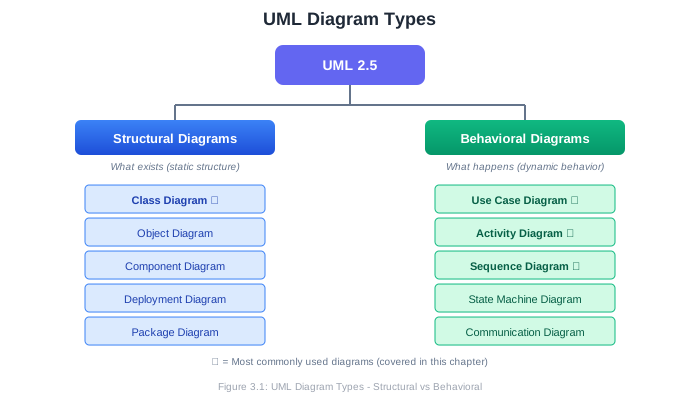
This chapter focuses on these four essential diagram types.
3.3.2 UML Notation Basics
Before diving into specific diagrams, let’s understand some notation conventions that apply across UML:
Naming conventions:
- Class names: PascalCase (e.g.,
ShoppingCart,UserAccount) - Attributes and operations: camelCase (e.g.,
firstName,calculateTotal()) - Constants: UPPER_CASE (e.g.,
MAX_ITEMS)
Visibility markers:
+Public: accessible from anywhere-Private: accessible only within the class#Protected: accessible within class and subclasses~Package: accessible within the same package
Multiplicity indicates how many instances participate in a relationship:
1Exactly one0..1Zero or one (optional)*or0..*Zero or more1..*One or moren..mBetween n and m
Stereotypes extend UML with additional meaning, shown in guillemets:
«interface»An interface rather than a class«abstract»An abstract class«enumeration»An enumeration type«actor»A user or external system
3.4 Use Case Diagrams
Use Case diagrams capture the functional requirements of a system from the user’s perspective. They show what the system does (use cases) and who interacts with it (actors), without detailing how the functionality is implemented.
3.4.1 Use Case Diagram Elements
Actors represent anyone or anything that interacts with the system from outside. Actors can be:
- Human users (Customer, Administrator, Manager)
- External systems (Payment Gateway, Email Service)
- Hardware devices (Barcode Scanner, Printer)
- Time-based triggers (Scheduled Task, Nightly Batch)
Actors are drawn as stick figures with their role name below:
    O
   /|\     Customer
   / \
Use Cases represent discrete pieces of functionality that provide value to an actor. They’re drawn as ovals with the use case name inside:
    ╭─────────────────────╮
    │   Place Order       │
    ╰─────────────────────╯
System Boundary is a rectangle that defines what’s inside the system versus outside. Actors are outside; use cases are inside.
┌─────────────────────────────────────────┐
│           Online Store System           │
│                                         │
│   ╭───────────────╮  ╭───────────────╮  │
│   │ Browse Catalog │  │  Place Order  │  │
│   ╰───────────────╯  ╰───────────────╯  │
│                                         │
│   ╭───────────────╮  ╭───────────────╮  │
│   │ Track Order   │  │ Manage Account│  │
│   ╰───────────────╯  ╰───────────────╯  │
│                                         │
└─────────────────────────────────────────┘
Associations connect actors to the use cases they participate in, shown as solid lines:
    O
   /|\─────────────╭───────────────╮
   / \             │  Place Order  │
 Customer          ╰───────────────╯
3.4.2 Use Case Relationships
Use cases can relate to each other in several ways:
Include Relationship («include»)
When one use case always includes the behavior of another. The included use case is mandatory. This is useful for extracting common behavior shared by multiple use cases.
╭─────────────────╮         ╭─────────────────╮
│   Place Order   │─────────│  Verify Payment │
╰─────────────────╯«include»╰─────────────────╯

╭─────────────────╮         ╭─────────────────╮
│   Renew Sub     │─────────│  Verify Payment │
╰─────────────────╯«include»╰─────────────────╯
Both “Place Order” and “Renew Subscription” always include payment verification.
Extend Relationship («extend»)
When one use case optionally adds behavior to another under certain conditions. The extension is not always executed.
╭─────────────────╮         ╭─────────────────╮
│  Apply Coupon   │─────────│   Place Order   │
╰─────────────────╯«extend» ╰─────────────────╯
“Apply Coupon” extends “Place Order” but only when the customer has a coupon.
Generalization (inheritance arrow)
When one actor or use case is a specialized version of another.
      O
     /|\
     / \
   Customer
       △
      ╱ ╲
     ╱   ╲
    O     O
   /|\   /|\
   / \   / \
Guest   Registered
Customer Customer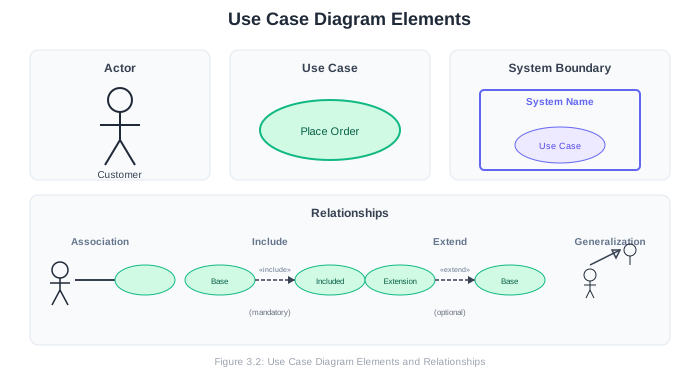
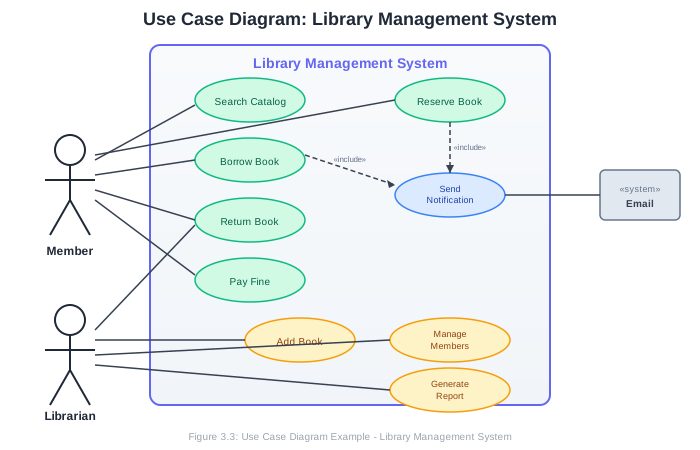
3.4.3 Complete Use Case Diagram Example
Here’s a use case diagram for a library management system:
3.4.4 Use Case Descriptions
While the diagram provides an overview, each use case needs detailed documentation. A Use Case Description (or Use Case Specification) expands on what happens within a use case.
Use Case Description Template:
USE CASE: Borrow Book

ID: UC-003
Actor(s): Member, Librarian
Preconditions:
  - Member is logged in
  - Member has no overdue books
  - Member has not exceeded borrowing limit

Main Success Scenario (Basic Flow):
  1. Member searches for a book
  2. System displays book details and availability
  3. Member selects "Borrow"
  4. System verifies member's borrowing eligibility
  5. System records the loan with due date (14 days)
  6. System updates book status to "On Loan"
  7. System sends confirmation email to member
  8. System displays loan confirmation with due date

Alternative Flows:
  3a. Book is not available:
      3a1. System displays "Book unavailable" message
      3a2. System offers reservation option
      3a3. Return to step 1 or end

  4a. Member has overdue books:
      4a1. System displays message about overdue books
      4a2. Use case ends

  4b. Member at borrowing limit:
      4b1. System displays borrowing limit message
      4b2. Use case ends

Postconditions:
  - Book is assigned to member
  - Due date is set
  - Book availability is updated
  - Transaction is logged

Business Rules:
  - Maximum 5 books per member
  - Loan period is 14 days
  - Members with overdue books cannot borrow

Frequency: ~200 times per day
3.4.5 Best Practices for Use Case Diagrams
Naming Use Cases:
- Use verb-noun format: “Place Order,” not “Order” or “Ordering”
- Focus on user goals, not system actions: “Register Account,” not “Store User Data”
- Keep names concise but descriptive
Choosing Actors:
- Name actors by their role, not their identity: “Customer,” not “John”
- If different user types have different access, make them separate actors
- Don’t forget non-human actors (external systems, scheduled jobs)
Scope:
- Keep diagrams focused; split into multiple diagrams if needed
- Show 5-15 use cases per diagram
- Each use case should deliver value to an actor
Relationships:
- Don’t overuse «include» and «extend»; simple is often better
- «include» for mandatory common behavior
- «extend» for optional behavior
- If unsure, just use simple associations
Common Mistakes:
- Drawing implementation details (login, database operations)
- Too many use cases (every button click is not a use case)
- Actors that don’t interact with any use case
- Use cases with no associated actor
- Confusing use cases with features or functions
3.5 Activity Diagrams
Activity diagrams model the flow of activities in a process. They’re excellent for visualizing workflows, business processes, algorithms, and use case scenarios. Think of them as enhanced flowcharts with support for parallel activities.
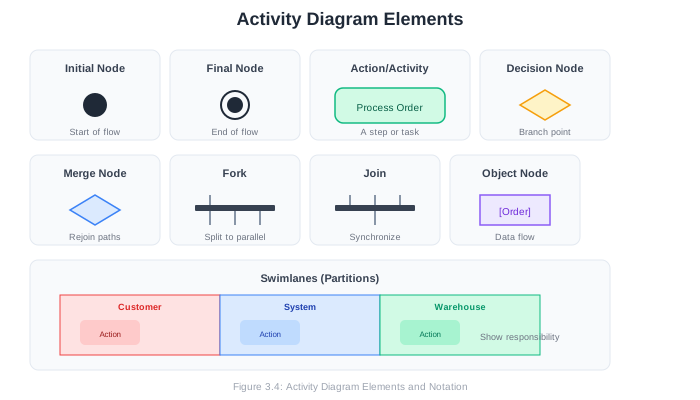
3.5.1 Activity Diagram Elements
Initial Node (filled circle): Where the flow begins.
●Final Node (circle with inner filled circle): Where the flow ends.
◉Action/Activity (rounded rectangle): A single step or task.
╭─────────────────────╮
│   Verify Payment    │
╰─────────────────────╯
Decision Node (diamond): A branch point where flow takes one of several paths based on a condition. Guards (conditions) are shown in brackets.
        │
        ▼
       ◇
      ╱ ╲
[yes]╱   ╲[no]
    ╱     ╲
   ▼       ▼
Merge Node (diamond): Where multiple paths come back together.
   ╲     ╱
    ╲   ╱
     ◇
     │
     ▼
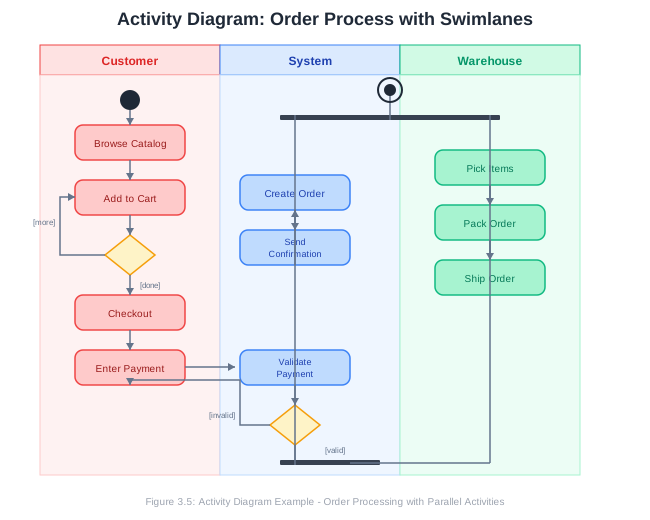
Fork (thick horizontal bar): Splits flow into parallel paths.
        │
   ─────┼─────
   │    │    │
   ▼    ▼    ▼
Join (thick horizontal bar): Synchronizes parallel paths; waits for all to complete.
   │    │    │
   ─────┼─────
        │
        ▼
Swimlanes (vertical or horizontal partitions): Show who or what performs each activity.
3.5.2 Control Flow vs. Object Flow
Control flow (solid arrows) shows the sequence of activities:
╭─────────────╮     ╭─────────────╮
│  Activity A │────►│  Activity B │
╰─────────────╯     ╰─────────────╯
Object flow (solid arrows with object nodes) shows data passing between activities:
╭─────────────╮     ┌─────────┐     ╭─────────────╮
│Create Order │────►│ [Order] │────►│Process Order│
╰─────────────╯     └─────────┘     ╰─────────────╯
3.5.3 Complete Activity Diagram Example
Here’s an activity diagram for an online order process with swimlanes:
3.5.4 Activity Diagram for Algorithm Logic
Activity diagrams can also model algorithms. Here’s a diagram for a simple login process: 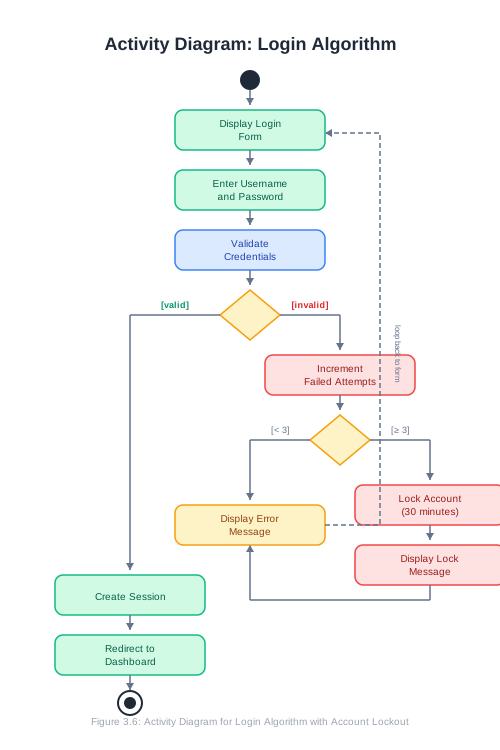
3.5.5 Best Practices for Activity Diagrams
Structure:
- Start with a single initial node
- End with one or more final nodes (or flow nodes for ongoing processes)
- Every path from the initial node should eventually reach a final node or loop
Decisions and Merges:
- Every decision needs at least two outgoing flows
- Guard conditions should be mutually exclusive and complete
- Use merges to rejoin split paths (optional but clarifies the diagram)
Parallelism:
- Use forks when activities can happen simultaneously
- Use joins to synchronize parallel paths
- All forked paths must eventually join (or reach a final node)
Swimlanes:
- Use when multiple actors or systems are involved
- Helps clarify responsibility for each activity
- Swimlanes can be vertical or horizontal
Level of Detail:
- Match detail level to the diagram’s purpose
- High-level process diagrams: fewer, larger activities
- Detailed workflow diagrams: more granular steps
- Avoid mixing abstraction levels in one diagram
Common Mistakes:
- Missing guard conditions on decision branches
- Unbalanced forks and joins
- No path to final node
- Activities that are too vague (“Process stuff”) or too detailed (“Set variable x to 5”)
3.6 Sequence Diagrams
Sequence diagrams show how objects interact with each other over time. They’re particularly useful for modeling the behavior of use cases, showing the messages exchanged between objects to accomplish a task.
3.6.1 Sequence Diagram Elements
Lifelines represent participants in the interaction. Each lifeline has a name and optionally a type, with a dashed line extending downward representing the participant’s existence over time.
┌────────────────┐
│   :Customer    │
└───────┬────────┘
        │
        │ (lifeline)
        │
        │
Messages are communications between lifelines, shown as arrows:
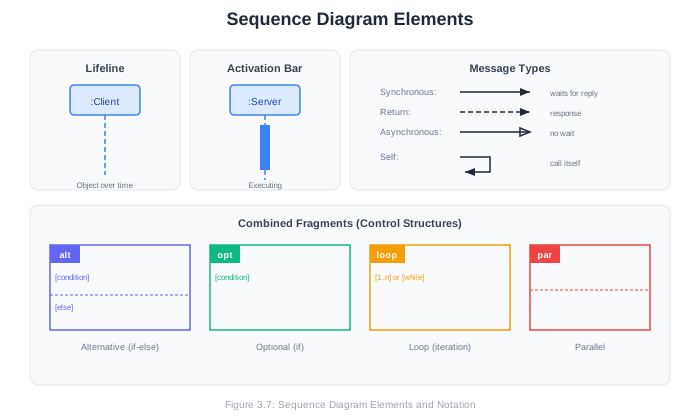
Synchronous message (solid arrow, filled head): Sender waits for response
────────────────────►Asynchronous message (solid arrow, open head): Sender continues without waiting
────────────────────▷Return message (dashed arrow): Response to a synchronous call
- - - - - - - - - - ►Self-message (arrow back to same lifeline): Object calls itself
    ┌───┐
────┤   │
    │   │
◄───┘   │
        │
Activation bars (rectangles on lifelines) show when an object is active (executing):
┌────────────┐                    ┌────────────┐
│  :Client   │                    │  :Server   │
└─────┬──────┘                    └──────┬─────┘
      │                                  │
      │      request()                   │
      │─────────────────────────────────►│
      │                                  ┃
      │                                  ┃ (processing)
      │                                  ┃
      │      response                    ┃
      │◄─ ─ ─ ─ ─ ─ ─ ─ ─ ─ ─ ─ ─ ─ ─ ─ ┃
      │                                  │
3.6.2 Combined Fragments
Combined fragments represent control structures like loops, conditions, and alternatives:
alt (alternatives): Conditional logic (if-else)
    ┌──────────────────────────────────────┐
    │ alt  [condition]                     │
    │      ├───────────────────────────────┤
    │      │  (messages if true)           │
    │      ├───────────────────────────────┤
    │      │  [else]                       │
    │      │  (messages if false)          │
    └──────────────────────────────────────┘
opt (optional): Conditional execution (if without else)
    ┌──────────────────────────────────────┐
    │ opt  [condition]                     │
    │      │                               │
    │      │  (messages if condition true) │
    │      │                               │
└──────────────────────────────────────┘loop: Repeated execution
    ┌──────────────────────────────────────┐
    │ loop [condition or count]            │
    │      │                               │
    │      │  (repeated messages)          │
    │      │                               │
    └──────────────────────────────────────┘
par (parallel): Concurrent execution
    ┌──────────────────────────────────────┐
    │ par                                  │
    │      │  (parallel region 1)          │
    │      ├───────────────────────────────┤
    │      │  (parallel region 2)          │
    └──────────────────────────────────────┘
3.6.3 Complete Sequence Diagram Example
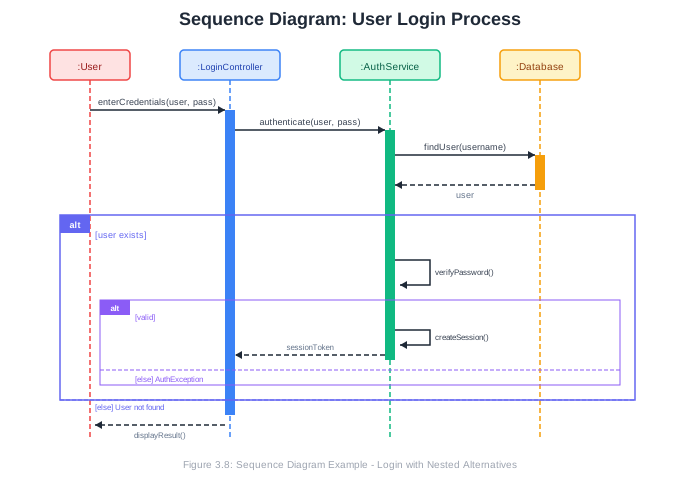
Here’s a sequence diagram for a user login process:
3.6.4 Object Creation and Destruction
Objects can be created during the interaction:
┌──────────┐
│ :Factory │
└────┬─────┘
     │
     │         create()                   ┌──────────────┐
     │───────────────────────────────────►│  :Product    │
     │                                    └──────┬───────┘
     │                                           │
     │                                           │
Objects can be destroyed (shown with an X):
     │                                           │
     │                                           │
     │         destroy()                         │
     │──────────────────────────────────────────►X
     │
3.6.5 Best Practices for Sequence Diagrams
Focus:
- One diagram per scenario or use case
- Show the main success path; use separate diagrams for alternatives
- Include enough detail to understand the interaction, but not implementation minutiae
Naming:
- Name lifelines with role:Type format (e.g.,
:Customer,cart:ShoppingCart) - Use descriptive message names that indicate what happens
- Include parameters when they add clarity
Layout:
- Arrange lifelines left-to-right in order of first involvement
- Place the initiating actor on the left
- Keep crossing message lines to a minimum
Level of Detail:
- High-level diagrams: show major components and their interactions
- Detailed diagrams: show individual method calls and returns
- Match detail level to your audience and purpose
Common Mistakes:
- Too many lifelines (hard to read; consider splitting the diagram)
- Missing return messages for synchronous calls
- Unclear message sequencing
- Mixing abstraction levels (business actions and technical implementation)
3.7 Class Diagrams
Class diagrams show the static structure of a system: the classes, their attributes and methods, and the relationships between them. They’re the most commonly used UML diagram for designing object-oriented systems.
3.7.1 Class Notation
A class is shown as a rectangle divided into three compartments:
┌─────────────────────────────────┐
│          ClassName              │  ← Name compartment
├─────────────────────────────────┤
│ - privateAttribute: Type        │  ← Attributes compartment
│ # protectedAttribute: Type      │
│ + publicAttribute: Type         │
├─────────────────────────────────┤
│ + publicMethod(): ReturnType    │  ← Operations compartment
│ - privateMethod(param: Type)    │
│ # protectedMethod(): void       │
└─────────────────────────────────┘
Visibility markers:
+Public-Private#Protected~Package
Attribute syntax:
visibility name: type [multiplicity] = defaultValueExamples:
- id: int
+ name: String
- items: Product [0..*]
+ status: OrderStatus = PENDING
Operation syntax:
visibility name(parameters): returnTypeExamples:
+ calculateTotal(): Decimal
- validateInput(data: String): Boolean
+ addItem(product: Product, quantity: int): void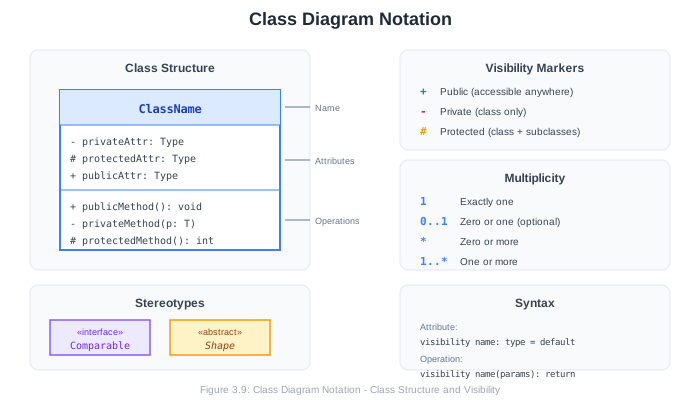
3.7.2 Relationships Between Classes
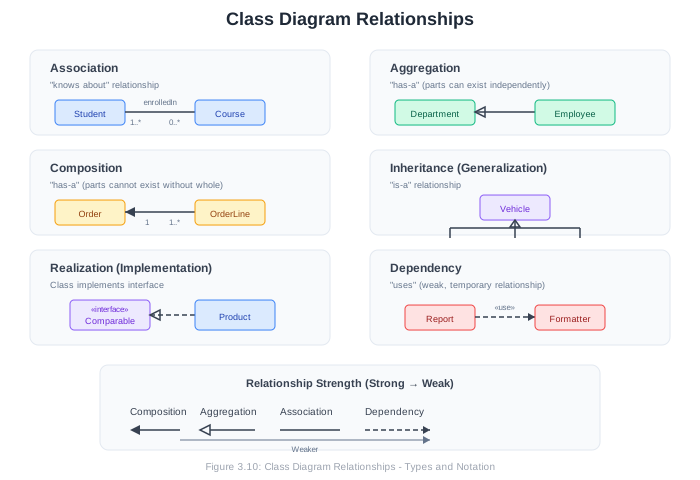
Association: A general relationship between classes. Objects of one class know about objects of the other.
┌─────────────┐                    ┌─────────────┐
│   Student   │────────────────────│   Course    │
└─────────────┘                    └─────────────┘
With role names and multiplicity:
┌─────────────┐     enrolledIn     ┌─────────────┐
│   Student   │──────────────────►│   Course    │
└─────────────┘  1..*        0..*  └─────────────┘
A student is enrolled in zero or more courses; a course has one or more students.
Navigability: Arrows indicate which class knows about which:
┌─────────────┐                    ┌─────────────┐
│    Order    │───────────────────►│  Customer   │
└─────────────┘                    └─────────────┘
Order knows about Customer, but Customer doesn’t have a direct reference to Order.
Aggregation (hollow diamond): “Has-a” relationship where parts can exist independently of the whole.
┌─────────────┐                    ┌─────────────┐
│  Department │◇───────────────────│  Employee   │
└─────────────┘                    └─────────────┘
A department has employees, but employees can exist without the department.
Composition (filled diamond): “Has-a” relationship where parts cannot exist without the whole.
┌─────────────┐                    ┌─────────────┐
│    Order    │◆───────────────────│  OrderLine  │
└─────────────┘                    └─────────────┘
An order contains order lines; order lines cannot exist without an order.
Inheritance/Generalization (hollow triangle): “Is-a” relationship; one class is a specialized version of another.
         ┌─────────────┐
         │   Vehicle   │
         └──────△──────┘
                │
       ┌────────┼────────┐
       │        │        │
┌──────┴──────┐ │ ┌──────┴──────┐
│     Car     │ │ │    Truck    │
└─────────────┘ │ └─────────────┘
         ┌──────┴──────┐
         │ Motorcycle  │
         └─────────────┘
Realization/Implementation (dashed line, hollow triangle): A class implements an interface.
┌─────────────────────┐
│   «interface»       │
│    Comparable       │
├─────────────────────┤
│                     │
├─────────────────────┤
│ + compareTo(): int  │
└──────────△──────────┘
           ┊
           ┊
┌──────────┴──────────┐
│      Product        │
├─────────────────────┤
│ - name: String      │
│ - price: Decimal    │
├─────────────────────┤
│ + compareTo(): int  │
└─────────────────────┘
Dependency (dashed arrow): A weaker relationship; one class uses another temporarily.
┌─────────────┐                    ┌─────────────┐
│   Report    │- - - - - - - - - -►│  Formatter  │
└─────────────┘                    └─────────────┘
Report depends on Formatter (perhaps uses it as a parameter or local variable) but doesn’t hold a long-term reference.
3.7.3 Association Classes
Sometimes a relationship itself has attributes. An association class captures this:
┌─────────────┐                    ┌─────────────┐
│   Student   │────────────────────│   Course    │
└─────────────┘          │         └─────────────┘
                         │
                    ┌────┴────┐
                    │Enrollment│
                    ├─────────┤
                    │- grade  │
                    │- date   │
                    └─────────┘
The Enrollment class captures attributes of the student-course relationship (grade, enrollment date).
3.7.4 Complete Class Diagram Example
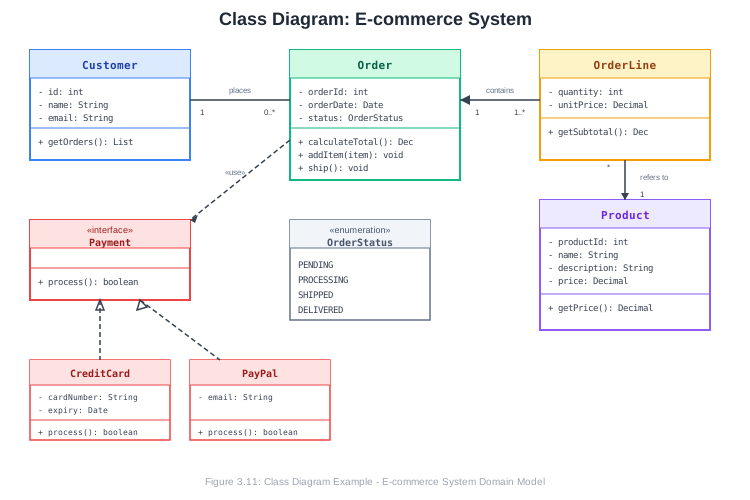
Here’s a class diagram for a simplified e-commerce system:
3.7.5 Domain Models vs. Design Class Diagrams
Class diagrams serve different purposes at different project stages:
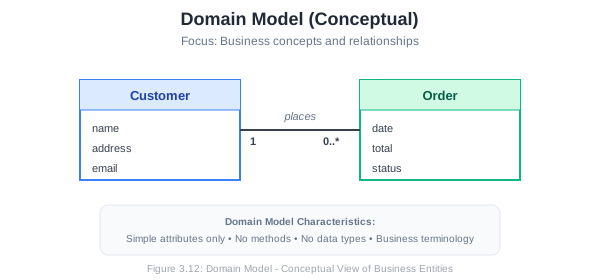
Domain Model (conceptual class diagram):
- Created during requirements/analysis
- Shows concepts in the problem domain
- Focuses on what exists, not implementation
- Uses business terminology
- Minimal or no methods
- No implementation-specific types
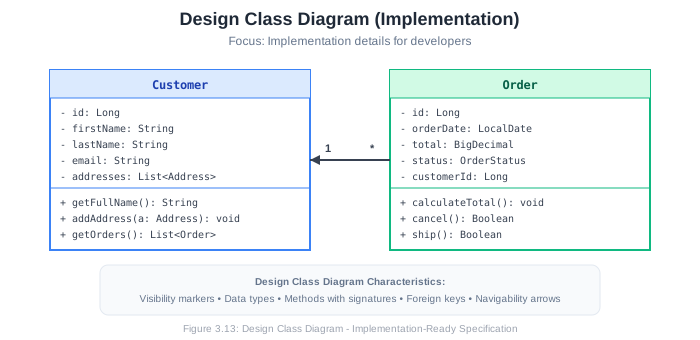
Design Class Diagram:
- Created during design
- Shows software classes
- Includes implementation details
- Uses programming terminology
- Complete methods with signatures
- Specific types (String, int, List< Product >)
Example: Domain Model
Example: Design Class Diagram
3.7.6 Best Practices for Class Diagrams
Organization:
- Group related classes together
- Use packages for larger diagrams
- Consider multiple diagrams for different views or subsystems
Detail Level:
- Domain models: concepts and relationships only
- Design diagrams: full detail for implementation
- Overview diagrams: key classes and relationships, minimal detail
Relationships:
- Choose the right relationship type (association vs. dependency)
- Include multiplicities for associations
- Add role names when they add clarity
- Use navigability arrows to show direction of knowledge
Naming:
- Classes: noun phrases (Customer, ShoppingCart)
- Attributes: noun phrases (firstName, orderTotal)
- Methods: verb phrases (calculateTotal, validateInput)
- Use consistent naming conventions
Common Mistakes:
- Too much detail (every attribute and method)
- Too little detail (just boxes with names)
- Incorrect relationship types
- Missing multiplicities
- Confusing domain concepts with implementation classes
3.8 Choosing the Right Diagram
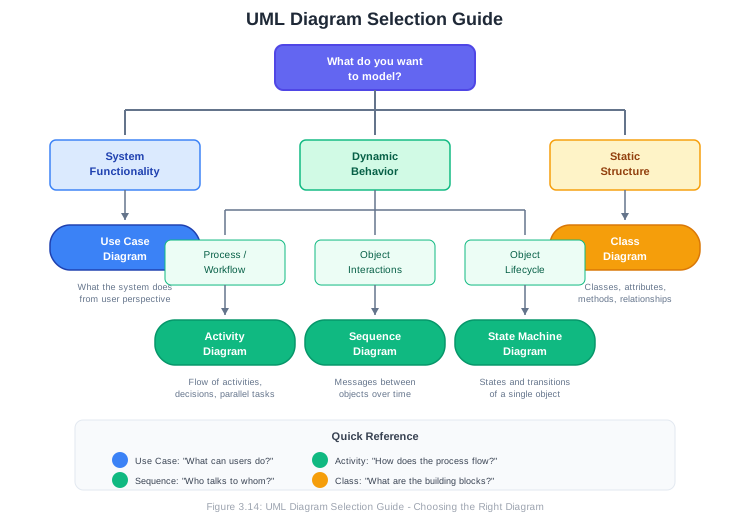
With multiple diagram types available, how do you decide which to use?
3.8.1 Matching Diagrams to Questions
| Question You’re Answering | Diagram Type |
|---|---|
| What can the system do? Who uses it? | Use Case Diagram |
| How does a process flow? What are the steps? | Activity Diagram |
| How do objects interact to accomplish a task? | Sequence Diagram |
| What classes exist? How are they related? | Class Diagram |
| What states can an object be in? | State Machine Diagram |
| How is the system deployed? | Deployment Diagram |
| How is code organized into packages? | Package Diagram |
3.8.2 Diagrams Through the Development Lifecycle
Requirements Phase:
- Use Case diagrams to capture functionality
- Activity diagrams for business processes
- Domain models for key concepts
Design Phase:
- Sequence diagrams for use case realizations
- Class diagrams for detailed design
- State diagrams for complex object behavior
- Component and deployment diagrams for architecture
Implementation Phase:
- Class diagrams as code reference
- Sequence diagrams for complex interactions
- Activity diagrams for algorithms
Testing Phase:
- Use cases and activity diagrams for test scenarios
- Sequence diagrams for integration test design
3.8.3 Diagram Selection Guide
3.9 Modeling Tools
While you can sketch UML diagrams on paper or whiteboards, tools provide benefits like professional appearance, easy modification, and collaboration features.
3.9.1 Categories of Tools
Full-Featured UML Tools:
- Enterprise Architect (commercial)
- Visual Paradigm (commercial/free community edition)
- StarUML (commercial/free)
- Modelio (open source)
These tools offer complete UML support, code generation, reverse engineering, and team collaboration.
Diagramming Tools with UML Support:
- Lucidchart (web-based, collaborative)
- Draw.io/diagrams.net (free, web and desktop)
- Microsoft Visio (commercial)
- Miro (web-based, collaborative)
These tools support UML shapes but aren’t specialized UML tools.
Text-Based Tools:
- PlantUML (text to diagram)
- Mermaid (text to diagram, integrates with Markdown)
- Nomnoml (text to diagram)
These tools let you write diagrams in a text format that’s version-control friendly.
3.9.2 PlantUML Example
PlantUML uses a simple text syntax to generate diagrams:
Use Case Diagram:
@startuml
left to right direction
actor Customer
actor Admin

rectangle "Online Store" {
    Customer --> (Browse Products)
    Customer --> (Place Order)
    Customer --> (Track Order)
    Admin --> (Manage Products)
    Admin --> (Process Orders)
    (Place Order) .> (Process Payment) : include
}
@enduml
Sequence Diagram:
@startuml
actor User
participant "Login Controller" as LC
participant "Auth Service" as AS
database "User DB" as DB

User -> LC: enterCredentials(user, pass)
LC -> AS: authenticate(user, pass)
AS -> DB: findUser(user)
DB --> AS: user
AS -> AS: verifyPassword()
AS --> LC: token
LC --> User: loginSuccess(token)
@enduml
Class Diagram:
@startuml
class Customer {
    -id: Long
    -name: String
    -email: String
    +placeOrder(): Order
}

class Order {
    -id: Long
    -date: Date
    -status: OrderStatus
    +calculateTotal(): Decimal
    +cancel(): void
}

class OrderLine {
    -quantity: int
    -unitPrice: Decimal
    +getSubtotal(): Decimal
}

Customer "1" -- "0..*" Order : places
Order "1" *-- "1..*" OrderLine : contains
@enduml
3.9.3 Mermaid Example
Mermaid integrates well with Markdown and is supported by GitHub, GitLab, and many documentation platforms:
Sequence Diagram:
sequenceDiagram
    participant U as User
    participant L as LoginController
    participant A as AuthService
    participant D as Database

    U->>L: enterCredentials(user, pass)
    L->>A: authenticate(user, pass)
    A->>D: findUser(user)
    D-->>A: user
    A->>A: verifyPassword()
    A-->>L: token
    L-->>U: loginSuccess(token)
Class Diagram:
classDiagram
    class Customer {
        -Long id
        -String name
        -String email
        +placeOrder() Order
    }

    class Order {
        -Long id
        -Date date
        -OrderStatus status
        +calculateTotal() Decimal
        +cancel() void
    }

    Customer "1" --> "0..*" Order : places
3.9.4 Tool Selection Considerations
When choosing a modeling tool, consider:
- Learning curve: How quickly can you become productive?
- Collaboration: Does your team need to work together on diagrams?
- Integration: Does it integrate with your other tools (IDE, documentation)?
- Cost: Is it within budget?
- Version control: Can diagrams be tracked in Git?
- Export options: What formats can you export to?
For your course project, Draw.io (free, easy) or PlantUML (text-based, version-control friendly) are excellent choices.
3.10 Chapter Summary
Systems modeling provides visual blueprints that help us understand, communicate, and design software. UML offers a standardized notation for these models, with different diagram types serving different purposes.
Key takeaways from this chapter:
Models are simplified representations that help us understand complex systems. Different diagrams reveal different aspects of the system.
Use Case diagrams capture system functionality from the user’s perspective. They show actors (who uses the system) and use cases (what they can do).
Activity diagrams model workflows and processes. They’re excellent for showing the steps in a process, decision points, parallel activities, and swimlanes for responsibility.
Sequence diagrams show how objects interact over time. They’re particularly useful for modeling use case scenarios and understanding the flow of messages between components.
Class diagrams show the static structure of the system: classes, their attributes and methods, and relationships between them. They range from conceptual domain models to detailed design specifications.
Choosing the right diagram depends on what you’re trying to communicate. Use case diagrams for requirements, activity diagrams for processes, sequence diagrams for interactions, and class diagrams for structure.
Tools range from simple drawing applications to sophisticated modeling environments. Text-based tools like PlantUML offer version-control-friendly alternatives.
3.11 Key Terms
| Term | Definition |
|---|---|
| UML | Unified Modeling Language; a standardized visual notation for software systems |
| Actor | An external entity (person, system, device) that interacts with the system |
| Use Case | A discrete piece of functionality that provides value to an actor |
| Activity Diagram | A diagram showing the flow of activities in a process |
| Swimlane | A partition in an activity diagram showing who performs each activity |
| Sequence Diagram | A diagram showing object interactions over time |
| Lifeline | The representation of a participant in a sequence diagram |
| Class Diagram | A diagram showing classes, their attributes/methods, and relationships |
| Association | A relationship between classes indicating objects of one class know about objects of another |
| Aggregation | A “has-a” relationship where parts can exist independently |
| Composition | A “has-a” relationship where parts cannot exist without the whole |
| Generalization | An “is-a” (inheritance) relationship between classes |
| Domain Model | A conceptual class diagram showing concepts in the problem domain |
| Multiplicity | The number of instances that participate in a relationship |
3.12 Review Questions
Explain the purpose of systems modeling in software engineering. What are three benefits of creating models before writing code?
What is the difference between structural and behavioral UML diagrams? Give two examples of each.
In a use case diagram, what is the difference between the «include» and «extend» relationships? When would you use each?
Create a use case diagram for an ATM system. Include at least three actors and eight use cases with appropriate relationships.
Explain the purpose of swimlanes in activity diagrams. When are they most useful?
What is the difference between a fork and a decision in an activity diagram? How do they differ visually and semantically?
In a sequence diagram, what is the difference between synchronous and asynchronous messages? When would you use each?
Explain the difference between aggregation and composition in class diagrams. Provide an example of each.
What is the difference between a domain model and a design class diagram? At what project phase would you create each?
You’re designing a ride-sharing application. Which UML diagrams would you create, and what would each show?
3.13 Hands-On Exercises
3.13.1 Exercise 3.1: Use Case Diagram
Create a use case diagram for a hotel reservation system. Include:
- At least 3 actors (consider guests, staff, external systems)
- At least 10 use cases
- At least 2 «include» relationships
- At least 1 «extend» relationship
- A system boundary
Write detailed use case descriptions for 2 of your use cases.
3.13.2 Exercise 3.2: Activity Diagram
Create an activity diagram for one of the following processes:
Option A: Online food ordering (from browsing menu to delivery) Option B: Library book borrowing (including reservation if unavailable) Option C: Job application process (from submission to hire/reject)
Include:
- Initial and final nodes
- At least 2 decision points with guards
- At least 1 fork/join for parallel activities
- Swimlanes showing different participants
3.13.3 Exercise 3.3: Sequence Diagram
Create a sequence diagram for one of the following scenarios:
Option A: User purchasing an item online (including payment processing) Option B: User posting a message to a social media platform Option C: ATM withdrawal transaction
Include:
- At least 4 lifelines
- At least one combined fragment (alt, opt, or loop)
- Synchronous and return messages
- Activation bars
3.13.4 Exercise 3.4: Class Diagram
Create a class diagram for a course registration system. Include:
- At least 8 classes
- Appropriate attributes and methods for each class
- At least one inheritance relationship
- At least one composition relationship
- At least one association with multiplicity
- An interface
3.13.5 Exercise 3.5: Project UML Package
For your semester project, create a UML package containing:
- A use case diagram showing the main functionality
- An activity diagram for a key process or workflow
- A sequence diagram for a primary use case
- A domain model (conceptual class diagram)
Upload all diagrams to your GitHub repository in a docs/diagrams folder.
3.13.6 Exercise 3.6: Tool Exploration
Choose one of these modeling approaches and create the class diagram from Exercise 3.4:
- Draw.io: Create the diagram using the web-based tool
- PlantUML: Write the diagram in text format
- Mermaid: Write the diagram in Mermaid syntax in a Markdown file
Compare the experience. Which do you prefer and why?
3.14 Further Reading
Books:
- Fowler, M. (2003). UML Distilled: A Brief Guide to the Standard Object Modeling Language (3rd Edition). Addison-Wesley.
- Larman, C. (2004). Applying UML and Patterns (3rd Edition). Prentice Hall.
- Rumbaugh, J., Jacobson, I., & Booch, G. (2004). The Unified Modeling Language Reference Manual (2nd Edition). Addison-Wesley.
Online Resources:
- UML Specification (OMG): https://www.omg.org/spec/UML/
- PlantUML Documentation: https://plantuml.com/
- Mermaid Documentation: https://mermaid.js.org/
- Draw.io: https://app.diagrams.net/
- Visual Paradigm UML Guides: https://www.visual-paradigm.com/guide/uml-unified-modeling-language/
Tutorials:
- UML Diagrams (Lucidchart): https://www.lucidchart.com/pages/uml
- UML Tutorial (Tutorialspoint): https://www.tutorialspoint.com/uml/
3.15 References
Booch, G., Rumbaugh, J., & Jacobson, I. (2005). The Unified Modeling Language User Guide (2nd Edition). Addison-Wesley.
Fowler, M. (2003). UML Distilled: A Brief Guide to the Standard Object Modeling Language (3rd Edition). Addison-Wesley.
Larman, C. (2004). Applying UML and Patterns: An Introduction to Object-Oriented Analysis and Design and Iterative Development (3rd Edition). Prentice Hall.
Object Management Group. (2017). OMG Unified Modeling Language (OMG UML) Version 2.5.1. Retrieved from https://www.omg.org/spec/UML/2.5.1/
Rumbaugh, J., Jacobson, I., & Booch, G. (2004). The Unified Modeling Language Reference Manual (2nd Edition). Addison-Wesley.